
dljdacfojgikogldjffnkdcielnklkce
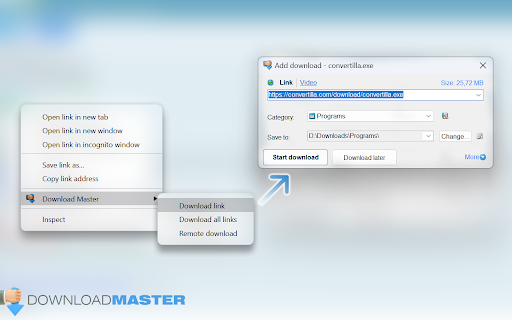
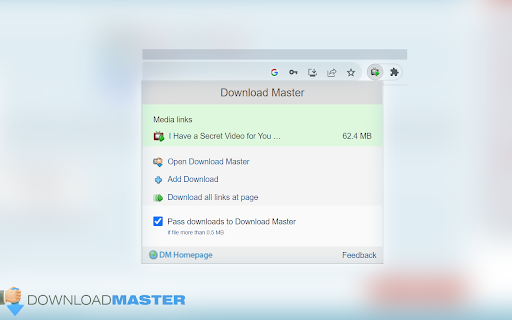

Intercept downloads for Download Master, download a file or a group of files from the context menu. Download with Download Master* by clicking on the any file link. Enable or disable browser integration from the extension menu, set the minimum file size from the extension options. Extension adds the ability to download using Download Master* specified file or group of files from the browser's context menu. After installing the plug-in a new section with items "Download link", "Download all links" and "Download remotely" is added the context menu of Chrome. Right-clicking on the link (example link) you will see a menu with 3 new items added: - Select "Download link" if you want to download the selected file; - Select "Download ALL links" if you want to download multiple files located on this page; - Select "Download remotely" if you want to download a file via a remote download service. When entering the page with the video clip, if the video service is supported, extension button will be changed. Click on it and select “Download video”, you transfer the movie for download using Download Master*. If you highlight text on a page, right-click and choose "Find selection on ...". You will go directly to the page with the search results where you can download your files. * The plug-in must be installed on the PC together with Download Master.

Online speech recognition
Speech to text on any web site and in Windows and Linux applications See https://voicenotebook.com/blog/exthelp/ for help The main features: Multi language support (click on the extension icon and select a language in the drop-down list) Speech input in any text field on the web (right click inside of the text entry field and select Speech pad in the Chrome shortcut menu) Voice input to the clipboard - right click in the empty space on the page (not in the editable field), and select Speech pad in the Chrome shortcut menu. In this case, the Voicenotebook.com site will be opened and voice recognition will be started. if the "Transfer to clipboard" checkbox is checked in the option page of the extension, then the voice typing processed directly to the system clipboard. Dictation to any windows or Linux application (Word, Excel, Gedit etc.). For this option an additional module must be installed from the Voicenotebook.com site.

AliRadar Shopping Assistant
AliRadar finds similar products, shows price history and seller’s ratings. Features of AliRadar extension: – display products’ price changes; – check seller trust level; – track products’ prices and send notifications when price is changed; – check photos and reviews from real products’ buyers; – search of similar products from more than 10 000 stores with cheaper prices; – find out main information about products by hovering links on other sites. Important: Aliradar is an independent service and it does not belong to any marketplace (e.g. AliExpress™). The purpose of Aliradar is to help to find better products from reliable sellers. AliRadar extension will help you to choose products faster, reducing customers risks by providing all the above information about sellers and products. By using this add-on, you agree to the AliRadar Privacy Policy available at https://aliradar.com/en/privacy.html and authorize that you can be redirected by the links of the affiliate programs of online stores. Single purpose of the extension: to find products with cheaper prices from reliable sellers. AliRadar extension uses the following permissions for the reasons listed below (a) tabs - 1. To open https://aliradar.com/en/thank-you.html page after extension installation and allow user to open instruction how to use extension; 2. To open tabs with products for instruction feature for new users, to demonstrate extension functionality; 3. To open the https://aliradar.com/en/bye.html page when users remove extension in order to ask them for feedback 4. To display correct extension icon to show the status if extension works on current page; (b1) webRequest – allows to identify pages of products to apply the partner programs of online stores; (b2) webRequestBlocking - Is needed to provide stable work of partner programs of online stores; (c) cookies – 1. to determine the relevant language and currency for the user in the online-store where the extension works; 2. to check user's authorization status in the extension; (d) storage - to cache data in order to display information about products faster. This is needed to ensure stability and absence of uncomfortable deceleration of the extension; Please feel free to contact us if you have any questions: support@aliradar.com -------------------------------------------- Disclaimer: This extension uses Google Analytics™ to collect extension usage statistics to help improve user experience. If you want to opt-out of Google Analytics™ tracking, please visit http://tools.google.com/dlpage/gaoptout or you can set up a filter in Adblock™ Plus or similar ad blocker tools like AdBlock™, uBlock™ or Adblock™ Pro. Other name: Ali Radar

Backit Plugin
Get cashback for every order in AliExpress and other popular stores with Backit plugin A plugin that provides cashback from online purchases. We’ll return part of your spending from purchases on AliExpress, marketplaces, grocery deliveries, online courses, and pharmacies. We have hundreds of partners, so any purchase can become more profitable. From the user's perspective, receiving cashback consists of simple steps: You log in to the plugin. Then, you launch the plugin on the page of the online store you're interested in. Next, click the "Activate cashback" button and make your purchase in the online store. The store tracks the source of your visit and determines that you are our user. After you pick up your order, the store transfers a monetary reward for the purchase to us, and we pay it to you. Payouts are available to a card, phone balance, or e-wallet. You can request payouts on our website: https://backit.me/en/cashback/payout. Backit pays out money for all categories of goods: from food and household chemicals to electronics, building materials, and automotive products. Moreover, with Backit, cashback is even returned for items purchased in regular offline stores. The full list of stores and their cashback conditions is available on our website: https://backit.me/en/cashback/shops/compilation/all. Additionally, in the plugin, you can: View information about the cashback accrued (balance). Create an invitation link for your friends so they can also use cashback, and you get a reward for it. View information about your orders and future cashback. Track the price dynamics of a product, and more. By installing the "Backit" extension, you accept the terms https://backit.me/en/cashback/rules and allow the extension to redirect you through the store links to which the "Backit" cashback service is connected. We also inform you that the extension uses Google Analytics to collect usage statistics to improve your user experience. If you do not want to send data to Google Analytics, please visit: http://tools.google.com/dlpage/gaoptout or use filtering in Adblock Plus or other ad-blocking applications. The Backit extension uses the following permissions for the reasons listed below: proxy - to allow the use of proxies in our extension, if for some reason you are unable to use the plugin. management - to send requests to backit.me, receive the list of stores, activate cashback, etc. notifications - to display notifications. tabs - to provide the plugin with access to information about current browser tabs. This is used to interact with open web pages, for example, to track visited sites and automatically activate cashback or other useful features. storage - to allow the plugin to save and retrieve data in the browser’s local storage. This is necessary for saving user settings, cashback information, and other personalized data to provide a more convenient plugin experience. webNavigation - to allow the plugin to track changes in browser navigation (for example, when you visit a new page). It is used to activate plugin functionality on specific sites, such as automatically activating cashback when visiting supported stores.

Яндекс.Музыка - управление плеером
Расширение добавляет на панель браузера кнопку для управления плеером сервиса Яндекс.Музыка (Yandex.Music) Основная функциональность: * Поддержка нового дизайна Яндекс.Музыки * Всплывающее окно для управления плеером, вызываемое кнопкой на панели браузера * Горячие клавиши * Оповещения о текущем треке * Поддержка трансляции в файл информации о треке (для стримеров)
