
jfcnoffhkhikehdbdioahmlhdnknikhl
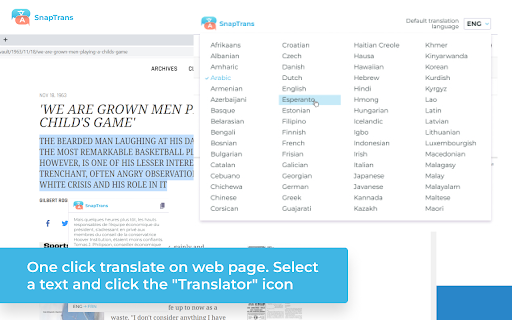
SnapTrans: Instantly Translate Words and Selections on Web Pages with a Click! SnapTrans: Instantly Translate Words and Selections on Web Pages with a Click Are you tired of switching tabs and copy-pasting text for translations? Say goodbye to the hassle with SnapTrans! 🌍💬 One-click word and selection translation on web pages: Effortlessly translate any word or selected text on web pages with just a single click. No more interruptions in your browsing flow! 🔍✨ Multiple languages: SnapTrans supports a wide range of languages, ensuring you can communicate effectively across different cultures and regions. 🌎🌐 Powered by Google Translate: SnapTrans leverages the power of Google Translate, a trusted and accurate translation engine, to provide you with high-quality translations that you can rely on. 📚🔌 Research and Learning: Easily translate unfamiliar terms, phrases, or sentences while conducting research or studying online. Expand your knowledge effortlessly! 📚🔎 Multilingual Communication: Break language barriers during online discussions, collaborations, or while browsing foreign websites. Communicate with confidence and connect with people from all around the globe! 🌐💬 Travel and Exploration: Explore the world without language barriers! SnapTrans enables you to quickly understand signs, menus, and other text while traveling, allowing for a smoother and more enjoyable experience. ✈️🌍 Language Enthusiasts: Improve your language skills and broaden your vocabulary by effortlessly translating words or phrases that pique your curiosity while browsing. Embrace the joy of learning new languages! 🗣️📖 Business and E-commerce: Expand your business horizons by easily understanding product descriptions, customer reviews, or competitor websites in different languages. Stay ahead of the game! 💼💸 Don't miss out on this game-changing browser extension! Install SnapTrans now and unlock a world of instant translations at your fingertips. 📲✨

Translator - Select to Translate
Translate words and phrases while browsing the web using the Google Translator. Full page translator. This extension offers a range of features to help you navigate different languages online. It allows you to effortlessly translate web pages, highlighted text, Netflix subtitles, and private messages. You can also have the text read aloud and save important translations to your personal dictionary for learning. Encountering unfamiliar words while reading an online article? No problem! Simply select the text you want to translate, and with a click of a button, you'll get the translation. You can also speak the translated text and save it directly to your dictionary. For text input and translation, just click the extension button to open a pop-up window. The extension's beautiful design makes it easy to use, allowing you to explore its functionality and choose your preferred color theme. When reading foreign articles, you can quickly understand every word with the full-page translation feature. With a simple click on the extension's button in the context menu or the pop-up, the entire page will be translated into your chosen language. With "Translator: Select to Translate," you can easily translate complete web pages with a single click. Just select "Translate page" from the context menu on any webpage, and it will be instantly translated into your preferred language. Extension relies on Google Translator to quickly translate individual words on the web page you are currently viewing.

Inline Lingo Translator
Instantly Translate Words and Text Snippets on Web Pages with a Single Click with Inline Lingo Discover the Power of Inline Lingo: Effortlessly Translate Words and Text Snippets on Web Pages with One Click! Features: - One-click word and selection translation on web pages - Multiple languages - Powered by Google Translate Enhance your browsing experience with Inline Lingo. Translate words and text snippets effortlessly, empowering you to understand content in multiple languages with just one click. With the seamless integration of Google Translate, unlock a world of multilingual communication right at your fingertips. Download Inline Lingo now and explore the web like never before!

Translate Photo — Instant Image Translator
Use Translate photo instantly in your browser — translate images, screenshots and photos on any webpage in one click Translate photo directly on any webpage: translate images, screenshots and photos without switching tabs. Fast AI-powered text recognition and smart language detection for immediate image translation. 🚀 Quick Start Tips 1. Add to Chrome and pin the extension. 2. Open a page with an image, screenshot, poster or diagram. 3. Click the icon or draw a selection to translate photo text. 4. Receive the translation in a popup, copy it or share as needed. Unlock seamless understanding with Translate Photo — Instant Image Translator. This tool lets you translate photo content directly in your browser, removing the need to type text manually or jump between apps. Whether you read a foreign comic, analyze a chart, or browse international news, the photo translator makes image text accessible in seconds. 🌟 Why Choose Translate Photo? 1️⃣ Instant in-browser translation: select an area and see translated text without leaving the page. 2️⃣ AI-powered text recognition for higher accuracy on complex scripts and layouts. 3️⃣ Supports many languages: translate photo to english and dozens of other pairs. 4️⃣ Works with screenshots, banners, protected PDFs and mixed-content pages. 🛠️ Key features • Area selection and cropping for precise translation. • Contextual popup showing original text and the translation side-by-side. • Lock the translation to reserve it on the page. • Copy and share translated text in one tap. • Hotkey / keyboard shortcut for instant translation screenshot actions. 🌎 Real-world use cases ➤ Travel: translate menus, signs and maps while browsing foreign websites. ➤ Shopping: product photos translation and descriptions of international stores. ➤ Study: translate textbook screenshots and notes for language learners. ➤ Work: translate receipts, invoices and locked pdfs quickly. ⚙️ How it works 1. Select the image region to extract text. 2. AI-powered recognition reads the text and detects the source language. 3. The extension translates the extracted text extraction and displays it inline. 4. Analyze results or adjust language preferences. 📖 Technical & privacy notes - Lightweight and fast processing for instant image translation. - Smart detection focuses on text blocks and reduces false positives. - Formatting-aware extraction preserves basic layout for readability. - Minimal permissions only. - Recognized text is processed securely and temporary data is cleared after translation. A full privacy policy is linked in the store. 📱 Supported platforms & formats • Works in Chrome and other Chromium-based browsers that support extensions. • Supported formats: jpg, png, webp and pdf pages with embedded images. • Use translate photo to english or other target languages with auto-detect or manual selection. Advanced settings & tips 1️⃣ Choose a preferred translation language and popup settings in settings to compare results. 2️⃣ Enable auto-detect for seamless translations. 3️⃣ Pin the extension and use the hotkey for faster access. 4️⃣ Select only the area with text for mixed content to improve recognition accuracy. Compare with other tools ➤ Unlike many web upload services and mobile apps, Translate Photo works directly on the page for faster context-aware results. ➤ This in-page workflow avoids extra upload steps and keeps you focused on the content. Roadmap & support • Regular updates improving recognition accuracy and layout handling. • Planned: optional offline recognition mode and additional language packs. • Send feedback or bug reports and join beta testing for early features. Translate Photo brings fast, in-page image translation to your daily browsing. Translate images, translate screenshots and translate photos without leaving the page — install Translate Photo and make image text readable instantly. ❓ Frequently Asked Questions Q: Does this work like google translate on photo? A: It provides a similar user experience: the extension performs image text extraction and translates the result in-browser. If you searched for google translate photo workflows, this tool offers an in-page alternative. Whenever it is japanese to english photo translator or spanish photo translator, it will provide picture translate to you. Q: How do I translate photo to english? A: Activate the extension, select the image area and the tool will translate the extracted text automatically. Q: Is my data stored permanently? A: No. Recognized text is processed securely and temporary data is cleared after translation. See the privacy policy for full details.

Translate Website
Easy Translate Website – translate any website in one click. Fast website translator with accurate web page translation. Translate Website is a powerful website translator designed to help you work with foreign content effortlessly while browsing. This advanced web page translator lets you translate web pages and understand global content without leaving your browser. 🌍 Every day users open pages in unfamiliar languages. News, blogs, and online stores often contain valuable insights, but language becomes a barrier. With this tool, you can translate web content instantly or smoothly convert into your preferred language, making language translation feel natural and seamless. Imagine reading a French tech article. Instead of copying text into another tool for text translation, you can instantly render into English directly. The extension performs fast Full-page translation, showing clean and readable translated text without interrupting your flow. Another case: you open a Japanese marketplace with unique products. Descriptions and reviews are difficult to understand. With one click, you can turn into English the entire page and clearly see all translations, helping you make confident decisions. Students and researchers benefit as well. When working with academic materials, they often need to interpret or paraphrase complex information. This extension helps Translate web pages or put into plain English difficult passages, making study faster and more efficient. Travelers frequently visit local booking platforms that are not available in their language. Instead of struggling, they can translate website to english or simply convert into their native language to understand directions, pricing, and details. ✈️ Key features include: ✧ One-Click Web Translation ✧ Instant Full-page translation for entire pages ✧ Accurate text translation and paraphrase options ✧ Smart Web page translation powered by modern tech ✧ Smooth Translate while browsing experience The extension supports multiple language environments and provides translations in over 100 languages. You can easily put website into english, or render into French, Chinese, German, and more for users worldwide. Professionals often need to process foreign documentation. For example, a developer reading Chinese guides can quickly decipher the content or rephrase technical parts into clear instructions using this website translator. Supported capabilities include: -Translate web pages instantly -translate any website while browsing -perform fast Web page translation -put in plain English complex content Powered by advanced systems, the extension lets you Translate with AI, delivering accurate and natural language translation. It understands context and can even gloss difficult phrases, making content easier to follow. Another real-life case: following international news. Updates often appear first in local languages. You can quickly get web pages on your language, interpret key details, and stay informed without waiting for official translations. Why users choose Translate Website: ➤ Fast translate web content instantly technology ➤ Reliable website translator for daily use ➤ Smooth Full-page translation experience ➤ Intuitive web page translator interface ➤ Advanced Translate with AI capabilities If you are wondering how to translate a website, the solution is simple. Open any page and let the extension read any website, convert into your language, or render into English with one click. 🚀 Main advantages: ▸ Quick translate any website feature ▸ Accurate Web page translation results ▸ Clear and readable translated text ▸ Powerful language translation engine ▸ Support for multiple language use cases Designed for simplicity, Translate Website works as an easy browser tool that helps you understand foreign content. It allows you to Translate websites, reword complex phrases, and instantly access global information. This AI-powered solution helps you translate web content instantly, Translate web content, and translate website to english when needed. With intelligent Translate with AI technology and reliable Full-site translation, you can explore the internet freely and understand content from anywhere in the world. 🌐
