
jegcnfcnelickncaheoibddppcaiofhm


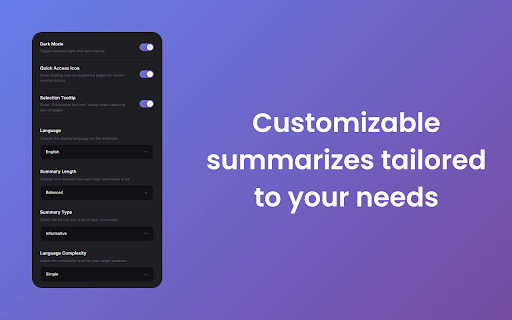
LucidPages helps you instantly generate concise, AI-powered summaries of any webpage, article, or blog post. Whether you're a student, researcher, or just browsing the web, LucidPages saves you time by extracting the key points from even the longest content with one click. Built with a sleek, distraction-free design and powered by Google Gemini, LucidPages delivers fast, reliable summaries directly in your browser—no copy-pasting, no fluff. Now, go beyond summaries with built-in AI chat: ask questions directly about the page or its summary for deeper insights. • AI Summaries in One Click – Summarize the current page instantly with a single button. • Ask the AI Anything – Chat with AI about the webpage or summary to clarify, expand, or explore further. • Quick Access Icon – Instantly summarize any page with a floating icon. • Highlight-to-Summarize – Select text anywhere and get a focused summary. • PDF Summarization Support – Summarize academic papers, reports, and other PDFs with ease. • Summary History – Automatically saves your previous summaries for quick access anytime. • Multi-Language Support – Summarize and chat in multiple languages with seamless translation support. • Listen to Summaries – Instantly convert summaries into natural, human-like audio for hands-free listening. • Smart Extraction – Works on most websites, even cluttered or long-form pages. • Light & Dark Mode – Toggle themes to suit your environment. • Clean & Simple UI – Distraction-free, responsive design. • Cached Results – Revisit summaries without repeating the process. • Copy with Ease – One-tap copy to clipboard for notes or sharing. • Reading Mode – Expand summaries to fullscreen for immersive reading. LucidPages is perfect for anyone who wants to stay informed without wasting time. Save hours of reading, ask smart questions, revisit past summaries, listen hands-free, and browse smarter with LucidPages.

GoldDust
Ask a question about a company or a person. If the answer is on the internet - our AI agent will locate, synthesize, and display it. Welcome to GoldDust, the Chrome extension that automates the tedious and repetitive research you need to effectively qualify leads, prioritize opportunities, and customize outbound messaging. ⭐ Seamless Integration: Whether you're scrolling through LinkedIn, checking out a company’s website, checking latest news or deep in your CRM, GoldDust is there to enrich your experience without the hassle of switching tabs or tools. ⭐ Rich Info, On Demand: You've got a treasure trove of information, when and where you need it. It’s like magic, but for work. ⭐ Custom Insights: You’re getting the good stuff – customized insights that matter to you. Say goodbye to info overload and hello to insights that make a difference

Zimzee - Save Anything In One Click
You built the product. Zimzee handles the marketing. Paste your URL and Zimzee builds your full marketing plan — angles, campaigns, hooks, scripts, characters, and scenes. Then it turns all of it into finished ads: UGC videos, image ads with copy, and variations ready to run. No marketing background needed. No team required. WHAT YOU CAN DO Get a full marketing plan (AI CMO) Turn your brand or URL into angles, campaigns, and a clear picture of what to create next. Create finished ads Write UGC-style video scripts with characters, scenes, and direction — then turn them into finished video and image ads, ready to run. Build ads your way (AI Studio) Take full control and build ads directly with your own inputs. Run on autopilot New ads created for you automatically, based on your strategy. Save and reuse anything Capture ads, posts, and pages as you scroll — and turn what's working in your market into your own creative. Turn your brand or URL into a full marketing plan — angles, campaigns, hooks, and CTAs Create ad concepts with angles, hooks, and CTAs ready to use Write UGC-style video scripts with characters, scenes, and direction Build finished video and image ads — ready to run Recommend what to create next based on your live strategy One-click save as you scroll — from social media, websites, and ad libraries One-click ad creation from your brand, saved content, or a fresh idea Save ads, posts, landing pages, images, videos, files, bookmarks, and Kindle highlights Full-page and regional screenshots of any page Automatically captures ad copy and landing pages together Unlimited organization with buckets, tags, and cards Permanent cloud storage — your saves never disappear Public share links for saved content Daily reminders so nothing gets lost Dark and light mode Most tools wait for you to prompt them. Most save tools just store things. Zimzee builds the plan and creates the ads. Paste your URL. Start with an idea. Or start with nothing. Zimzee handles the rest.

Taby
Quickly move between tabs, bookmarks and history Taby is a navigation extension designed to optimize your browsing experience. Taby provides quick access to all your open tabs, bookmarks, and browsing history through an easy-to-use, mouse-free command palette. You can quickly search and filter through your tabs, bookmarks, and history. Plus, you can customize it with different themes, resize the command palette. We’d love to hear your suggestions! Please feel free to leave comments, rate the extension, and share your feedback to help us make Taby even better for you. Your privacy is important to us. We ask for permissions to access storage, history, and bookmarks to ensure Taby works properly, and we never store any personal data. Taby is also open-source! You can explore and do not hesitate to leave star, it would support me a lot the code here: https://github.com/ByHelyo/taby Try Taby today for a faster, easier browsing experience! - Display all opened tabs, bookmarks and history in current window via a convenient command palette or popup. - Navigation with filtering options - Search by title, URL, or index - Powered by a fuzzy search filtering - Navigate between tabs using arrow keys - Switch to a tab with 'Enter' or a simple click - Move the position of the command palette - Shortcut for duplicate tab. - Choose from 5 different themes - Adjust the command palette size - Reverse scrolling - `Alt+Q` to open/close the popup. - `Alt+W` to open/close the command palette. - `Escape` to close the menu. - `Enter` to switch to the selected tab. - `↑` `↓` arrows to navigate and select tabs above and below the currently selected tab. - Optional shortcut to duplicate current tab.

Snippy Summary - AI YouTube Summarizer
Free AI YouTube Summarizer with Gemini. One-click summaries, timestamps, custom prompts. 11 languages. Bring your API key. Snippy Summary - Free AI YouTube Video Summarizer Transform any YouTube video into concise, actionable summaries instantly - completely free with your own Gemini API key. 🚀 Key Features: Export to Obsidian Light mode Dark mode One-Click Summaries - Never leave YouTube, get instant AI-powered summaries Smart Timestamps - Click any timestamp to jump directly to video moments Custom Prompts - Personalize summary style for your specific needs Adjustable Length - From quick overviews to detailed breakdowns 11 Languages - English, Spanish, French, German, Italian, Portuguese, Russian, Chinese, Japanese, Korean, Hindi One-Click Copy - Instantly copy summaries to clipboard Left Click to summarize selected text Summarize web pages ✅ Perfect For: Students summarizing lectures and educational content Professionals analyzing industry talks and webinars Content creators researching trends and competitor content Anyone wanting to learn faster from YouTube videos 💰 Completely Free - Just bring your own Gemini API key for unlimited summaries 🔒 Privacy First - Your API key stays secure, we don't store your data ⚡ Fast & Efficient - Powered by Google's Gemini Flash Lite for lightning-fast results Save hours of video watching time. Install Snippy Summary and transform how you consume YouTube content today!
