
mnocfefponilgkmehcdbmdojkeodoffd


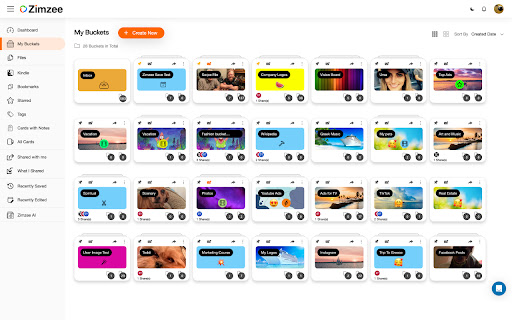
You built the product. Zimzee handles the marketing. Paste your URL and Zimzee builds your full marketing plan — angles, campaigns, hooks, scripts, characters, and scenes. Then it turns all of it into finished ads: UGC videos, image ads with copy, and variations ready to run. No marketing background needed. No team required. WHAT YOU CAN DO Get a full marketing plan (AI CMO) Turn your brand or URL into angles, campaigns, and a clear picture of what to create next. Create finished ads Write UGC-style video scripts with characters, scenes, and direction — then turn them into finished video and image ads, ready to run. Build ads your way (AI Studio) Take full control and build ads directly with your own inputs. Run on autopilot New ads created for you automatically, based on your strategy. Save and reuse anything Capture ads, posts, and pages as you scroll — and turn what's working in your market into your own creative. Turn your brand or URL into a full marketing plan — angles, campaigns, hooks, and CTAs Create ad concepts with angles, hooks, and CTAs ready to use Write UGC-style video scripts with characters, scenes, and direction Build finished video and image ads — ready to run Recommend what to create next based on your live strategy One-click save as you scroll — from social media, websites, and ad libraries One-click ad creation from your brand, saved content, or a fresh idea Save ads, posts, landing pages, images, videos, files, bookmarks, and Kindle highlights Full-page and regional screenshots of any page Automatically captures ad copy and landing pages together Unlimited organization with buckets, tags, and cards Permanent cloud storage — your saves never disappear Public share links for saved content Daily reminders so nothing gets lost Dark and light mode Most tools wait for you to prompt them. Most save tools just store things. Zimzee builds the plan and creates the ads. Paste your URL. Start with an idea. Or start with nothing. Zimzee handles the rest.

Stop It Grandpa
NOW AUTOMATICALLY UPDATES! Boomer parents becoming increasingly radical over time? Got a friend who's starting down the path of white supremacy? Thinking your friends are sneaking in that direction and it's freaking you out? No problem! Just get this app onto their browser and they'll be redirected from their favorite propaganda to more rational news sources. It's like child block for the elderly!

Tanuki Utilities
Provide useful utilities for GitLab users. * Change the GitLab favicon to a project icon; you can easily distinguish many GitLab tabs. * Move "Copy reference" button on top bar; the button is always shown for your easy access. This extension tries to change favicons in the **all** sites by default. You can specify which GitLab site (e.g. gitlab.com or your self-hosted site) you would like to change favicons. #### Change the GitLab favicon to a project icon

Anti FeR toolkit
Adds features and extensions for the bushtarion web game (formerly Canola toolkit formerly Antisback's bushtarion toolkit) This adds some functionality to the Canola toolkit, which it is forked from. Fixes the regex for Company name matching (no more oddities with names that include '@', '~', or '^'), adds information about who someone has attacked, includes stealth mobs in the activity chart, and maybe more! 1.2.22 Changes: Defaults for options set to "on" 1.2.21 Changes: Additional options for the military page and supply depot 1.2.18 Changes: Includes an options page, navigate by right-clicking the icon and selecting "Options" 1.2.13 Changes: Displays development information for technologies unlocked for a given dev/construction Shows troop count on a hack Shows a horribly formatted estimate on the flak needed to land on a target given the visible units Display information about what you are 30% and 70% of in the score breakdown overlay Show gov defense in spy report incoming (but doesn't account for when it recalls) 1.2.12 Changes: Fixes seed/income calculation Adds a button to hack from the search page in a new tab Spy report incoming/outgoing is now sorted by ETA Spy report incoming/outgoing displays original mob ETA Adds an input so that dynamic AR calculation can be done from the spy report 1.2.11 Changes: Attacks on an HQ don't show a huge number for ETA Stealth mobs sent now default to ETA 5 sent New "Plant Max" feature calculates how many seeds you are able to plant given how many gards you have home. Updates grass seed bonus in Spring 1.2.10 Changes: Fixes single person mobs not showing up on spy reports Fixes HQ incoming/outgoing not showing HQ outgoing mobs stay in the outgoing screen "until recalled", which I don't know when it is recalled so take the info as an alert more than a reality Alerts if the user does not have enough harvesters to cover the max needed (in total, not at home) 1.2.9 Changes: Reverting mob notes and loving on Alci 1.2.8 Changes: Makes mob notes on alliance incoming screen more interesting for some :) 1.2.7 Changes: Fixes score evaluation for players with public ID's Fixes military mob calculations for "all" Income calculator now reasonably accounts for exponential seed loss and nighttime seed penalty Search results include a "Total" row for acres and score 1.2.6 Changes: Fixed spy report when spying a member of your own alliance Finished searching by Public Name Added full Hack output to console debugger when hacking from Alliance incoming page Added troop cost calculation on Military page 1.2.5 Changes: Fixes score calc for insurance that is "claimable early" Alliance incoming "Defend" and "Retaliate" links are now buttons Added "Hack" button on alliance incoming to make a best guess at route and fill out incoming notes Added "Recall" button on alliance incoming to recall from alliance page 1.2.4 Changes: Add Land Fat percentage to search results Fix Alliance page incomings when AHQ! is targeted Add Unit Stats quick link in side panel Add ID list generation with search results (in console debugger output) Add "Has Attacked" information on news page 1.2.3 Changes: Alerting when the user has uncultivated acres Maintenance page additionally displays the seeds you can grow with troops home Alliance page has quick links to setup defensive or offensive mobs from the incoming screen

Congree Web Interface
Write according to your company's Style Guide This extension helps you to integrate your company's Congree Authoring Server into specific websites. Research Meets Practice Content optimization solutions based on scientific insight and long-standing industry experience Higher text quality with less effort Apart from the reuse of sentences and consistent use of terminology, Congree offers a comprehensive Language Check that covers 98 percent of the English and German languages. The Congree Authoring Server is scalable and thus supports the editorial work in small, medium-sized, and large enterprises. Rule-Based Language Check Apart from the spelling, grammar, and terminology, the rule-based Language Check also checks the style. Predefined rule sets cover most application cases; additional company-specific rules can be added as needed. Authoring Memory The Authoring Memory serves as a sentence repository, which shows all text segments that are similar to your text and that were written and approved in the past. You can apply these text segments with a click. New sentences are included in the Authoring Memory after they are checked and approved. Congree Data Grooming can help to maintain and improve the quality of your Authoring Memory. Terminology Component The connection of third-party terminology software enables access to a wide range of information on terminology hits. The terminology component in Congree delivers definitions and usage information on specialized terms – including preferred terms, admitted terms, and deprecated terms.
