
jefahagkjmhbdcklaeilcdbmibpbhhlm
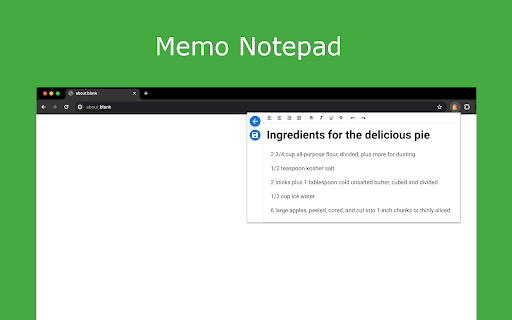
Boost productivity with Memo Notepad Chrome Extension for easy online note-taking and text editing. 👉 Introducing memo notepad - your ultimate digital companion for all your note-taking needs! 🏆 memo notepad is the perfect Chrome extension for seamlessly jotting down your thoughts, ideas, to-do lists, and more in a simple and intuitive interface. 🏆 Whether you're a student, professional, or simply someone who loves staying organized, memo notepad is here to make note-taking a breeze! 🏆 With this extension, you can access your notations anytime, anywhere, thanks to its online functionality. 🏆 Say goodbye to traditional pen and paper methods and hello to the convenience of digital note-taking! 👍 This innovative text editor allows you to create, edit, and save your notes online, ensuring that your important memos are always just a click away. 👍 No more worrying about losing sticky notes or forgetting important information - memo notepad has got you covered! 👍 memo notepad is more than just a regular online notepad. It's a comprehensive tool that offers a range of features to enhance your note-taking experience. 👍 From organizing your memos with tags and categories to customizing the look and feel of your notations, this extension empowers you to stay productive and efficient. 👉 Key Features of memo notepad: 1️⃣ Create and manage unlimited notes online. 2️⃣ Categorize your memos for easy access. 3️⃣ Customize the appearance of your notations with different fonts and colors. 4️⃣ Easily share your records with friends, colleagues, or classmates. 5️⃣ Sync your notes across all your devices for seamless access on the go. ⭐ memo notepad is not just an online notepad, it's your personal assistant for staying organized and on top of your tasks. ⭐ Whether you're brainstorming ideas, taking meeting notes, or simply jotting down your thoughts, this app has all the tools you need to make note-taking a delightful experience. ⭐ Don't let your notes get lost in the shuffle - with memo notepad, you can trust that your important information is securely stored online for easy retrieval whenever you need it. ⭐ Say goodbye to cluttered desks and messy notebooks, and hello to the simplicity and efficiency of our extension! Experience the convenience of an online note pad with the flexibility to access your records offline as well. memo notepad offers the best of both worlds, ensuring that you can stay productive whether you're connected to the internet or not. Get started with memo notepad today and discover the joy of taking notes in a digital age. 💥 With its user-friendly interface, advanced features, and seamless synchronization capabilities, this app is the only note-taking tool you'll ever need. 💥 Join thousands of users who rely on memo notepad as their go-to notepad app for all their note-taking needs. 💥 Start organizing your thoughts, ideas, and tasks in one place with the power of this extension. 💥 Try it now for free and see the difference it can make in your productivity! 👉 Unleash your creativity with our notes online platform, designed to inspire and empower you in your daily tasks. 🔥 Experience the power of a text editor that caters to your unique needs, whether you're writing a quick memo or drafting a detailed project plan. 🔥 Stay organized and efficient with our online note pad, a go-to tool for capturing your ideas and staying on top of your tasks. 🔥 Let our platform be your digital notebook, guiding you through your daily memos and notes with ease. 👉 Embrace the future of note-taking with our memo notepad, the ultimate solution for managing your memos on the go. 🌞 Our platform offers a blend of functionality and convenience, ensuring that you have everything you need to stay productive and organized. 🌞 With our note pad feature, you can create, edit, and share your notes with ease, making collaboration a breeze. 🌞 Say goodbye to traditional notepads and hello to the future of memo management with our cutting-edge platform. 👉 memo notepad - where notes meet innovation! Start your note-taking journey with this extension today and elevate your productivity to new heights. Say hello to a clutter-free, organized digital workspace with this app by your side. 👍

Chrome Notes
A simple notepad extension for Google Chrome NEW: You can now use speech to text NEW: You can now open Chrome Notes with Ctrl+Shift+X (Command+Shift+X on mac) NEW: You can now download and upload complete backups NEW: Chrome Notes adds a right click menu option to send the selected text to a new note! NEW: You can now have multiple notes! NEW: You can now customize the font size! A simple notes extension, right in your browser! Easily copy around a few words to and from different browser windows and other apps. Thank you for over 100,000 users, 100 ratings and 4.5 stars! Chrome Notes remembers your notes and mode, even after closing your browser or restarting your computer! Notes are stored in local storage, so nobody else will ever see them, not us, and not Google, Microsoft, or Apple. Features: * Resizable notepad * Shortcut buttons for cut, copy, paste, and select all * Normal keyboard shortcuts work too * Save as a .txt file * Open in new window * Speak selected text out-loud * Remembers last notepad size for you next time * Store multiple notes, and quickly create, edit, share, or delete * Focus mode for distraction free writing * Adjustable font size * Right click and send selection to new note * Download and upload full backups * Speech to text (click the mic and speak to put your words on the notepad) * Keyboard shortcut Ctrl+Shift+X (Command+Shift+X on mac) to open Chrome Notes is the smart, simple notepad built for you 😊

Simple Sticky Notes
Boost your productivity with simple sticky notes app. Make handy floating notes! Online sticky notes in Chrome on Mac & Windows 🚀 Quick Start 1. Install the simple sticky notes extension by clicking "Add to Chrome". 2. Right-click on any website page and select extension icon or press Alt+Shift+N (⌥⇧N on Mac). 3. Your thoughts are now saved on that page! Here are 8️⃣ reasons to choose this sticky notes app 1️⃣ Reliable — it just works. In every browser. No data lost. 2️⃣ Incredibly easy to use, with a simple and intuitive interface. 3️⃣ Your stick notes stay exactly where you leave them, even after you restart your browser. 4️⃣ Hotkey: Alt+Shift+N (⌥⇧N on Mac) — sticky in one keystroke 5️⃣ Customize your workspace by changing the color and size of your simple sticky notes. 6️⃣ No ads and we respect your privacy. Everything is stored locally in your browser. 7️⃣ The smarter, web-integrated alternative to traditional desktop post it notes. 8️⃣ Take your saved items anywhere with easy export & import — no cloud or account needed. 📝 Context is Everything ➤ Move beyond standalone simple sticky notes for desktop. As a researcher, you can pin insights next to a specific paragraph. As a shopper, leave a reminder on a product page. This sticky notes chrome extension turns the entire internet into your personal notebook, so every idea is always in context. ➤ This post it extension is perfect for anyone who needs to remember information tied to a specific source. Whether you're a student, developer, or project manager, this tool streamlines your workflow by letting you place simple sticky notes exactly where you need them. ➤ Pinning is easy: right-click or use the hotkey. You can drag, resize, or let them auto-fit their content. Need focus? Pin one on screen! This is the smart way to use a simple sticky notes web tool 📈 Boost Your Productivity ➤ Go beyond the basics. This note extension helps you organize your ideas more clearly with easy-to-use online post it reminders. Whether you're managing tasks or saving important information, your digital sticky notes stay right where you need them — always accessible and tied to the right content. ➤ Turn your google sticky notes into an effective way to stay organized. Keep your thoughts and ideas visible right on the pages where they matter most. Whether you're collecting information for research or tracking important information, this post it notes google tool helps keep everything in context — boosting focus and productivity without switching tabs. 🎨 Stay Organized, Visually ➤ With our color notes app, you can use different colors to visually categorize your ideas. ➤ The true power lies in the dashboard. This central hub for all your stickie notes lets you see everything at once. Feeling overwhelmed? Use powerful filters to sort your content by website, domain, page URL, color, or even by the words you’ve written. It’s the ultimate way to manage your sticky notes online. 🖥️ The Perfect Chromebook Companion ➤ Looking for the chromebook notes app? You found it. With a lightweight, browser-based design, this tool fits naturally into your daily flow — making it the ultimate sticky notes for chromebook solution. Students and professionals can seamlessly keep their ideas and tasks organized right where their work happens. 📌 How does it work? 💡 This is a Chrome extension that lets you pin virtual sticky notes to any webpage. Simply right-click to create a thought. Its position, color, and content are saved automatically for that specific page. You can view all your ideas in the dashboard or on-page extension popup. It’s always just a click away, right where you left it. 📌 I just want to know how to add sticky notes to desktop. How is this different? 💡 Our extension offers a smarter way! Instead of cluttering your actual computer desktop, you can pin your ideas contextually on any webpage. Your desktop becomes the website you're actively using, keeping your thoughts organized and tied directly to their source. 📌 How do I install it? 💡 To install this app, go to the Chrome Web Store and select "Add to Chrome". You can start using it immediately. 📌 Are these stickies saved online or just on my computer? 💡 By default, your data is saved securely on your local browser for maximum privacy. However, you can instantly turn them into powerful online sticky notes by enabling the optional Google Drive sync. This gives you the best of both worlds: privacy and accessibility. 📌 Can this extension work on any website? 💡 Yes, it can create floating notes on any website. They are saved per-site, so they only appear where you created them. 📌 Can I move my stickies to another device without cloud sync? 💡 Yes! Export/import your simple sticky notes and transfer them without cloud storage. 📌 Is my privacy protected? 💡 Absolutely! The extension operates locally within your browser. It doesn't collect or store any of your personal data on external servers, ensuring your stickey notes are private. 📌 Can I sync my data across devices using the cloud? 💡 Yes! This makes our app the go-to sticky notes for google users. It offers optional synchronization with Google Drive. You'll need to authorize it once to create a secure backup of all your data. After that, simply sign in on another device to see all your creations, tags, and colors exactly as you left them. 🚀 This simple sticky notes program comes packed with features designed for a modern workflow. If you have any questions, reach out to us. Embrace the power of page-specific stickies, and let your most organized, productive work begin.

Annotate Website
Use Annotate Website chrome extension to annotate websites and PDF files. A simple annotation tool to highlight text and keep notes. This chrome extension helps you highlight text and add comments on web pages and PDF files. It is a practical browser extension for students, researchers, and professionals who work with websites daily. Select text and a floating button appears. Click it to create a persistent highlight. Click again to open an annotation bubble where you can add or edit comments and change colors. A side panel shows all annotations. For rapid work, turn on Annotation Mode so every text selection instantly becomes a highlight. Power users use hotkeys: hold Alt or Option while dragging, and Enter or Esc to save or cancel notes. 📚 Who Is It For: 1️⃣ Students who need to annotate websites for research papers. 2️⃣ Researchers gathering sources and organizing findings online. 3️⃣ Knowledge workers reviewing industry reports and intelligence. 4️⃣ Professionals who read documentation and technical materials. This annotate website extension works on almost any webpage and includes a built-in PDF viewer so you can also annotate PDF files. Whether learning how to annotate a website or know how to highlight text, this tool adapts to your workflow. → Create annotations and notes on web pages and PDF documents. → Use Annotation Mode for rapid marking with automatic colors. → Access all annotations through a scrollable side panel. → Export highlights to Markdown, Plain Text, or HTML formats. → Back up all data to a portable file and restore on profiles. Privacy is built into the design. This website annotation tool stores all data locally in your browser storage. Your notes stay private and available offline. No registration required. * Mark important passages on any website without disrupting reading. * Organize research findings from multiple sources in one interface. * Review and edit annotations quickly through the side panel. * Export annotations in formats compatible with note-taking apps. If exploring how to annotate a pdf or want to work with websites from your browser, this extension handles both web pages and documents. The built-in viewer provides the same annotation tools. For speed, Annotation Mode is focused for power users. When enabled, every text selection automatically becomes a highlight. Configure it to open the note bubble for immediate comments. ▸ No external account keeps full control over data locally. ▸ Annotation Mode and hotkeys for rapid highlight creation on websites. ▸ Multi-language interface with instant switching. ▸ Built-in PDF viewer removes need for separate pdf annotator. ▸ Export page annotations and full snapshots for backups. Data export is straightforward. Export notes to Markdown, Plain Text, or HTML. Export a full snapshot of annotations, notes, and preferences to a portable file for import on another profile. → Academic research: annotating website content for essays and reviews. → Professional development: capturing insights from articles and studies. → Content curation: gathering inspiration and references from the web. → Technical documentation: marking up guides, API docs, and specs. The side panel displays all annotations with snippets, colors, and timestamps. Click any card to jump to the original context. This web highlighter is built as a super simple highlighter but offers power features when needed. When you need to annotate web content, this highlighter for websites provides an efficient solution. Working with HTML content is seamless. You can highlight html text on any website and mark up documents. The extension handles html highlight text across dynamic pages. ❓ Where is my data stored? 💡 All highlights and notes are stored locally in your browser storage. ❓ Can I use this as a pdf highlighter? 💡 Yes, the extension includes a PDF viewer. Open any PDF file to highlight in pdf and add notes. ❓ How do I export annotations? 💡 Open the side panel, click the menu, and choose Markdown, Plain Text, or HTML. This online annotation platform provides an annotate website online solution for anyone who needs to engage with web content. The annotation website capabilities extend to both pages and PDFs. If you are looking for a reliable solution to manage highlights on websites, this tool provides what you need. It serves as both a practical browser tool and an efficient way to keep organized locally.

Auto Refresh
Enhance efficiency with Auto Refresh Chrome Extension. Automate page reloads and updates for seamless browsing experience. 🚀 Auto Refresh Chrome Extension! 🔄 Say goodbye to manual page refreshing and welcome a new era of seamless browsing. ⏲️ With our cutting-edge features like auto refresh page and auto reload tab, your browsing experience will never be the same. 📈 Stay up-to-date with automatic page updates and never miss a beat with our auto refresh web page feature. 💻 Tired of constantly hitting the refresh button? Let our auto page reloader do the work for you, saving you time and effort. 🔁 Experience the convenience of our page auto reload function, ensuring your tabs are always current and ready for action. ❓ Why Choose Our Extension? ➤ Efficiency at Its Best: Say goodbye to the constant click of the refresh button. With our auto page reloader and auto tab reloader, information retrieval is faster and more efficient. ➤ Tailored to Your Needs: The customization options ensure that the auto reloader for Chrome works exactly how you want it to, fitting perfectly into your workflow. ➤ User-Friendly Design: We prioritize ease of use, making our tool accessible to everyone, regardless of their technical skills. ➤ Time Saver: Automating the refresh process with our auto webpage refresh feature saves you a significant amount of time, especially when monitoring fast-changing data. ➤ Reliability: Built with robust technology, our extension guarantees reliable performance, ensuring that the tab auto refresh function is always smooth and consistent. 📋 Here's why our Auto Refresh Chrome Extension stands out from the rest: • Tracking stock market fluctuations without needing to manually refresh for the latest updates. • Keeping up with live sports scores or news events in real-time. • Monitoring social media feeds for the most current posts. • Ensuring auction and bidding sites are refreshed to catch the latest bids. • For developers, keeping documentation or development tools updated with the latest changes. 🌟 Upgrade your browsing experience with the power of auto reloader for Chrome! 🔗 Keep your tabs fresh with the page auto refresher feature, ensuring your content is always up to date and relevant. 💪 Forget about manual updates - our auto webpage refresh function keeps your browsing experience smooth and effortless. 🌐 Enhance your productivity with our tab auto refresh capability, allowing you to focus on your tasks without interruptions. 📊 Don't let outdated content slow you down - our extension guarantees that your web pages are continuously refreshed and ready for action. 🚦 Take control of your browsing with our auto tab reloader feature, making it easy to manage and update your tabs efficiently. 📌 Upgrade your browsing game with the auto reload page feature, keeping your content fresh and engaging with minimal effort. 🌐 Unleash the full potential of your browsing experience with the Auto Refresh Chrome Extension - your key to effortless and efficient browsing! 🎯 Say goodbye to manual refreshing and hello to a smoother browsing experience with our auto reload page feature. ✨ Experience the difference our extension can make in your daily browsing routine - try it out now and discover a new way to browse the web! 🌟 Enhance your browsing experience with the simplicity and efficiency of our Auto Refresh Chrome Extension. 🛡️ Safety and Privacy: ▸ Your safety and privacy are our top priorities. Our extension is designed with state-of-the-art security measures, ensuring that your browsing data remains private. Unlike other extensions, we do not track your browsing activity or collect personal information. ▸ In conclusion, our Chrome extension revolutionizes the way you interact with the web. By automating the refresh process, it enhances productivity, saves time, and ensures you're always up-to-date with the latest information. Embrace the future of browsing with our auto refresh page, auto reload page, and auto refresh web page capabilities. ✅ Try it today and experience a seamless, more efficient way to surf the web.
