
jedkicjdofbpiapgobapaphmdkampdil
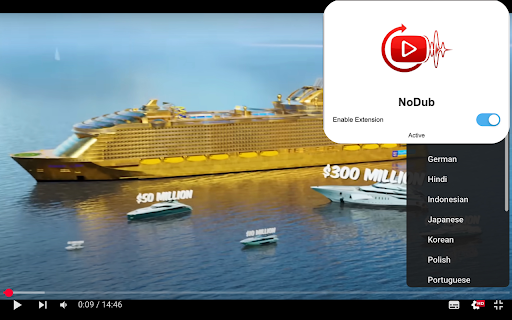
NoDub ensures you always hear YouTube videos in their original audio, not dubbed versions. Enjoy videos the way they were meant to be with Nodub, the browser extension that automatically selects the default, native audio track instead of dubbed or altered versions. This is the best YouTube original audio selector on the webstore. Tired of videos playing with dubbed voices? Nodub detects when a video is not using its native or default audio and switches it back to the original track automatically. With just one click, you can enjoy clear, authentic audio exactly as the creator intended. 🎵 Auto Select Audio: Automatically restore the default/native audio track when dubbed audio is detected. ⚡ Fast and Lightweight: Runs smoothly without slowing down your browsing experience. 🎯 Simple Interface: One-click audio switching, no setup required. 🛡️ Privacy First: All processing happens locally in your browser—no tracking, no external servers. - Install the Nodub extension. - Play videos as usual on your favorite platforms. - Nodub detects when the audio is not the original track. It automatically switches to the native audio, or you can click the icon to restore it manually. Nodub is designed for anyone who wants to always hear videos in their original audio without dubbed voices. It’s lightweight, secure, and privacy-friendly, with no ads, no tracking, and no unnecessary permissions. 🔒 Privacy Policy: We never collect, store, or share any personal data. Audio switching is handled fully in your browser. 👉 Install Nodub today and enjoy videos in their true, default audio automatically! 🚀

TranslateTube: YouTube Video Translator
Real-time AI voice dubbing for YouTube videos, no subtitles needed Language barriers shouldn't stop you from enjoying YouTube. Our extension translates videos in real-time using advanced AI, offering both voice dubbing and text translation. • Translates YouTube videos to English and 50+ other languages • Works even with videos without subtitles (no CC required) • Provides AI-generated voice dubbing so you can listen instead of read • Automatically creates transcripts while watching • Translates live streams in real-time as they happen 🔧 How to Use This Extension: 1. Install the extension 2. Open any YouTube video or live stream 3. Select your preferred language 4. Choose translation mode: Voice dubbing or subtitles 5. Click "Start" - translation begins immediately 1. YouTube Video Translator - Convert any video to your language 2. Auto-Translate - Works automatically with one click 3. AI-Powered - Uses advanced neural networks for accurate results 4. Transcript Generator - Creates text transcripts while you watch 5. No Subtitles Required - Translates videos without existing captions • Need to understand videos in other languages? → Get instant translation with voice or text output • Watching content without subtitles? → Our AI generates captions and translates them automatically • Following live international events? → Real-time translation for streams and broadcasts 🎓 Perfect For: • Students watching educational content in foreign languages • Professionals following international industry updates • Travelers preparing for trips with local videos • Anyone enjoying global entertainment without language limits • Supports 50+ languages including English, Spanish, French, German, Russian • Requires internet connection for AI processing • Privacy-focused: no personal data stored • Free basic plan with premium options available ⚠️ Important Note: This extension provides AI-generated translations, not professional human translation. Accuracy may vary with audio quality and specialized terminology.

YouTube Repeat
Let youtube repeat replay song in one click! Loop youtube video, listen song on repeat, and enjoy infinite loop for hours 🎵 Meet youtube repeat, your new Chrome tool developed by professionals from Milext Studio. This extension lets you loop any part or the whole of a youtube video. Set it up once, and it runs till you stop it. 🚀 How to loop a youtube video? Just follow these simple steps: 1️⃣ Download youtube repeat extension from the Chrome Web Store. 2️⃣ Open your favorite video. 3️⃣ Click on the newly added repeat button in the status bar. 4️⃣ Choose to loop the full clip or set a part. 5️⃣ Sit back and enjoy non-stop playback! 🎶 Youtube repeat is packed with useful features designed to enhance your video viewing experience. 🎬 Seamless Integration: It blends in with youtube video interface effortlessly. This makes it feel like a inherent part of YouTube. It's simple and intuitive, making it a breeze to use. You get a seamless, native look and feel with repeat youtube. 🖥️ Browser Compatibility: Built to work flawlessly on Chrome, it's browser friendly. It doesn't interfere with your browsing speed or performance. Enjoy uninterrupted browsing and looping with youtube repeat. It's unobtrusive, light, and efficient. 🔁 Control over Loops: With our tool, looping a specific part of a video is a walk in the park. Just pick the start and end points, and voila! Repeat any section of a video as much as you want. You now have precision control over the loops. 🎼 Repeat Count: Not just the segment, you can decide the number of repeats too. Want to play it ten times, or until you decide to stop it? You get to choose with youtube repeat. Enjoy a personalized video experience! 🎞️ Works with Vimeo: And it doesn't stop with youtube. The extension extends its looping love to Vimeo videos too! Now enjoy your favorite Vimeo content with our repeat feature. It's more fun across platforms. 🎓 Youtube repeat thrives on offering benefits to learners and students. ➤ Repeat Lessons: Do you need to grasp a tough part of a lesson? Loop the part with looper for youtube. Watch, pause and replay till you get it. ➤ Foreign Language Drill: Are you learning a new tongue? Pick a phrase or word in a language video and repeat! Listen and practice till perfect. Youtube repeat can be your language friend. ➤ Exam Prep: Revising for tests gets a boost. Repeat parts of a lecture, a study guide, or an exam tip. The more you hear, the more you recall. Get your loop youtube study edge now. 🎤 Youtube repeat extension brings in a host of benefits for singers and musicians too. ➤ Perfect Pitch: Got a tough part in a music piece? Want to get the pitch and tone right? Use repeat youtube to replay the part and practice along. Sing or play it till you hit it right. ➤ Music Pieces: Working with a complex music piece? Break it down into parts. Loop each part using youtube repeater and master one at a time. It's like your own music tutor. ➤ Song Lyrics: Need help with the lyrics? The chorus or a line not catching up? Set it on a loop and play youtube video on repeat. Listen, sing along, and get those words tight. 🕺 Welcoming all dancers to a better practice session with youtube repeat. ➤ Dance Practice: Got a tough step to master? Use looper youtube to replay the part. Mirror the moves till you nail it. ➤ Choreo Learning: Step by step, learn a whole choreography. Break it down, loop each part, and put it all together. Youtube replay makes it easy. ➤ Sync Drills: Syncing with a team? Use loop youtube to play the group parts. Practice till you all move as one. 🎧 Youtube repeat goes beyond students and musicians, helping various users. ➤ Workouts: Keep up with your fitness regime. Repeat a workout or yoga move till you get it right. Let yt video looper be your virtual fitness partner. ➤ Cooks and Chefs: Repeating the steps in a recipe has never been this easy. Loop the tricky part till you master the dish. Looper youtube is your kitchen companion. ➤ DIY Lovers: Not clear with a step in your DIY video? Just repeat that part until clear. Let youtube repeater guide you in your DIY tasks. 📌 Frequently Asked Questions: ❓ How do I install the extension? 💡 To install youtube repeat, just click on the "Add to Chrome" button. After quick installation, you’ll be able to looping youtube videos. ❓ How to loop a certain part of a youtube video? 💡 To replay a specific part of a youtube video, load the video page, click on the repeat button, set the start and end points for the loop, tick a box "Loop a portion" and voila! ❓ Does youtube count repeat views? 💡 Yes, our extension has a built-in counter, which help you to know how many times youtube video has been played. ❓ Does youtube repeat require access to my personal data? 💡 No, the extension does neither require access to your youtube account nor your personal data, ensuring your privacy. ❓ Do I need to sign up or create a youtube account to use it? 💡 There's no need to sign up or create a youtube account to use our extension, providing you with instant access ❓ I have some ideas and feedback for youtube repeat. Can I share them with the developers? 💡 Absolutely! Our team is always open to hearing from our users. Don't hesitate to send in your proposals, ideas, or reviews. We value what you have to say. ❓ If I encounter a problem while using youtube repeat, is there a customer support available? 💡 If you have any problem, feel free to contact us directly via email or leave a ticket in the Chrome Web Store. We’ll be glad to be of help 🥇 Youtube repeat is the ultimate Chrome extension for loop playback and YouTube replay functions. Download and install our extension today and get the best out of your YouTube experience! Happy viewing and repeated listening! 🎉

YouTube Audio Selector
Automatically select a predefined audio track language for YouTube videos. Works on Shorts, even those without audio selection. If you dislike AI audio tracks on youtube as much as I do, this extension is for you. Notice: You might no longer need this extension. Youtube has settings available to select preferred audio languages. Check out this Google / Youtube help article: https://support.google.com/youtube/answer/13339776 The extension still works. Features: * select **multiple** preferred languages (explanation below) * autoselects the most preferred audio language automatically (if enabled) In this extension you define a list of preferred languages in any order. Those languages will be used to match the audio language of the youtube player. ### This extension also works for shorts! * It does also work for shorts that do not have any audio selection available! * (some videos have multiple audio tracks, but shorts just dont load them) The audio track will be matched based on the following order: 1. One of your preferred languages matches the original audio track. 2. The original audio track is not one of your preferred languages, then the first matched preferred language will be used. 3. Original audio track will be used if no preferred language matches. You have predefined: - English - Spanish The extension will select the English audio track, as it is the original audio track of the video and english is one of the predefined languages. If the video had no English audio track and the original audio track would be French the extension would select the Spanish audio track, as it is the first matching predefined language. Since this extension uses undocumented behavior, it may break with updates from youtube. I am constantly working to fix those issues, but may take some time. If its not possible, I'll take down this extension, or provide respective information. If you encounter issues with this, please open an issue with as much details as possible. At least Video ID, selected languages Please enable dev logs, and add those to the issue. I'll look into it.

YouTube To Text
🚀 Quick Start Tips 1. Install extension by button “Add to Chrome” 2. Open any youtube video 3. Click button “Transcribe video” 4. Get youtube transcript with time codes! Here are 🔟 reasons to choose Youtube to Text 1️⃣ Transcribe and convert YouTube videos to text format 2️⃣ Explore and search through the textual content to quickly find the information you need 3️⃣ Supporting multiple languages, you can even transcribe videos with captions or automatically generated subtitles 4️⃣ Save transcriptions, create playlists, and organize your textual content for easy access 5️⃣ Create сlosed сaptions for improved accessibility 6️⃣ For language learners, youtube to text is an excellent tool for practicing listening and reading skills. 7️⃣ No ads and respect your privacy 8️⃣ Easy to use 9️⃣ Find the right moment in the video through text search 🔟 Powerful features special designed for work and educational scenarios 📝Save Your Time ➤ As a content creator, time is precious. The extension streamlines your workflow by providing an accurate transcription of your YouTube videos. Use the transcript as a foundation for editing or repurposing content, saving you hours of manual transcribing and ensuring your messaging is on point. ➤ The youtube to text is perfect for anyone who needs to transcribe YouTube videos on a regular basis. Whether you're researcher, or student, this extension will save you time and effort by automatically converting your videos into text format. ➤ The process of transcribing a YouTube video to text is simple with this extension. Once installed, all you need to do is open the YouTube video you want to transcribe and click on the Youtube to text icon in your browser. The extension will then automatically start transcribing the video into text format 📈 Boost Accessibility and Reach ➤ Captions and transcripts are crucial for enhancing accessibility and catering to a diverse audience. By converting YouTube videos into accurate text transcripts, the Youtube to Text enables you to add subtitles or captions to your videos with ease. Reach a wider audience and make your content available to individuals who are deaf, hard of hearing, or prefer to consume content in a text-based format. 📖 Learn from the Best ➤ With the Youtube to Text, you can gain valuable insights from industry experts, thought leaders, and influencers. Transcribe their captivating talks, interviews, and presentations to capture their wisdom and knowledge in a textual format. Get inspired, learn new skills, and emerge as a motivated and informed individual. ➤ Converting YouTube videos to text transcripts opens up a whole new world of possibilities. With the ability to search for specific keywords, phrases, or quotes within the transcript, you can quickly locate and extract valuable information. Uncover new insights, gather research data, or spark creativity by analyzing and referencing the content within the transcript. 🖥️ Enhance Video SEO ➤ Did you know that transcribed content can significantly improve the search engine optimization (SEO) of your YouTube videos? With the Youtube to Text, you can convert your videos to text, generate keyword-rich transcripts, and maximize your visibility in search results. Drive more organic traffic to your channel and expand your online presence. 📂 Organize and Archive with Ease ➤ Text transcripts act as valuable reference materials, helping you organize and archive content effectively. Use the Youtube to Text to convert YouTube videos into text, and seamlessly integrate them into your personal knowledge base or external note-taking platforms. Access important information with a simple search, making knowledge retrieval a breeze. ❓ Frequently Asked Questions: 📌 How does is it work? 💡 YouTube to text is a Chrome extension that allows you to convert youtube videos to text format. By transcribing youtube video, it provides you with a textual representation of the video's content, making it easier to read and search for specific information. 📌 Can I use it for free? 💡 Yes, extension is available as a free Chrome extension 📌 How do I install? 💡 To install YouTube to Text, go to the Chrome Web Store and select "Add to Chrome". It will be added to your browser, and you can start using it. 📌 Can extension transcribe any YouTube video? 💡 Yes, It can transcribe and convert any YouTube video to text format. It supports multiple languages 📌 Is my privacy protected when using extension? 💡 Absolutely! Extension operates locally within your browser, ensuring the privacy and security of your personal information. It does not collect or store any user data. 📌 Are there any limitations to the length or number of videos I can transcribe? 💡 There are no specific limitations imposed by the extension on the length or number of videos you can transcribe. You can convert multiple videos, regardless of their duration. 🚀 The Youtube to Text may come with additional features and capabilities, so be sure to explore all the exciting possibilities available to you. If you have any questions or need assistance, reach out to us. Embrace extension, and let your transcription adventures begin!
