
jdkfbjolbkocomndaingibljnhplcepj
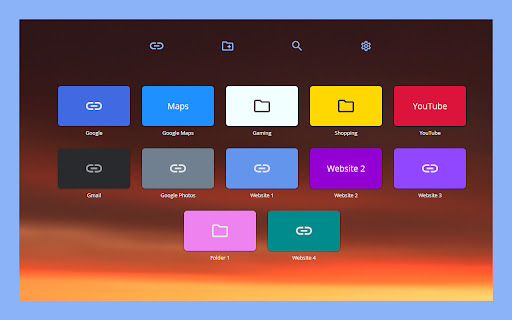
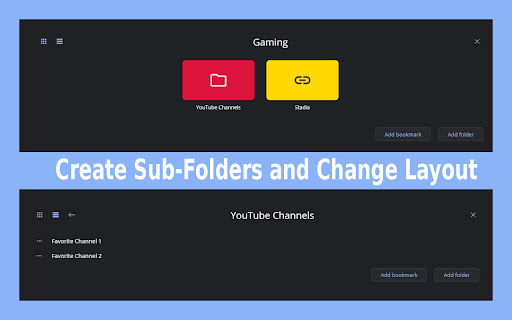

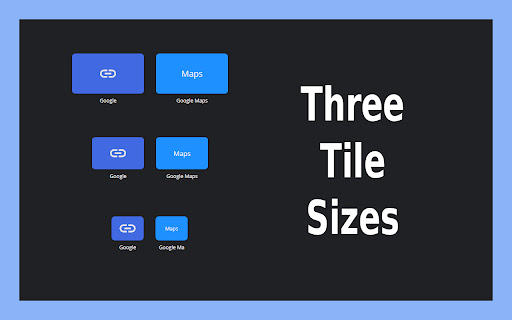

Clean and simple bookmarks on New Tab. Replace New Tab with bookmarks and folders of your choice. - Create folders and sub-folders - Make hidden bookmarks/folders - Drag and drop to change position of bookmark/folder - Folder layout: grid or list - Tile size: small, medium, large - From 1 to 13 columns (on small tile size) - Change tile color - Change background on New Tab page - Search bookmarks/folders - Mark bookmark as cannot be searched - Export and import Supa Speed Dials 1. How can I import my browser's bookmarks? - You can't. Only Supa Speed Dial bookmarks can be imported 2. How can I access bookmark/folder that is hidden and cannot be searched? - There is a way to access it, but I will leave this up to you to figure it out 3. How can I add bookmark to hidden folder? - Look at question #2 or make folder visible 4. Do you plan to add thumbnails? - Maybe someday

Websktop Speed Dial
Changes New Tab page to https://websktop.com Build and customize your own speed dial page with Websktop. With Websktop you can: 🏠 Build your own new homepage 🗂️ Organize your bookmarks 🖥️ Unleash the power of desktop-like user experience 🔥 Powerful copy, paste, drag & drop ✨ Create multiple Websktops 🌎 Share Websktops with others 🎨 Customize backgrounds, icons & more

Speed Dial World
A beautiful, easy-to-use speed dial that gives you immediate access to your favorite websites! To help you access your favorite websites much faster, "Speed Dial World" is an add-on. On any page, simply right-click and then pick Add to Speed Dial. You may also right-click on the toolbar button and choose Add to Speed Dial from there. A screenshot of the website will be added to the speed dial page. To access your speed dial, click on the toolbar symbol. Within the UI of speed dial, there is a settings sidebar that allows you to change certain aesthetic preferences. There are several background pictures included (open sidebar for alternate options). Please keep in mind that all preferences are auto-saved in memory. Note 1: When you first install the plugin, few websites are added to your speed dial automatically from your history (most visited sites). These websites do not have a screenshot. Note 2: A user might drag and drop any of the speed dial UI's cells to a new position. Simply drag and drop the cell to your preferred location; all cells will be reordered automatically, and you'll be able to store them to memory. Note 3: The "Speed Dial World" add-on does not alter the appearance of the new tab in your browser. It just creates a stand-alone page using Speed Dial UI. Note 4: To add desired pages to the speed dial, use the keyboard command (Alt + Shift + A). Note 5: To add the current tab or, if you want, all tabs to your speed dial, go to the extension's context menu and select "Add this tab or all tabs to my speed dial." If you choose all tabs, the extension will require broad host access.

Metro Speed Dial - Modern New Tab page
A modern, highly customizable speed dial that replaces the new tab page. Organize pages in groups, take notes and try new themes. Metro Speed Dial is a highly customizable extension that replaces the New Tab page and allows you to save and organize your favorite websites for quick and easy access. All the pages you love are just one click away! After installing Metro Speed Dial make sure to click the "Keep it" button on the "Change back to Google" notification to ensure Metro Speed Dial remains your default new tab. Features: • Easily customizable tiles • Tiles can be categorized and grouped • A wide selection of high quality 4K backgrounds & themes • Support for uploading your custom backgrounds • Notes and todos • Quick access to Chrome's history, downloads, bookmarks and extensions • Various search engines included in the Speed Dial • Support for importing & exporting your pages, notes & settings No data is collected while using this extension. No additional permissions are requested. To keep everything private and secure, the extension doesn't track your usage or your activity and it doesn't have access to any other tabs that you opened. Version 2.9.0 - New layout & design for the settings page - Added bookmarks import - Added options for search bar width & height, clock position & size, date format, tile safe zone - Added behavior options for opening pages & search results in new tab - Added multiple ways to switch or scroll through categories - Added an option to select the default category when opening a new tab - Modified search engine settings to use the browser's search engine Version 2.8.0 - Added efficient compression for custom backgrounds and for custom tile images - Added zoom & position sliders for custom tile images - Added custom colors for predefined tile thumbnails & frosted glass color override for each tile - Added 250 icons that can be used as thumbnails for tiles - Added new page thumbnails Version 2.7.1 - Added shortcut to easily hide page quick add button Version 2.7.0 - Added Frosted Glass Design - Added page quick add option - Added tooltips with explanations for all visual settings - Improved page management in settings - Added new backgrounds, themes & page thumbnails Version 2.6.0 - Added tile (page) categories - each category has its own section - Added custom search engine option - Added option to hide search bar - Added backup reminders - Improved tile custom image management - Added 200+ new predefined tile thumbnails Version 2.4.0 - Added page groups - Added drag & drop reordering for pages (in settings) - Added 12/24-hour clock toggle - Added dark mode - Added "about" page - Added status message for imports

Insta Speed Tester Plus
Speed dial with internet speed test. Insta Speed Tester Plus creates a colorful new tab where you can easily view your bookmarks, most visited sites and any site you'd like to add to your speed dial. Insta Speed Test Plus also includes a link to an internet speed tester so you can test your internet speed at any time from any location. Please note: This extension creates a new default tab. It features a link to the Internet Speed Tester a search bar with New Tab search powered by Yahoo®! By clicking on the "Add to Chrome" button, I accept and agree to installing the ‘Insta Speed Tester Plus’ Chrome extension and setting Chrome™ New Tab to that provided by the service, New Tab search powered by Yahoo!®, and to the Terms of Use and Privacy Policy. Terms Of Service: https://instaspeedtester.com/terms-of-service/ Privacy Policy: https://instaspeedtester.com/privacy-policy/ Contact Us: https://instaspeedtester.com/contact How to Uninstall: https://instaspeedtester.com/extension-uninstall/ About Us: https://instaspeedtester.com/about-us Required Permissions: The following permissions are requested as necessary to perform the various functions the extension provides. Top Sites Needed to display the top sites on the user's new tab. Bookmarks Needed to display bookmarks on the new tab page. Context Menus Adds a right click menu option so the user can add a web site like to their new tab page. Host Permission The host, instaspeedtester.com is the home for the extension which includes references to images and scripts on the host site.
