
gcgifffidchbnbnlpbkccdghhoekkcdj
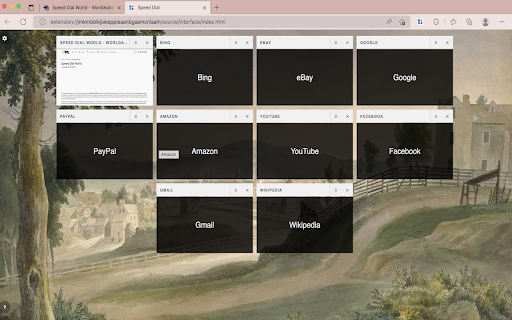
A beautiful, easy-to-use speed dial that gives you immediate access to your favorite websites! To help you access your favorite websites much faster, "Speed Dial World" is an add-on. On any page, simply right-click and then pick Add to Speed Dial. You may also right-click on the toolbar button and choose Add to Speed Dial from there. A screenshot of the website will be added to the speed dial page. To access your speed dial, click on the toolbar symbol. Within the UI of speed dial, there is a settings sidebar that allows you to change certain aesthetic preferences. There are several background pictures included (open sidebar for alternate options). Please keep in mind that all preferences are auto-saved in memory. Note 1: When you first install the plugin, few websites are added to your speed dial automatically from your history (most visited sites). These websites do not have a screenshot. Note 2: A user might drag and drop any of the speed dial UI's cells to a new position. Simply drag and drop the cell to your preferred location; all cells will be reordered automatically, and you'll be able to store them to memory. Note 3: The "Speed Dial World" add-on does not alter the appearance of the new tab in your browser. It just creates a stand-alone page using Speed Dial UI. Note 4: To add desired pages to the speed dial, use the keyboard command (Alt + Shift + A). Note 5: To add the current tab or, if you want, all tabs to your speed dial, go to the extension's context menu and select "Add this tab or all tabs to my speed dial." If you choose all tabs, the extension will require broad host access.

Minimalist Speed Dial - New Tab Shortcuts
Minimalist speed dial new tab with a customizable shortcuts grid—add lots of shortcuts fast. Turn your New Tab into a clean, fast speed dial. This extension replaces the default New Tab page with a minimalist layout: a search bar, a live clock, and a customizable grid of shortcuts. Add, edit, and organize shortcuts in seconds—perfect if you want more than the standard number of tiles. - More shortcuts, less clutter: keep your favorite sites one click away - Beautiful themes: 6 preset themes inspired by macOS wallpapers (Dark, Light, Tahoe, Sequoia, Sonoma, Monterey) or upload your own background image - Live clock & date: always visible above the search bar, auto-detects your system's 12/24-hour format - Fast to use: add/edit/remove shortcuts directly from the New Tab - Sync across devices: your shortcuts and theme sync via Chrome Sync - Minimalist design: Apple-inspired typography, clean spacing, zero bloat - Lightweight: under 50KB total, no frameworks, instant load - 6 beautiful preset themes + custom background image upload - Live clock and date display - Search button appears when you type - Improved text readability on all backgrounds - Full keyboard accessibility: navigate all shortcuts with Tab, Enter, Space, and arrow keys - Screen reader support: ARIA roles and labels on every interactive element - Focus management: modal focus trap with Escape-to-close - Reduced motion support for users who prefer less animation

Websktop Speed Dial
Changes New Tab page to https://websktop.com Build and customize your own speed dial page with Websktop. With Websktop you can: 🏠 Build your own new homepage 🗂️ Organize your bookmarks 🖥️ Unleash the power of desktop-like user experience 🔥 Powerful copy, paste, drag & drop ✨ Create multiple Websktops 🌎 Share Websktops with others 🎨 Customize backgrounds, icons & more

Speed dial 2.0 - New Tab, Bookmarks, History
Customizable dashboard every time you click a new tab that will help you organize your favorite sites, bookmarks, history, etc.! 1. Install and add the extension to Chrome. 2. This extension takes over your new tab and lets you add shortcuts (speed-dials) in a fun way. 3. Add a speed dial and assign it an icon. 4. Arrange your speed dials in standard/fancy/list views. 1. Drag and drop your speed dials. 2. Edit the number of columns, size of the speed dials and customizable transparency. 3. The new tab will have your speed dials, recently visited and closed pages, and visual bookmarks 🔖to make it easy for you to go and forth between them. 4. Sync your dials between different browsers. This extension is a New Tab replacement with syncable 3D Speed Dials, with which you can organize your bookmarks🔖, groups, and most visited pages.

Group Speed Dial
Speed Dial [Group Speed Dial] is the most advanced start page! It's like a visual bookmarks, plus many more tools for professionals! Speed dial ⏹️ will upgrade your "New Tab" page with quick access to your favorite pages organized into groups / folders. 🔒 Privacy-friendly - no ads, no tracking, instead you get E2E encryption! (E2EE) 🚧 Actively developed since 2016 by me - Juraj Mäsiar: https://www.linkedin.com/in/juraj-masiar/ ⭐ TOP FEATURES: 🔸 Cloud synchronization - synchronize your data between devices and browsers - for free and with E2EE (End-to-End encryption) 🔸 Cloud speed dials - access your links in any browser, even in your phone! 🔸 Search engines - easy access to your favorite search providers! 🔸 Timer - stopwatch / countdown / alarm 🔸 Top-sites - fast access to your most visited pages 🔸 Recently closed tabs list 🔸 Text notes - for your todo list 🔸 Import from other popular extensions (FVD and other speed dials and bookmark managers) 🔸 Share your speed dials groups with your friends (supports E2E encryption) 🔥 Need more features? Upgrade to PRO to get: 🔸 Live dials - a full live interact-able pages 🔸 Folders - organize your groups into folders 🔸 Grid layout - resize each dial individually 🔸 Multi-page dials - multiple links in a list 🔸 Weather forecast - for any location for 5 days 🔸 Automatic Productivity mode 🔸 and many more: https://github.com/fastaddons/GroupSpeedDial/wiki/PRO-version-features
