
jdgipneahaabnlcfomeogakemmlceofe


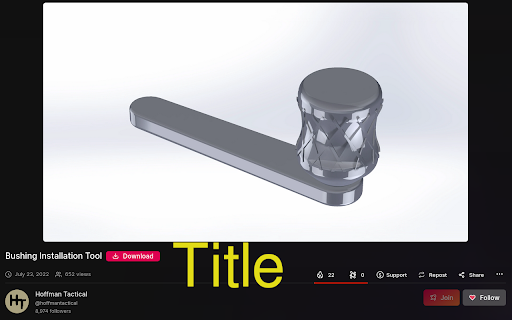
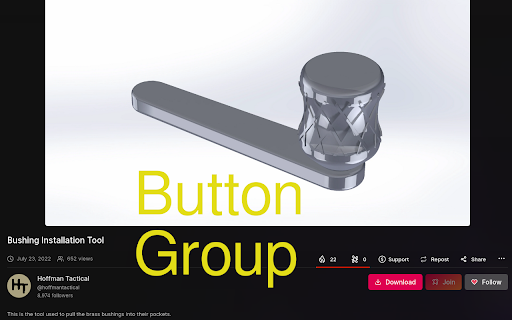
Odysee pages with a download button do not show any image. This adds the thumbnail image (but bigger) above the download button. Quality of life extension that displays the thumbnail of the current item on the page above the download button. (Only does something on pages with a download button) Thumbsee 1.5 brings some great new features, such as the ability to move the download button. Now you can move the button next the the Join and Follow buttons, or to the right of the title, or you can always keep the default layout if that's what you really prefer. The next fantastic addition is the ability to auto hide the bottom popup. The popup is much too good at popping up, now you have the ability to make it *pop*. The final feature is the ability to enable/disable the entire extension with the flick of a switch. I don't know why you would ever want to disable it though. [Major] + Added option to move the download button, options include... * Default: default button location * Title: after title, make the button a bit smaller too * Button Group: to the left of the Join button + Added option to hide bottom popup + Added option to enable/disable entire extension

Sports Social Feed
This extension makes your web browsing much easier and comfortable by helping you simply read sports social feeds in your city. By clicking “ADD TO CHROME”, you accept and agree to install the Sports Social Feeds Chrome Extension, set the Chrome™ New Tab search to Yahoo, and to the Terms of Use, and Privacy Policy. The extension requests the following permission: - Can read and change your data on sites: http://sports-newz.com/ Terms of Use: http://sports-newz.com/pages/terms-of-use.html Privacy Policy: https://sports-newz.com/pages/privacy-policy.html About us: https://sports-newz.com/pages/about-us.html Contact us: https://sports-newz.com/pages/contact.html Get the latest sports social feed and updates right at your homepage! Enjoy an easy-to-use sports-oriented homepage that keeps you connected and up to date with access to top sports social feeds from all over the world right from your browser homepage. Stay up to date with sports news while enjoying a rich search experience and social networks shortcuts. For easy access, we recommend pinning the extension to your browser toolbar. You may uninstall the extension at any time. To remove our extension from Google Chrome: 1) Click on the three vertical dots icon in the upper right-hand corner of your Chrome browser. 2) Go to "Settings.” 3) In the left menu that appears, click on "Extensions.” 4) From the list of installed Extensions, locate the extension you would like to uninstall.

Jira worklog
Extension to log work into jira This extension can be used to register work into jira tasks without entering to your company's jira webpage. You just need to add the hostname of the jira webpage and the tasks where you usualy register work, for example daily meetings, current working task, refinements or bugs and you can register work with just one click on each task. The extension only stores the jira url and the tasks, any other credentials or authentication needed must be done in the actual jira webpage.

Hide Youtube Video Button Text (CSS)
Hides the button text (including number of Likes) on Youtube videos using a CSS rule. You know all those extensions that slightly alter a website? Well this is another one. It removes the text next to the main buttons under a Youtube video. The buttons stay there, just not the text. So you can still like, dislike, share, etc the video, you just click the button. It saves some screen space, you know? Also, it hides the number of Likes a video has. Maybe this is a deal-breaker for you, I don't know. I personally don't like seeing how many Likes or Dislikes a video has, so I like it. You can always make your own extension if you want to, Google's tutorial is pretty clear about how to do it, although you'll need to learn a little CSS.

Upwork Cover Letter Generator with Chat GPT
Searches for job descriptions on Upwork job post page and generate Cover Letter with Chat GPT. This extension is designed to work specifically on Upwork job post pages. Once you click on the extension, it automatically searches for the job description on the Upwork job page and combines it with a predefined prompt. It then sends a request to the ChatGPT API using your API key obtained from the OpenAI settings page. The extension retrieves the generated text from the API response and displays it as a cover letter. The cover letter is shown in the extension’s popup.
