
jcmmbbgoebjleajoaibhfjjcfgdeliki

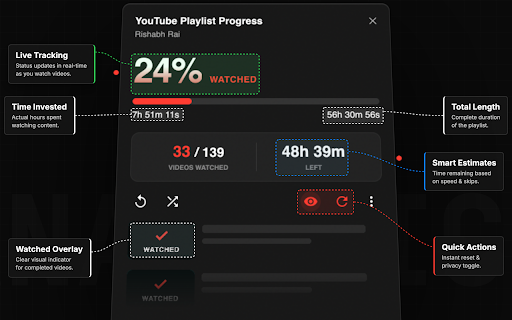


The ultimate learning dashboard. Track playlist completion, manage courses, skip chapters, and celebrate milestones on YouTube. 🚀 THE ULTIMATE LEARNING & BINGE-WATCHING DASHBOARD FOR YOUTUBE =============================================================== If you use YouTube for coding bootcamps, university lectures, tutorials, or long-form podcast series, you know the pain: "Where did I leave off?" and "I just got distracted by Shorts again." The YouTube Playlist Progress Tracker adds a beautiful, native-feeling learning layer on top of YouTube that tracks your completion, blocks distractions, and gamifies your educational progress. We have rolled out a major stability and functional update focusing on advanced utility and user requests: ● 🔍 ALL-NEW PLAYLIST VIDEO FILTERING SYSTEM: Added a powerful search and filtering tool directly inside your dashboard! Quickly filter through massive playlists containing hundreds of videos to find specific lectures or topics in seconds. ● 🐛 STABILITY & BUG FIXES : Fully addressed and resolved layout bugs, event tracking errors, and sidebar clipping issues reported. The interface is now more robust, seamless, and responsive than ever! ● ⚡ REDUCED BUNDLE SIZE: Optimized minification routines to shrink the extension package footprint, guaranteeing lightning-fast browser load times and zero overhead. 📊 VISUAL PROGRESS TRACKING ● Track Anywhere: View progress directly on both the playlist sidebar and the main playlist overview page! ● Real-Time Progress: Beautiful percentage rings and floating progress bars. ● Detailed Analytics: Track total watched time vs. remaining time, and see video counts instantly. 🧠 FOCUS MODE (Distraction Blocker) ● Stop "doom-scrolling" and focus on your studies. ● Instantly hide Sidebar Recommendations, Comments Section, YouTube Shorts Shelf, and Merch/End-Screen Clutter. ● Toggle specific elements on/off in Settings. 🎛️ MANUAL TRACKING MODE ● Take full control over what gets tracked. ● Automatic (Default): Tracks everything you watch. ● Manual: Choose to only track specific playlists when you click the "Track This Playlist" button, ignoring random music mixes. 💾 DATA PORTABILITY & BACKUPS ● Export/Import: Moving computers? Export your progress to JSON and import it on a new device. Never lose your learning data! ● Reset Progress: Want to retake a course? Instantly reset a specific playlist to 0% with a single click. ⏭️ SKIP & EXCLUDE VIDEOS (Unique Feature!) ● Not every video matters. Exclude intros, outros, filler, or irrelevant chapters. ● Your progress rings reflect only the content that truly matters to your learning. ● Restore excluded videos instantly with a single click. 🏆 MILESTONE MOTIVATION ● Stay inspired throughout your learning journey! ● Celebrate your wins at 25%, 50%, 75%, and 100% completion. ● Beautiful fireworks and confetti animations make finishing playlists highly addictive. 🎨 BEAUTIFUL & CUSTOMIZABLE ● Automatic Dark and Light mode support matching YouTube's theme. ● 5 Custom Accent Colors: Red, Blue, Purple, Green, and Orange. ● Compact Mode: Optimized layouts for smaller screens and laptop displays. 🔧 POWERFUL CONTROLS ● Unwatch Button: Instantly reset progress for any video. ● Mark videos or entire sections as unwatched. ● Clean overlay with quick-access statistics. 🔒 PRIVACY FIRST ● All progress data stays 100% on your device. ● No tracking. No analytics. No external servers. ● Your learning data is your own business. 🎯 PERFECT FOR: Turn YouTube into your personal university. Install the YouTube Playlist Progress Tracker v1.2.2 today!

Custom Progress Bar for YouTube™
Change Youtube™ progress bar to custom from fun collection. Make your Youtube™ player awesome! Transform your YouTube watching experience with Custom Progress Bar for YouTube. This fun and innovative Chrome extension allow you to replace the standard progress bar on YouTube with a wide range of custom options. With our collection of colorful and animated progress bars, you can add a touch of personality and excitement to your favorite videos. Custom Progress Bar for YouTube gives you a selection of 30 🍭 colorful progress bars inside the extension and about 1000 custom progress bars 🤩 are available on our website for you to download and enjoy. - Customization Galore: Choose from a vast selection of custom progress bars from our library. Whether you're into cute, funny, gaming, or meme-themed progress bars, we have something for everyone. With new additions regularly, there's always something fresh to explore. - Fun Animations and Colors: Make your YouTube player come alive with engaging animations and vibrant colors. From adorable bongo cats to popular memes and iconic characters, our custom progress bars will bring a smile to your face as you watch your favorite videos. - Easy Installation: Installing Custom Progress Bar for YouTube is quick and hassle-free. Simply add the extension to your Chrome browser, and you're ready to customize your YouTube progress bar with a few clicks. - Seamless Integration: Once installed, our custom progress bars will automatically appear on all YouTube videos and websites with embedded YouTube players. Enjoy a consistent and personalized viewing experience across platforms. - Regular Updates: We're committed to keeping our collection of custom progress bars fresh and exciting. Our team adds new designs regularly, ensuring you have a vast array of options to choose from. - User-Friendly Interface: Customizing your progress bar is a breeze with our intuitive and user-friendly interface. Easily navigate through different themes and animations, preview them in real-time, and apply your favorite choice with a single click. Use an awesome custom YouTube player and make your days more colorful!

TrackMyCourse: YouTube Playlist Progress Tracker
Turn YouTube playlists into courses. Track with checkmarks, progress bar, total and watched duration, and completion percentage. TrackMyCourse is a YouTube playlist progress tracker that turns playlists into structured courses. Stay organized with progress bars, checkmarks for watched videos, total and watched durations, invested time tracking, and clear completion percentages. 📊 Progress Bar & Completion Percentage – Instantly see how much of a playlist you’ve completed ✅ Checkmarks for Watched Videos – Mark videos as watched and keep your learning organized ⏱️ Duration Tracking – Track both watched and total time, plus invested time spent learning, for better planning 🔄 Dynamic Playlist Scanning – Automatically detects and scans videos, even in large playlists 📦 Import/Export Progress – Back up your courses and progress as JSON files and restore anytime, across browsers or devices 🏠 Homepage Course Overview – View your recent courses directly on YouTube's homepage for quick access 🎯 Focus Mode – Distraction-free learning by hiding recommendations and providing a toggle to show/hide comments only when needed 🔗 Cross-Course Video Matching – See if a video is part of other courses you're tracking, with automatic progress sync 🖥️ Popup Dashboard – See all playlists you’ve started, organized into 'In Progress' and 'Completed' courses for easy tracking 🎨 Seamless YouTube Integration – Minimal design, fully embedded in your YouTube interface 💾 Local Storage – All data is stored safely in your browser. No account required Whether you’re learning coding, languages, school or college subjects, or any skill through YouTube, this extension turns scattered playlists into a structured learning experience. Never lose track of what you’ve completed or where to continue next. 🎯 Who Should Use This Extension? 👩🎓 Students & Self-Learners – Track academic courses, tutorials, and lecture series. 👨🏫 Educators – Help students follow a clear learning path on YouTube. 🎥 Content Creators – Offer your audience a more professional, course-like experience on your playlists. TrackMyCourse respects your privacy. All progress is stored locally in your browser ✅. We do not collect, store, or share any personal information. Your learning data stays safe and private while you use the extension. Install TrackMyCourse today and make your YouTube learning journey productive, organized, and fun 🎉

Playlist Tracker
Keep track of your YouTube playlists Do you maintain playlists on YouTube? Don't you hate it when a video is deleted or made private, and you don't even remember what it was? Sync your playlists with Playlist Tracker, and get notified of any changes since the last sync. Notifications will include whether or not any videos have been added, deleted, renamed, or have changed from public to private (and vice versa). 1. The "Playlist ID" is the part after "list=" in the URL of the playlist. For example, for "youtube.com/playlist?list=PLsUMoyJKBqcn7dk3jC3i1023Ie-BntpgF", the "Playlist ID" is "PLsUMoyJKBqcn7dk3jC3i1023Ie-BntpgF". 2. Works only with public playlists for now. Playlists don't have to be your own, they just have to be public. 3. You may have to re-add your playlists if you clear your browser's cache. 4. If the extension starts behaving weirdly and you have to reset everything, click the clear-all icon on the top-right. 2. Add hover text to the "clear all" icon based on user feedback. 1. Can sync multiple playlists at once now. 2. Notifications now have the playlist name in the title. Shoutout to Grzegorz Ryznar for suggesting these! 🙌 2. Can specify either the playlist ID or the playlist URL now. 1. Support for tracking a much higher number of songs. 2. Separate notifications for songs added, deleted, renamed or made private.

Chrono: YouTube Speed Control & Time Tracker
Control playback speed, track playlist duration, and estimate finish times with beautiful dashboard. The ultimate productivity tool. Stop guessing when the video ends. Take control of your time. ⏳ Chrono isn't just another speed controller. It is a powerful productivity dashboard designed for students, professionals, and anyone who values their time. Whether you are speeding through a 2-hour lecture or binge-watching a playlist, Chrono calculates exactly when you will finish based on your current speed. 🚀 WHY CHRONO? Most extensions just change speed. Chrono helps you manage it. We combined a precision speed controller with a retro-style Flip Clock and intelligent time estimation logic to help you fit more content into your day. Go beyond YouTube’s limits with speeds from 0.25x up to 16x. One-Click Presets: Instantly jump to 1.25x, 1.5x, or 2x with our interactive speed rows. Fine Tuning: Use the +/- buttons for micro-adjustments. "When will I be done?" Chrono tells you the exact wall-clock time you will finish (e.g., "Finish at 3:45 PM"). Real-Time Updates: Change the speed, and the finish time updates instantly. See the Total Remaining Time for the entire playlist. Set a Custom Target: Only want to watch the next 5 videos? Chrono recalculates the time for just those videos. 🎯 Custom Goals (The "Student Saver") Have to leave in 20 minutes? Input your Target Time (e.g., "I need to finish by 4:00 PM"). Chrono automatically calculates the exact speed you need to watch at to hit that deadline. ☕ The "Delightful" Ad Break While an ad plays, Chrono displays a relaxing, animated Coffee Break card with fun status messages like "Perfect time for a stretch!" or "Grabbing some popcorn". Keeps your time tracking accurate by pausing the timer during ads. A stunning, translucent interface that feels like a native part of your OS. Dark Mode Friendly: Includes a "Solid Background" mode for perfect contrast on any theme. Compact Mode: Automatically gets out of your way when you don't need it. 🔒 PRIVACY FIRST Chrono runs entirely on your device. We do not track your viewing history or collect personal data. Your privacy is our priority. Maximize your learning. Conquer your watchlist. Install Chrono today.
