
jcajchndfkmnaefkhoaoiagemplbfffn
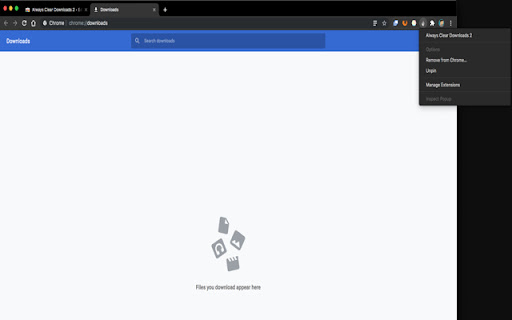
A Google Chrome Extension to always clear the downloads list of all completed downloads. This extension makes up for the fact that Chrome does not have an option to keep its download list clear at all times. You can clear the downloads list yourself by hand, but Chrome currently doesn't have an option to automatically clear it for you. This extension does it for you automatically. This extension works in a very simple way: After a specified amount of time (the default is 5 seconds), the downloads list is cleared out for you. Don't worry, the files you downloaded are still there, and in-progress downloads are not harmed. Version 3: **You can now specify the amount of time before the extension clears the download list. Open the extension options and enter your own value.** The default interval is 5 seconds. If you are updating from version 2, Chrome may ask you to grant the extension more permissions. This is necessary to store your preference. As always, you can inspect the code yourself. The source for this extension can be found at https://github.com/tsuliwaensis/AlwaysClear

uAutoPagerize
A browser Extension for auto loading paginated web pages!!! *What's this This is an extension that provides infinite scrolling on various sites. It is a derivative of AutoPagerize. It is an extension that automatically loads and appends the "next page" in search engine, blogs, etc. * How to use When you scroll to the bottom of the page, the page will be added without your permission. When you cannot use the comment box due to the addition, click the green icon in the page to pause it. This may not work well on sites that change pages dynamically using JavaScript. In that case, right-click on the toolbar icon and select "Disable on this page".

Illust Downloader EX for pixiv.net
You can easily download images, comics, and novels from pixiv.net! *This extension is unofficial and is not affiliated with Pixiv Inc. "pixiv" is a registered trademark of Pixiv Inc. *As of May 17, 2025, this extension has been renamed to "Illust Downloader." With Illust Downloader EX, you can download 'ugoira' as video files (such as AVI, WebM, etc.), APNG, GIF animations, SVG, and more. It also offers features such as sorting illustrations into folders based on various criteria like author or time, compiling manga into ZIP files, a function to see if an illustration on the list page has already been downloaded, bulk download functionality, and many other convenient features. The basic functions are free forever. You can try premium features free for one month, so please take advantage of this opportunity. To use all premium features of Illust Downloader EX, there is a monthly fee of 195 yen. Basic functions are available for free, but some functions, such as downloading 'ugoira,' are limited. For first-time users, there is a special offer to try all features free for one month, so please take this opportunity to experience it. - Automatically sort illustrations into folders, which you can name. Depending on how you use it, you can sort by author, by date, and more. - Save ugoira as ZIP files and play them with a dedicated player. You can also save each frame separately, or as video files (AVI, WebM, etc.), APNG, GIF animations, SVG, etc. - Compress and save manga in ZIP format. Manga can be saved in a format that adds a zero in front of the page numbers for easier viewing in manga viewers. - Easily identify whether an illustration or novel has already been downloaded from the list page. - Add a one-click save button to thumbnails. - Save comments, captions, etc., in text format. - Save novels with illustrations included, and use many other features. - Share download history with other PCs. - Access batch download functionality. - Various other features are available for use.

5CH STYLE FORMAT
5ちゃんねる(旧2ちゃんねる)のスレッド(記事)ページをすっきり整形&URL直リンク化、画像・レスのPOP表示等、いろいろ機能を付加します。 ▼基本機能 ・5ch.netのスレッドでのみ動作 ・CSSの書き換えによる見栄えの整形 ・リンクURLの直リンク化 ・書き込みボックスの自動フィット ・コメント番号をクリックでレス番号として書き込みボックスへ引用(引用符付き) ・右クリックから選択文字を書き込みボックスへ引用(引用符付き) ▼オプション選択できる機能(ON/OFF可) ・新着コメの読み込みボタン「▼」を設置 ・新着コメのオートリロード&スクロール ・新着コメを色分け ・記事内の画像URL下にサムネイルを表示 ・コメント内の画像URLにマウスオーバーで画像をPOP表示 ・コメント内の「h抜きURL」を補完してリンクを設置 ・コメント内にAAが含まれる時はフォントの最適化を試みる ・ユーザーIDにマウスオーバーでレス履歴をPOP表示 ・ユーザーID右横にユーザーのコメント数を表示 ・ユーザーIDをクリックで「必死チェッカーもどき」検索 ・書き込みボックスをフロートさせる(ドラッグ可) ・全件表示に自動リダイレクト ・ページ最上部、最下部へのジャンプボタンを設置 自分でニュース系スレを見るために作ったということもあってニュース以外の板はあまり検証してませんが、今後ブラッシュアップしていく予定ですのでよかったら使ってみてください。

Illust Downloader for pixiv.net
You can easily download images, comics, and novels from pixiv.net! *This extension is unofficial and is not affiliated with Pixiv Inc. "pixiv" is a registered trademark of Pixiv Inc. *As of May 17, 2025, this extension has been renamed to "Illust Downloader." [About Illust Downloader] Illust Downloader is an extension that allows you to automatically assign file names and download illustrations, manga, and novels from Pixiv. It also offers features to enhance your Pixiv experience, such as the ability to enlarge illustrations directly on the gallery page. [Introducing Illust Downloader EX] The basic features of Illust Downloader are available for free indefinitely. However, by purchasing a license (¥195 per month), you can upgrade to Illust Downloader EX. Illust Downloader EX allows you to download Ugoira (animated illustrations) as video files (AVI, WebM, etc.), APNG, GIF animations, SVG, and more. Additionally, it offers advanced features such as organizing illustrations into folders based on criteria like artist or time, compiling manga into ZIP files, identifying downloaded items directly on the gallery page, batch downloading, and many other convenient functionalities. The premium features are available for a one-month free trial, so feel free to try them out. [Regarding Bugs and Suggestions] If you encounter any bugs, have suggestions for improvements, or other requests, please use the "Feedback, Suggestions, and Bug Reports" option within the Illust Downloader settings to get in touch with us.
