
jbilkebbjmgmgegabeabbghhhpbeeedg
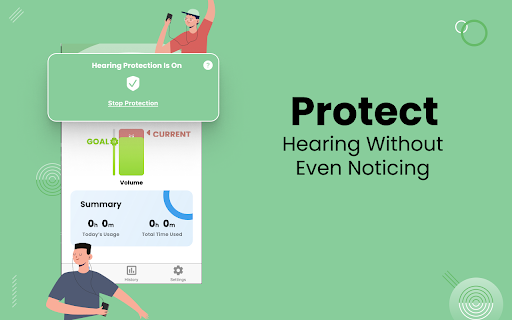
Protect Your Hearing, Without Even Noticing Did you know that headphones can cause hearing damage to your ears the same way other loud noises do? Don't risk your hearing any longer - try HearSafe, the hearing damage protector app that reduces volume gradually over time. Our volume adjuster app aims to help prevent people from getting noise-induced hearing loss from listening to their headphones at a loud volume. If your ears don’t get time to recover, this damage can be permanent. Your love for music doesn't have to damage your hearing. With this safe hearing app, you can listen to your favorite tunes at a safe volume without sacrificing enjoyment. Loud volume Cause Loss of Hearing Ability: One in every six to eight teenagers have hearing loss, and this hearing damage was most likely preventable. Hearing loss not only affects the quality of your music, but your entire way of life. Loss of hearing ability is associated with cognitive impairment, and since it makes conversations difficult, it can lead to feelings of isolation and even depression. But with this app's loud volume limit, you can listen to your favorite songs at a safe level of volume without worrying about the long-term effects on your hearing. How This Volume Adjuster App Works: The safe sound app works by reducing your volume slowly over time. Using the patent-pending algorithm, the user doesn’t even notice their volume is reducing over time since their ears adapt to the lower volume in a process called the stapedius reflex and threshold shift. This means users are able to listen to their music at a safe level without sacrificing enjoyment. Runs in the Background for a Seamless Experience: The safe hearing app is very intuitive to use. To start the hearing protection, simply click the "protect my ears" button, and the protection will begin. You can adjust your goal volume, or how low your volume will get, by dragging the goal volume up and down. The app will show you a summary box that provides information on how much the app has benefitted you, allowing you to track your progress and see the positive impact the app is having on your hearing health. Features of HearSafe – Hearing Protector: • Simple and easy to use loud volume adjuster app UI/UX • intuitive and clutter-free Loud Noise control app layout • Ability to adjust your goal volume • Patent pending advance algorithm to protect loss of hearing ability • Access Privacy policy, TOC and Rate us options in Settings Page. The safe hearing app is the perfect solution for anyone who wants to enjoy their music without worrying about the long-term effects on their hearing. With the patent-pending algorithm, the safe sound app gradually reduces the volume without sacrificing the enjoyment of the music. It is very easy to use, and with the goal volume adjustment feature, you can customize the app to your needs. Download HearSafe – Hearing Protector today!

Audio Limiter Pro
Professional audio limiter and compressor for web content. Control dynamics, prevent clipping, enhance listening. Transform your web audio experience with Audio Limiter Pro, a professional-grade audio processing extension that gives you complete control over audio dynamics on any website. ### Key Features 🎚️ **Professional Audio Processing** - Real-time dynamic range compression - Adjustable threshold, attack, release, and ratio controls - Input and output gain adjustment - Precision ceiling limiter to prevent clipping 🔊 **High Pass Filter (HPF)** - Clean up low-frequency rumble and muddy bass before compression for a cleaner mix. - Adjustable frequency cutoff from 0 Hz to 500 Hz. 📊 **Visual Feedback** - Professional VU meters for input, output, and gain reduction - Real-time clip indicators - Activity status light - Smooth, accurate metering 🎨 **9 Beautiful Themes** - Default (Woodgrain) - Light Mode - Dark Mode - Steampunk - Futuristic/Cyberpunk - Western - 80s Synthwave - Matrix - Neon ⚙️ **Smart Presets** - Music: Optimized for music streaming (includes 20Hz HPF) - Movies: Enhanced for film audio (includes 60Hz HPF) - Podcasts: Perfect for spoken content (includes 80Hz HPF) - Gaming: Tuned for game audio (includes 40Hz HPF) - Broadcast: Professional broadcast settings (includes 60Hz HPF) - Commercials: Heavily compressed settings (includes 100Hz HPF) - Custom: Save your own presets 🔄 **Advanced Controls** - Bypass mode for A/B comparison - Per-tab audio processing - Persistent settings across sessions - One-click reset to defaults ### Perfect For - YouTube videos and music - Spotify Web Player - SoundCloud and other music platforms - Podcasts and audiobooks - Online courses and webinars - Gaming streams and videos - Any HTML5 audio or video content ### How It Works 1. Click the Audio Limiter Pro icon in your Chrome toolbar 2. Toggle the power button to enable audio processing 3. Adjust controls to your preference or select a preset 4. Enjoy perfectly controlled audio dynamics All audio processing happens locally in your browser with zero latency. Your settings are automatically saved and synced across devices. ### Privacy First - No data collection or transmission - All processing happens locally - No account required - No tracking or analytics ### Technical Specifications - Uses Web Audio API for professional-quality processing - Supports all HTML5 audio and video elements - Real-time parameter adjustments - Sample-accurate processing - Minimal CPU impact ### Support For issues, feature requests, or questions, please contact us through the Chrome Web Store support page. ## Version History ### Version 1.2.0 - **High Pass Filter (HPF)**: Integrated a pre-compressor High Pass Filter (0 Hz to 500 Hz) to eliminate muddy bass and low-end rumble. - **Smart Preset Defaults**: Tailored HPF frequency cutoffs for all default presets. - **Automated NPM Scripts**: Added easy command-line packaging scripts. - **Dependency Cleanup**: Streamlined dependencies to pure Vanilla JS extension files. ### Version 1.1.0 - **Fullscreen Support**: The extension now works seamlessly with fullscreen videos on sites like YouTube and Netflix! - **Architecture Overhaul**: Completely refactored to use modern Chrome APIs for improved stability and performance. - **Bug Fixes**: Resolved numerous bugs where the UI would become out of sync after exiting fullscreen. - **UI Polish**: Fixed visual glitches with power buttons in several themes. ### Version 1.0.0 - Initial Release - Professional-grade audio limiting and compression. - 9+ customizable themes. - Smart presets for music, movies, and more. - Real-time VU meters. - Bypass mode for A/B testing.

Sound Booster up to 600%
Amplify volume up to 600%, customize EQ presets, switch output devices per tab, with visualizers and shortcuts. 🚀 Boost Volume to 600%: Amplify your audio up to 600% safely. Perfect for hearing quiet videos or boosting music on low-volume speakers. 🎚️ Instant Audio Profiles: Enhance your sound with a single click. Choose from optimized presets like Bass, Voice, and Treble to suit what you're listening to. 🎧 Smart Device Switching: Route audio exactly where you need it. Select different speakers or headphones for specific tabs directly from the extension. ⌨️ Custom Keyboard Shortcuts: Control volume instantly with hotkeys. Pro Tip: You can map your own preferred keys for volume and extension control in the Chrome Extensions shortcuts menu (chrome://extensions/shortcuts). 📊 Live Audio Analyzer: See what you hear. Visualize your audio frequencies in real-time with the built-in dual spectrum analyzer. 💾 Site-Specific Memory: The extension automatically remembers your volume levels and speaker preferences for your favorite websites.

Sound Meter (Noise & Decibel)
Measure the surrounding sound (dB) and noise with your computer's microphone! Sound Meter (Noise & Decibel) extension enables you to measure the surrounding sound (dB) and noise with your computer's microphone. This add-on helps you easily measure some important sound factors, such as the sound level in decibel, noise level, sound average, and normalized sound value. When you open the app for the first time, it may ask you about microphone access. Please accept the dialog box to start the add-on. Also, note that the app may take a few seconds before getting ready. So please be patient while the add-on is getting ready. Once the loader is disappeared, the add-on is ready to use. It uses the microphone in your system to capture the surrounding sound. If your computer does not have a microphone, please attach one to it before using the add-on. On the top toolbar within the interface, you see several pieces of information about the surrounding sound. You can also change the capturing sound API via the buttons at the top-right. Note: The interface for this app can be opened in a separate window, new tab, or toolbar popup (choose a context from the toolbar button's right-click menu). When you open the app for the first time, please open it in the window or tab to see the microphone permission dialog. If you see any bug or have a feature request, please fill out the bug report form on the addon's homepage (https://mybrowseraddon.com/sound-meter.html).

Ear Protector Extension
An alarm tells you how long the sound has been playing! If you are playing a sound using the Chrome browser, we will send you a warning alert every hour! Protect your hearing with Ear Protector Extension
