
janabgnbgjajbcplklpcckjnmfmjbpom
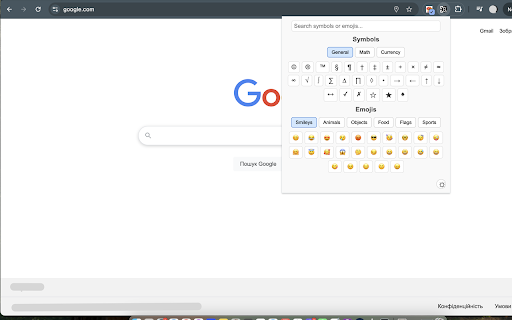


Copy and paste unique symbols and categorized emojis with an enhanced selection. Enhance your typing with Symbol & Emoji Picker—a lightweight Chrome Extension that makes it simple to insert unique symbols and emojis anywhere you type. Whether you need currency symbols like $, €, or ₴, mathematical notations like π and ∑, or fun emojis like 😊 and 🍕, this tool has you covered. Wide Selection: Access a curated collection of symbols (general, math, currency) and emojis (smileys, animals, objects, food, flags, sports). Smart Search: Find what you need fast—type keywords like 'euro,' 'smile,' or 'pizza' to instantly filter results across all categories. Theme Toggle: Switch between light (☼) and dark (☾) modes to match your style, with preferences saved automatically. One-Click Copy: Click any symbol or emoji to copy it to your clipboard, with a subtle 'Copied' confirmation. User-Friendly Design: Enjoy a clean, organized interface with tabbed categories for quick navigation. Perfect for writers, developers, designers, or anyone who loves adding flair to their text. Install Symbol & Emoji Picker today and express yourself effortlessly!

Keyboard.cool (keyboard.blade.sk) - emoji & symbol keyboard
Insert emoji and symbols directly into text fields. Use super fast search to pick from over 7500 symbols. Take your texting to the next level. 🤯 use the most up-to-date emoji (version 15.1 - 2023). ⌨ insert symbols directly into the focused web page or copy them to clipboard. 💨 built for speed - loads fast, searches even faster, bring up the keyboard with customizable hotkey (defaults to 𝙲𝚃𝚁𝙻+𝚂𝙷𝙸𝙵𝚃+𝚉 / ⌘+𝚂𝙷𝙸𝙵𝚃+𝚉). ☝🏿 selectable skin tones and emoji styles (EmojiOne and native). 🥶 arguably has the coolest logos. Word of advice: the emoji and symbols you copy may or may not display correctly to you or the recipient, depending on what device they're using. Most new(-ish) devices should be fine. Some websites using non-standard input methods may not accept the inserted characters, in which case you can use the clipboard (𝙲𝚃𝚁𝙻+𝚅 or ⌘+𝚅).

Emoji Keyboard — typing to emoji
keep trying to find an emoji. Select and copy your favorite emoji like cow, horse, eating, flag, laughing, crying and more emojis If you have difficulty with any emoji prayer in your social media post or comment, we can use this extension. It's very easy to use, you can copy any emoji you like from here with just one click and then you can paste that coffee with your comment or post. To make it easier for users to insert emojis and emoticons into their messages, many devices and operating systems now include an Emoji Keyboard extension. This extension adds a dedicated keyboard to a device's native keyboard, providing users with a wide selection of emojis, emoticons, and symbols that they can easily insert into their text. Now you don't have to go to any other website to find any emoji, you can easily search and copy the emoji you like and add it to your post message or comment. Adding emojis to your message can be important to convey what your message or comment is about, but you no longer have to go to a website to find emojis to accompany your message. You can search any emoji according to your emotion and you can find any kind of animal and all other emojis here.

Emoticon symbols copy and paste - ThisEmoji
Emoticon symbols list, Emoji keyboard for copy and paste. This is an emoji Keyboard extension that help you easily copy an emoji and paste it on any web page. Feature: 1. Automatically copy after clicking the Emoji. 2. Support continuous copying. 3. Support to automatically add emoticons to the input box in the webpage after clicking. 4. Support custom Emoji fonts. 5. Support setting Emoji skin color. 6. Support to adjust the size of Popup. 7. Support search emojis by keywords.

Character / Emoji Finder
Easily search for unicode characters and emojis. Handy browser extension to copy and paste the characters that you need. Character / Emoji Finder is a handy extension to use to search for a specific Unicode character or emoji. You can search by keyword or Unicode codepoint. Once you have found the character or emoji that you need, you can now easily copy the character to the clipboard for use in another program or webpage. If you need to get more information on any of the selected characters, you can just click on the 'More Info' button which will redirect you to the characters webpage, on the page you will find extra information for the selected character or emoji. All characters and emojis are available up to Unicode version 17.0 If you search for a character that displays a black rectangle, that means you do not have any font files that support that character. Head on over to https://www.charactercodes.net/font-support/ to test your fonts for character support. Likewise, if an emoji does not show, it may mean that it has just been released and your operating system does not support it yet.
