
jakpaeegkaccoonfepokcngipgkdbekk
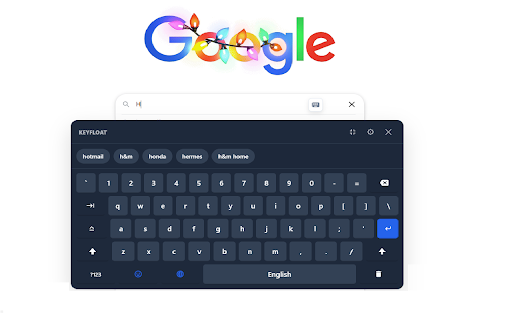


A customizable, floating on-screen keyboard with smart predictions, 21 languages, and privacy-focused features. Type smarter, not harder, with KeyFloat — the ultimate virtual keyboard extension. Whether you are using a touchscreen, have a broken physical keyboard, or need to type in a foreign language, KeyFloat provides a seamless typing experience directly in your browser. 🚀 TOP FEATURES: 🌐 Multi-Language Support Switch instantly between 21 different languages including English, Spanish, French, German, Japanese, Korean, Russian, Arabic, and more. Includes native character layouts. 🧠 Smart Cloud Predictions Speed up your typing with intelligent word suggestions powered by Google’s prediction engine. Privacy First: Suggestions are fetched via an anonymous proxy. We never store or transmit your personal data. 🎨 Fully Customizable Themes Auto-Theme: Matches your system’s Light or Dark mode automatically. Custom Styling: Pick your own colors for the background, keys, and text to match your aesthetic. High Contrast Mode: Optimized for visibility and accessibility. 🛡️ Privacy & Security We take your privacy seriously. KeyFloat: Automatically detects and disables itself on password/sensitive fields. Operates offline for the local dictionary. Includes a "Panic Button" to instantly pause the extension and hide it from the page. ⚡ Smart Behavior Auto-Show: Detects text fields and smart-positions the keyboard icon. YouTube Optimized: Works perfectly over the YouTube search bar without blocking native buttons. Quick Actions: Includes a "Clear Field" (Trash) button and standard keyboard shortcuts. Perfect for: Touchscreen laptops and kiosks. Learning a new language (type without installing system language packs). Accessibility needs. Surfing the web with just a mouse. Install KeyFloat today and upgrade your browsing experience!

FluidKeys Virtual Keyboard
A customizable virtual keyboard for Chrome. A customizable virtual keyboard for Chrome. Supports light and dark mode. Supported keyboard styles based on the input type: * Default * Numeric * Telephone * Email * URL

Touch Keyboard - On-screen virtual keyboard
On-screen virtual keyboard for touch screens and kiosks Touch Keyboard adds a fully-featured on-screen keyboard to any web page, built for touch screen kiosks, interactive displays, and accessibility. It appears automatically when you tap an input field, or can be set to always-on or on-demand mode with a draggable floating icon. 30+ LANGUAGE LAYOUTS Switch languages instantly from the toolbar. Long-press any key to access accented characters, diacritics, and script-specific alternates. THEMES + CUSTOM THEME DESIGNER Choose from several included themes or design your own theme. EMOJI PANEL Browse and insert emojis. MECHANICAL KEYBOARD SOUNDS Adjust volume or design a fully custom click sound with waveform, pitch, duration, and noise controls. SMART INPUT DETECTION - Auto-switches to numpad for number, telephone, date, and time fields - Date/time input preview bar with format validation - Works with regular inputs, textareas, contenteditable elements - Compatible with Google Docs, Word Online, CKEditor SPACEBAR TRACKPAD Hold the spacebar to turn it into a two-axis cursor trackpad for precise text cursor positioning, just like on a phone keyboard. CLIPBOARD INTEGRATION Detects copied text and shows a one-tap paste bar above the keyboard. NAVIGATION TOOLBAR Built-in browser controls: Back, Forward, Refresh, Home (configurable URL), and Scroll to Top. Includes a URL bar for quick web address entry, hold .COM to suggest common domain endings based on your keyboard layout language. URL ALLOW & DENY LISTS Control exactly which websites show the keyboard. Use denylist mode to block specific sites, or allowlist mode to restrict the keyboard to approved URLs only. Supports wildcards and domain-wide patterns. KEY REPEAT & TYPING SETTINGS Configurable key repeat with adjustable initial delay and repeat speed for Backspace, Delete, Space, Enter, and Arrow keys. Auto-capitalization after sentences. Optional Delete key and Clear All button. SETTINGS MANAGEMENT Export and import your full configuration as a backup file. Reset to defaults at any time. All settings sync across devices via Chrome's built-in sync. Perfect for: kiosk deployments, digital signage, interactive displays, accessibility setups, touch screen PCs, and anyone who needs a reliable on-screen keyboard in Chrome.

SmartKey - Auto-Popup Keyboard
Touch-friendly virtual keyboard with auto-capitalize, voice input, cursor positioning, draggable UI, and 15 language layouts SmartKey automatically displays an on-screen keyboard when you click on text fields, and hides it when you're done typing. Perfect for touch screen devices, tablets, and kiosk setups. • Auto-popup & auto-hide - Keyboard appears when you focus an input and disappears automatically • Voice input - Speak to type using offline AI speech recognition (Whisper). No internet needed, your voice stays private • Cursor positioning - Type anywhere in a field, not just at the end. Drag on the spacebar to move the cursor • Key repeat - Hold backspace to continuously delete characters • Auto-capitalize - Automatically capitalize after sentences, Enter key, or when keyboard opens • Sticky shift - Shift key stays active until pressed again (optional) • Resizable keyboard - Adjust width and height to fit your screen • Draggable keyboard - Reposition the keyboard anywhere on screen • Number row - Optional dedicated number row above the keyboard • Autostart mode - Keep keyboard always visible on page load • 15 keyboard layouts - English, French, German, Spanish, Italian, Russian, Korean, Polish, Swedish, Norwegian, Hungarian, Slovenian, Czech, Ukrainian, and Tamil • Quick .com button - Fast domain entry for email and URL fields • Optional floating button - Manual keyboard trigger (can be disabled) • Works in iframes - Handles same-origin iframe scenarios • Efficient performance - Zero CPU usage when idle

Virtual Keyboard Plus
Fullscreen on-screen virtual keyboard for touch screen devices Enhance Your Typing Experience with the Virtual Keyboard Extension for Chrome! --------------------------------------------------------------------------------------------------------------------------------- Say goodbye to hardware limitations and hello to seamless typing with the Virtual Keyboard extension for Chrome. This extension brings a full-featured on-screen keyboard right to your display, letting you type effortlessly on any device. Whether you’re using a touchscreen computer, working on a laptop without a physical keyboard, or dealing with a broken keyboard, this extension has you covered. Key Features ************* Flexible Activation Options: ------------------------------------------- Choose between Always On, On Demand, and Turn Off modes to customize your typing experience. The keyboard can appear as a fixed feature on your screen, pop up only when needed, or stay off entirely until you activate it. Smart Auto-Activation: ------------------------------------ The Virtual Keyboard automatically activates in text fields, providing a smooth, responsive typing experience exactly when you need it. This feature is especially helpful for forms, search boxes, and any other input areas where typing is required. Freely Movable Keyboard: ----------------------------------------- Move the keyboard to any position on your screen. Whether you’re left-handed, right-handed, or need extra space for other applications, the on-screen keyboard adapts to your preferences, offering a flexible typing solution for any setup. Perfect for Any Scenario --------------------------------------- * Touchscreen Devices: Ideal for tablets or touchscreen computers, where typing without a physical keyboard can be challenging. * Kiosk & Presentation Systems: This extension is great for kiosk setups, public display computers, or presentation systems that may lack traditional keyboard access. * Faulty or Missing Hardware: Perfect for users experiencing issues with their physical keyboard or for laptops without built-in keyboards. This extension makes typing a breeze, even when hardware fails. Why Choose the Virtual Keyboard Extension? ----------------------------------------------------------------------- Designed with both functionality and ease of use in mind, this extension provides all the benefits of a virtual keyboard without the need for additional software. It’s optimized for a wide range of users, from those who require accessibility solutions to professionals working with public displays or in presentation settings. Turn your screen into a dynamic, versatile workspace with the Virtual Keyboard Extension for Chrome. Enjoy the ease of typing anywhere on your screen with a simple, powerful tool designed to make your digital experience smoother and more accessible.
