
plheijecnjdabnkflgmfjboakjiploag


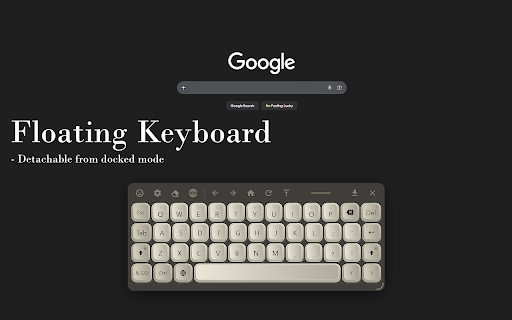

On-screen virtual keyboard for touch screens and kiosks Touch Keyboard adds a fully-featured on-screen keyboard to any web page, built for touch screen kiosks, interactive displays, and accessibility. It appears automatically when you tap an input field, or can be set to always-on or on-demand mode with a draggable floating icon. 30+ LANGUAGE LAYOUTS Switch languages instantly from the toolbar. Long-press any key to access accented characters, diacritics, and script-specific alternates. THEMES + CUSTOM THEME DESIGNER Choose from several included themes or design your own theme. EMOJI PANEL Browse and insert emojis. MECHANICAL KEYBOARD SOUNDS Adjust volume or design a fully custom click sound with waveform, pitch, duration, and noise controls. SMART INPUT DETECTION - Auto-switches to numpad for number, telephone, date, and time fields - Date/time input preview bar with format validation - Works with regular inputs, textareas, contenteditable elements - Compatible with Google Docs, Word Online, CKEditor SPACEBAR TRACKPAD Hold the spacebar to turn it into a two-axis cursor trackpad for precise text cursor positioning, just like on a phone keyboard. CLIPBOARD INTEGRATION Detects copied text and shows a one-tap paste bar above the keyboard. NAVIGATION TOOLBAR Built-in browser controls: Back, Forward, Refresh, Home (configurable URL), and Scroll to Top. Includes a URL bar for quick web address entry, hold .COM to suggest common domain endings based on your keyboard layout language. URL ALLOW & DENY LISTS Control exactly which websites show the keyboard. Use denylist mode to block specific sites, or allowlist mode to restrict the keyboard to approved URLs only. Supports wildcards and domain-wide patterns. KEY REPEAT & TYPING SETTINGS Configurable key repeat with adjustable initial delay and repeat speed for Backspace, Delete, Space, Enter, and Arrow keys. Auto-capitalization after sentences. Optional Delete key and Clear All button. SETTINGS MANAGEMENT Export and import your full configuration as a backup file. Reset to defaults at any time. All settings sync across devices via Chrome's built-in sync. Perfect for: kiosk deployments, digital signage, interactive displays, accessibility setups, touch screen PCs, and anyone who needs a reliable on-screen keyboard in Chrome.

FluidKeys Virtual Keyboard
A customizable virtual keyboard for Chrome. A customizable virtual keyboard for Chrome. Supports light and dark mode. Supported keyboard styles based on the input type: * Default * Numeric * Telephone * Email * URL

Animalese Voice Generator
Generate playful game-like chatter from your text. 🎧 Bring Your Typing to Life with Animalese Sounds Make typing fun again. Animalese Typing Sounds adds playful, animated voice effects to every keystroke—turning your keyboard into a cute, game-like experience. Inspired by cozy life-simulation games, this extension transforms your text into charming, expressive sounds as you type. Hear a unique Animalese-style sound for every letter you type—instantly and smoothly. Choose your vibe: • Classic Animalese • Cute High Pitch • Deep Funny Voice • Fast Chatter • Robot Pet 🎮 Why You’ll Love It • Makes typing more fun and engaging • Great for content creators and streamers • Adds personality to your workflow • Perfect for kids, students, and anyone who loves cute sounds 🔒 Privacy First • No data collection • No tracking • Everything runs locally in your browser 🚀 How to Use 1. Install the extension 2. Start typing anywhere 3. Enjoy instant Animalese-style sounds 🎶 Optional: • Open the extension popup to customize your voice settings Use it while chatting or writing to add personality and fun to your typing experience.

Keystroke
Plays satisfying mechanical keyboard sounds for every keystroke you type. Keystroke brings real mechanical keyboard sounds to every keystroke you type, plus lifelike mouse clicks that make using your computer way more satisfying. Pick from over 20 premium sound packs like the deep thunks of CherryMX Black, snappy Topre hybrids, creamy NovelKeys, crisp Holy Pandas, or smooth Gateron Milky Yellows. For mice, get that Logitech G502 crack, Razer Mamba snap, Apple Magic flex, or Corsair Harpoon pop. Everything's super customizable—you can disable anytime, swap packs instantly, and it works smoothly across all sites with zero lag. Turn boring typing into something you actually enjoy. Try it now!

SmartKey - Auto-Popup Keyboard
Touch-friendly virtual keyboard with auto-capitalize, voice input, cursor positioning, draggable UI, and 15 language layouts SmartKey automatically displays an on-screen keyboard when you click on text fields, and hides it when you're done typing. Perfect for touch screen devices, tablets, and kiosk setups. • Auto-popup & auto-hide - Keyboard appears when you focus an input and disappears automatically • Voice input - Speak to type using offline AI speech recognition (Whisper). No internet needed, your voice stays private • Cursor positioning - Type anywhere in a field, not just at the end. Drag on the spacebar to move the cursor • Key repeat - Hold backspace to continuously delete characters • Auto-capitalize - Automatically capitalize after sentences, Enter key, or when keyboard opens • Sticky shift - Shift key stays active until pressed again (optional) • Resizable keyboard - Adjust width and height to fit your screen • Draggable keyboard - Reposition the keyboard anywhere on screen • Number row - Optional dedicated number row above the keyboard • Autostart mode - Keep keyboard always visible on page load • 15 keyboard layouts - English, French, German, Spanish, Italian, Russian, Korean, Polish, Swedish, Norwegian, Hungarian, Slovenian, Czech, Ukrainian, and Tamil • Quick .com button - Fast domain entry for email and URL fields • Optional floating button - Manual keyboard trigger (can be disabled) • Works in iframes - Handles same-origin iframe scenarios • Efficient performance - Zero CPU usage when idle
