
jajeidpjifdpppjofijoffbcndlpoedd
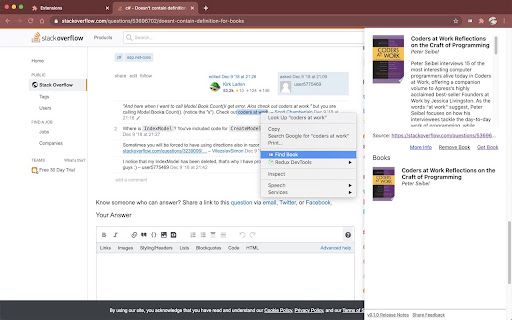
Search book recommendations and manage your reading list from any webpage. Most book recommendations become forgotten unless you write them down. Keep better track of books you come across on the web and manage your reading list through this simple browser extension. Searching for a book is easy. Start by highlighting text on a webpage, right click, and select 'Find Book'. Now you can save the book to your reading list for later. Use the extension icon to revisit your reading list any time. To avoid this being just another place to keep your reading list, subscribe to 'My Book Reminders' to turn your passive reading list into an active one. Now you'll receive gentle reminders with useful information about the books on your reading list to help you manage and prioritize your books. This helps aid in removing books you may no longer be interested in. Reach out with suggestions and complaints.

Meta-Press.es
Explore the press from your computer, with no middlemen between the newspapers and you. Discover millions of results within seconds, and explore the last ones in your browser via this WebExtension. Select your press review and export it in a few clicks.

Add Book to Goodreads
Detects books on web pages and provides quick access to add them to your Goodreads shelves. It works on book-related pages across the web, including Amazon, Google Books, publisher sites, and many others. Since the extension works across all websites to detect book information, it requires broad permissions including "Your data on all websites" and "Your tabs and browsing activity".

Booksidian
Create Obsidian notes for books (from the book's Goodreads page) or for YouTube videos This extension allows you to customize the note's title and content based on the book / video parameters (short and full titles, authors, channel, etc.)

Thymeline
Add events to your timeline the easy way Keep track of everything important about your projects all in one place. Meet Thymeline, the free Chrome extension that will magically transform your project chaos into an organized masterpiece. Created for Project Managers. Here is how Thymeline saves you time. No APIs. No integrations. As simple as copy & paste. Easily copy relevant information from any of your existing tools or apps without any hassle. Once you download the chrome extension... Step 1: Visit any website. Step 2: Highlight any text. Step 3: Click on the Thymeline Chrome extension Step 4: Add to existing Thymelines. That’s it! Thymeline can handle as many projects as you’re juggling. Create as many Thymelines as you need! Multiple projects, multiple Thymelines, we can handle it. Keep track of it all in a simple interface. Share with others Share your Thymelines with others on your team with view or edit privileges, keeping everyone on the same page. Want to keep it private? You can do that too.
