
jaccbcondahanfcamjolmjppaaaeccea

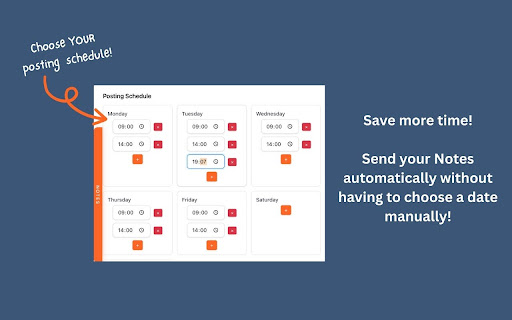


Draft, schedule, and automate your Substack Notes. Start growing on autopilot with scheduled Substack Notes. Plan, write, and queue weeks of Notes in one sitting so your audience hears from you daily, even when you are offline. With Dispatchrly, you get: - Visual calendar scheduling for Substack Notes, with drag-and-drop rescheduling and automatic posting at the exact time you choose. - A powerful draft system with rich text editor, live preview, auto-save, templates, and unlimited searchable drafts so you never start from scratch. - A Content Vault to capture ideas and inspiration from any creator in one click, organize them by category, and find them instantly when it is time to write. - Queue-based automation that lets you batch-create Notes, auto-schedule from your queue, and stay consistent during busy periods or holidays. Who it is for: - Substack creators and newsletter writers who want consistent daily Notes without living inside Substack. - Content creators and social media managers who repurpose posts into Substack Notes and need a reliable scheduling workflow. Pricing and safety: - 7-day free trial with full features, then a $39 one-time purchase for lifetime access (no subscriptions or monthly fees). - All data stored locally on your device, with no external servers or data selling, and verified via the Chrome Web Store. Requirements: Google Chrome and a Substack account. Support is available via your Chrome Web Store reviews section

Substack Note Scheduler
Schedule posting notes to Substack by automating the posting process. Meet Substack Note Scheduler — the "I swear I'll post on time" button for your Notes, now with a side of "I never want to see that topic again." 🎯 Why you'll love it - Inline scheduler: No popups. Type your note, drop in images, click "Schedule," and the composer politely clears itself. - Fancy time picker: An iOS-style scroll wheel because you deserve to feel like you're picking a meditation alarm, not a post time. - Mute Words: Tired of seeing notes about [that thing]? Add it to your mute list and watch those posts vanish. Free tier gets 3 words; upgrade for unlimited vocabulary vendettas. - Free tier forever: Schedule up to 5 notes free; upgrade for unlimited. Quota badges tell you exactly how many freebies you've got left. - Queue overlay: A floating "Scheduled Posts" pill slides out a panel with badge counts, thumbnails, edit/reschedule/delete, and subscription management. - Analytics tab: Time, content, clicks, ❤️, 💬, restacks; sortable columns; pinned totals/averages; cached instant loads; skeletons while fresh data streams in; adjustable cache TTL + Clear Cache. - Images included: Drag-and-drop images; they post with your text on schedule. - Restack controls: Toggle restacks, set intervals, and clear them if you want some peace. ℹ️ How to use it 1. Open Substack's composer, type your note (text + optional images). 2. Click "Schedule" and spin those sleek time wheels to pick your moment. A beautiful card shows exactly when your genius goes live. 3. Watch your quota badge: "Always free up to 5 notes — X left." 4. Manage via the overlay pill: see all scheduled notes, edit times/content inline, or delete with confirmation. 5. Check Analytics on your profile: instant cached rows, smooth skeletons, sortable stats; tweak cache TTL or clear it anytime. 6. Head to Settings to see your subscription tier, usage stats, and mute word management. 🤩 Mute Words — your new favorite feature 🤩 - Add words or phrases you're tired of seeing - Choose "Hide" (gone forever) or "Collapse" (blurred, in case you're curious) - Case-sensitive option for the pedants among us - A running tally of notes you didn't waste time reading Nice touches - Live quota labels in the scheduler and overlay so you're never surprised. - Keyboard/gesture friendly: ESC to close, drag the handle, click the pill to toggle. - Light and dark mode support — it tries its best (your mileage may vary). - Lifetime and Pro subscriber badges in Settings, because you earned that flex. 🚨 Notes - IMPORTANT! 🚨 - Keep one Substack tab open at send time; it posts client-side using your session. - Your browser must be on for alarms to fire. - Analytics Privacy: Analytics data is fetched with your logged-in session and cached locally via chrome.storage; you can adjust TTL or clear cache anytime. - Respect Policies: Ensure your use complies with Substack's Terms of Service. 🚀🚀🚀 Upgrade when you're ready to schedule an army of notes and mute an army of topics; until then, enjoy the free slots and the smug feeling of being on time (and blissfully unaware of [that thing]).

WriteStack
Helps users manage and schedule their Substack posts. Schedule your notes on Substack.

BlackMagic.so Extension
BlackMagic.so extension brings a completely new experience to Twitter. The new sidebar provides useful information for your everyday Twitter activities.

My Web Audit
Innovative Website & SEO Audit Tool - Quickly show prospects what's wrong with their website. Get more meetings. Win more deals. My Web Audit is an innovative auditing tool for web agencies, freelancers, and SEO professionals looking to build trust faster and close more—and bigger—deals with beautiful, actionable, and easy-to-understand audit reports. With our easy-to-use browser extension, you can quickly run a website, on-page SEO, Marketing ROI, Google Business Profile (GBP), Page Speed, Accessibility, and many other vital audits for businesses. Highlight design, SEO, security, and performance issues that could cost businesses money and present your business as the solution. Our audit reporting tool is unmatched in its value and ease of use. It is an essential tool for any web agency, freelancer, or SEO professional looking to improve their sales process and close more deals.
