
efnjehgfpbogpclnkikafpbgbahaflfd
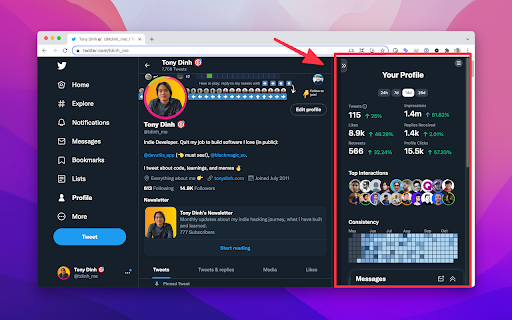
BlackMagic.so extension brings a completely new experience to Twitter. The new sidebar provides useful information for your everyday Twitter activities.

Drippi.ai
Drippi.ai companion extension This is the companion app to https://app.drippi.ai/. By installing the app you will be able to connect your twitter account to Drippi enabling you to view your twitter DMs, send DMs, and more directly from the Drippi app.

Kleo
Kleo is the browser extension that helps you discover and create the best content. Go to Kleo.so for more information.

Tweet Hunter X: Sidebar for X
Stop doomscrolling and start exploring. A browser extension that enhances X and guides you to the best content. It integrates smoothly with X to provide you with the best possible experience. ✅ Recent Hits: get the top performing posts from your timeline ✅ Highlights: see anybody’s best tweets for research or inspiration ✅ Conversations: see posts/replies you had with someone ✅ Enhanced search experience: shortcuts and improvements to X's search experience 💟 AI-powered features (only for Tweet Hunter subscribers) including viral tweet inspiration and AI writing assistant

BrandBird ✦ Beautiful Screenshots By Default✦
Create beautiful social media posts & sharable images by screenshotting your current tab! Just open the extension and choose one of the 4 commands and see the magic happen: 𝟙. 𝕍𝕚𝕤𝕚𝕓𝕝𝕖 𝕊𝕔𝕣𝕖𝕖𝕟 Grabs a screenshot of your current active tab and import it to BrandBird for further polishing. 𝟚. 𝔼𝕩𝕥𝕣𝕒𝕔𝕥 𝔼𝕝𝕖𝕞𝕖𝕟𝕥 Select any element from any website to avoid cropping the image, and import it to BrandBird to make it beautiful. 𝟛. ℍ𝕚𝕘𝕙𝕝𝕚𝕘𝕙𝕥 𝔼𝕝𝕖𝕞𝕖𝕟𝕥 Pick an element and the BrandBird Chrome extension will automatically highlight it. Perfect for product tutorials . 𝟜. 𝕆𝕡𝕖𝕟 𝔾𝕣𝕒𝕡𝕙 (𝕆𝔾) 𝕄𝕒𝕜𝕖𝕣 Extracts the title, description & logo from the active tab, grabs a screenshot, and imports everything to the BrandBird studio. Then, the image will be imported into BrandBird, and you can customize further edit it by adding: - Gradient, pattern, or image backgrounds - Shadows - 3D Effects - Device Mockups - Annotation elements like circles, arrows, rectangles, and text - Crop, resize, and blur parts of your image - And many more ℝ𝕚𝕘𝕙𝕥-ℂ𝕝𝕚𝕔𝕜 𝔸𝕔𝕥𝕚𝕠𝕟𝕤 You can instantly import text, images, and tweets to the BrandBird editor by using the right-click Chrome extension functionality. 🛟 Learn more in our how-to-use guide: https://help.brandbird.app/posts/how-to-use-chrome-extension
