
ipocdfgahhjaigldllakopnkofpcpahn

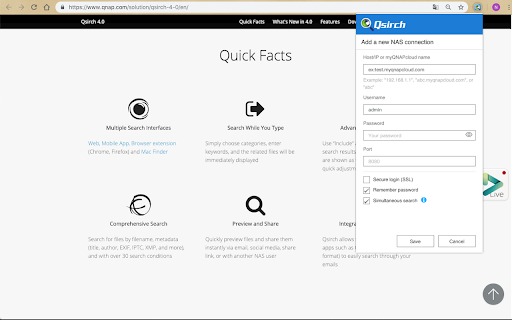
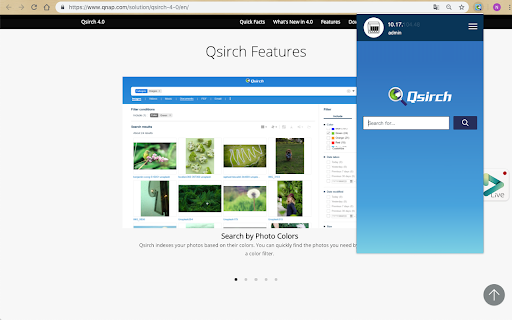
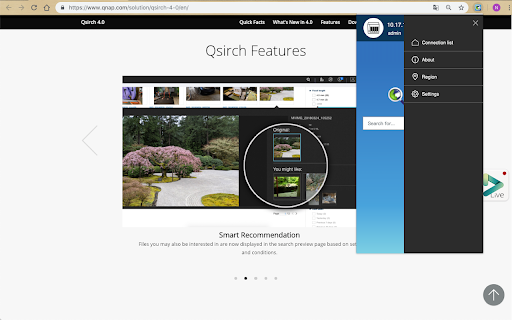

Qsirch Helper allows you to quickly search for files on your QNAP NAS. Install the Qsirch add-on to enable Qsirch from your web browser. Simply click the Qsirch icon on the right of the address bar to simultaneously search on Google and your QNAP NAS. The Qsirch and Google search results will appear side-by-side for easy comparison. Minimum Requirements • A QNAP NAS with Qsirch 2.2(or newer) installed. Key Features • Quickly search for files on your QNAP NAS. • Supports HTTPS connections. • Supports simultaneous search on Google. • Added QID sign in and management: You can now use QID to simplify NAS management and to increase your network security.

ExtManager
Manage the chrome extensions. One click to enable or disable extension. Group extensions and drag it. Sort extensions by drag it. You can easily enable, disable, and uninstall your extensions,applications and themes by "ExtManager". No need to enter the chrome own extensions page every time. Features: 1. Display enabled extensions on top. 2. Display enabled/group/all extensions simply. 3. Enable/disable extension by one click. 4. Group extensions and drag it into the group. 5. Sort extensions by drag it. 6. Uninstall extension simply when you confirm. Support text list, large icon list and small icon list of a variety of permutations, suitable for different expansion of the number of people. You can easily open the system pages, such as the download page, history page, page extensions, plug-ins page, chrome settings page, the search engine settings page, clear the browser cache pages, page content settings, font and encoding settings, language settings, reset the browser settings page and so on.

Open In IINA
Open videos and audios in IINA. In 2.0.1, we fixed the following issue: - IINA not working in Chrome Extension right click menu (#2501) by @lusuee. - "Open link/video/audio in IINA" in the context menu when you right-clicked corresponding content. - A bunch of new features for the IINA icon. When clicked, it could: * Open media in this page directly, and optionally enter PIP or full screen * Show a menu and let you choose the action, such as adding to playlist or open in a new IINA window. You can customize the IINA icon behavior by right-clicking the icon and choose "Options". You can find the source code at https://github.com/lhc70000/iina.

All in one web searcher
Search anything on the internet easily by typing into ONE unified search box All in one web searcher allows to search any website easily by typing in one search box. All in one web searcher is a simple yet powerful extension to search multiple sites with ZERO click. Add sites to search, customize the order and search anywhere quickly. USING THE EXTENSION ---------------------------------- - Click the extension icon, simply hover over the search tabs and type the search term. - Press enter to search the keyword in the selected search engine. - Press "tab" or "alt" keys to cycle through tabs if needed. - Add custom search engine sites as you need. - Simple and quick way to search any page without a click ! FEATURES --------------- - Simple and fast UI for quick searches - Add multiple search sites easily and customize the order. - Add sub search sites like "Images" search, "Map" search etc. for easy search. - Keyboard shortcuts to cycle through the tabs. - Custom/Automatic icons for the tabs can be used. - No unwanted background process and memory. Light and fast extension. - Available in two themes - Text free extension and hence multilingual DEFAULT SEARCH ENGINES --------------------------------------- All popular search engines like Google, Bing, Wikipedia, DuckDuckGo are available out of the box. You can customize and add any search engine you want to this list with "sub search" engines like searching images, books, news etc. as needed. PRIVACY -------------- All in one web searcher extension does NOT collect any kind of information. The last used search keyword is saved locally. For any concerns, please contact me at aakashweb.com NOTE -------- After installing, please go to options page and change the "Tab selection method" to hover or click according as per your preference. Set a keyboard shortcut for opening the popup under "Manage extensions" page for even quicker search. CHANGE LOG ------------------- 5.0: - New: Move to manifest version 3.0 - New: Modernized search form styles. - Included new search engines as default. - Fix: Remove unused and old search engines from the default list. - Fix: Minor code refactoring - Fix: Last search term was not saved when button was clicked 4.1: - New option to open the results in new/same tab. - Minor enhancements to design and options page. - Updated jQuery and jQuery UI to the latest versions. - Fix issue where 'alt' key not cycling through tabs. - Replace deprecated events. 4.0: - Removed tabs permission. - Reorganized the assets used by the extension. - Updated default search URLs to HTTPS - Minor changes to the options page. 3.1: - Added feature to export and import search engine customization settings 3.0: - New simple Icon. - Reorder tabs easily. - Libraries updated to newest version. - Small interface changes. 2.0: - Core code re-written from bottom. - New Icon. - Instant popup load - Customize the default order of the list.

什么值得买 实时推送
“什么值得买”是致力于帮助网友买到更有性价比商品的平台。本插件为官方推送插件,帮助您及时获取优惠信息、消费资讯,欢迎使用! “什么值得买”是致力于帮助网友买到更有性价比商品的平台。 【选好物】这里有来自行业专家、资深编辑、硬核达人、真实用户的海量优质内容,为你评测、推荐值得买的全网好物,帮你去伪存真,避开消费雷区。 【找优惠】这里除了汇集全网电商平台优惠信息,还为你提供实时比价和历史低价信息,帮你省钱省时间。 【来分享】这里有装机小王子、全能辣妈、运动装备达人、装修达人……无数热爱生活的用户在值得买分享他们的生活经验和购物心得,欢迎你来值得买分享你的精彩生活。 3.0.5版本 更改信息: logo更新。
