
pdnojahnhpgmdhjdhgphgdcecehkbhfo
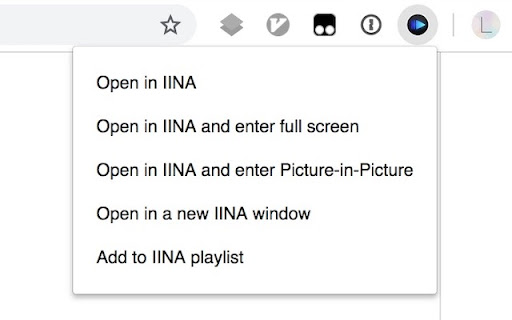
Open videos and audios in IINA. In 2.0.1, we fixed the following issue: - IINA not working in Chrome Extension right click menu (#2501) by @lusuee. - "Open link/video/audio in IINA" in the context menu when you right-clicked corresponding content. - A bunch of new features for the IINA icon. When clicked, it could: * Open media in this page directly, and optionally enter PIP or full screen * Show a menu and let you choose the action, such as adding to playlist or open in a new IINA window. You can customize the IINA icon behavior by right-clicking the icon and choose "Options". You can find the source code at https://github.com/lhc70000/iina.

Aria2 Explorer
Speed up your downloads with Aria2, manage your download tasks easily. Aria2-Explorer captures browser's download task and exports it to Aria2 via JSON-RPC interfaces to complete download task. Aria2 is a lightweight multi-protocol & open-source command-line download utility. It supports HTTP/HTTPS, FTP, SFTP, BitTorrent and Metalink. 1. For Windows, please install Aria2 Manager: https://apps.microsoft.com/detail/9p5wq68q20wv?cid=cws Other platform, please download Aria2 utility: https://github.com/aria2/aria2/releases/latest. 2. For Windows, please run Aria2 Manager . Other platform, please run Aria2 in the Terminal with typing aria2c --enable-rpc. 3. Install this Chrome extension. 4. Enable auto-capture on the extension options page and configure others as you need. (For Motrix user, please use http://localhost:16800/jsonrpc as the RPC URL) After these steps, you could enjoy the multi-threads and BT download experience inside the Chrome. Warning: Please turn off auto-capture function, when you are using other extension to download network resources. Otherwise, there will be conflict and exception arisen. Features: [ ZERO collection of user data and privacy ] 1. Auto capture browser download tasks - Capture notification - Support magnet links - Toggle auto-capture by shortcut (Default: Alt + A) - Set all Aria2 options manually before download - Filter task by the domain, file extensions or file sizes Filter priority: domain > file-ext > file-size, white-list > black-list 2. Auto-select Aria2 RPC server by matching the preset download URL pattern 4. Synchronize and store all settings on the cloud 5. Support for zh-CN/zh-TW/en/fr/it/ja/ko/ru/uk languages 9. Support shortcuts in the options page (Save: Alt + S Reset: Alt + R Download: Alt + J Upload: Alt + U)

Downie (Unofficial)
Sends current page to Downie. PS: 1. This is not the official version. 2. For unsupported sites, clicking on the Downie icon will not open Downie and a message will be displayed ============================= Important: We had to lock the download of YouTube videos because of restrictions of the Chrome Store. There are always videos which are protected by the sites and cannot be downloaded.

V2EX Polish
专为 V2EX 用户设计,提供了丰富的扩展功能。 为原网站添加了众多便捷的功能,让你的 V2EX 页面焕然一新 ! ―――――― ◉ 扩展功能 🪄 界面美化 UI 设计更现代化,为你带来愉悦的视觉体验。 📥 评论回复嵌套层级 主题下的评论回复支持层级展示,更轻松地跟踪和回复其他用户的评论。 🔥 热门回复展示 自动筛选出最受欢迎的回复,第一时间了解热评。 😀 表情回复支持 评论输入框可以选择表情,让回复更加生动和有趣。 📃 长回复优化 智能折叠长篇回复,一键展开查看完整内容。 📰 内置主题列表 无需打开网页,插件内即可快速获取最热、最新的主题列表和消息通知。 更多实用功能: ⊙ 便捷回复操作:上传图片、预览回复内容、文字转 Base64。 ⊙ 添加用户信息卡片,快捷查看用户信息。 ⊙ 右键菜单扩展:支持解析页面中 Base64 编码内容。 ⊙ 在主题列表中即可预览内容,无需再进入主题页面。 ⊙ 自动领取每日签到奖励。 ⊙ 用户标签设置,快速标记各类用户。 ⊙ 支持备份个人配置,方便跨设备、跨脚本同步配。 ⊙ 支持自动跟随系统切换浅色/深色主题。 ⊙ 支持预加载多页回复,让嵌套回复更完美。 ⊙ “稍后阅读”功能:添加感兴趣的主题,方便日后浏览。 ⊙ 支持水平分区展示主题内容。 ―――――― ◉ 更多信息 ⊙ 代码开源,在 GitHub 中查看:https://github.com/coolpace/V2EX_Polish ⊙ 任何想法、新功能需求?在此反馈:https://github.com/coolpace/V2EX_Polish/discussions/1 ⊙ 浏览我们的主页,发现更多:👉 https://v2p.leoku.dev 👈 ―――――― 喜欢我们的扩展吗?请在应用商店给我们好评!🥰

Cubox
Highlighter, Clipper, AI Reader. Read, annotate and take notes with AI assistant. One-click Saving, Clipping, Highlighting and Taking Notes. Cubox is an AI reader built for learning. With the Cubox browser extension, you will unleash the full potential of highlights and notes. • You can quickly select multiple sections of text, images, or links on a webpage with just one shortcut, and easily highlight or clip them. • In capture mode, you can multi-select, or click and drag to batch select adjacent content. • Select contents on webpage with mouse dragging, then highlight them with just one click. • It supports adding notes, changing colors, allowing you to fully experience all the highlighting features right on the webpage. • Get a quick understanding of the article’s summary through summarization. Use key questions to understand the main points of the article and their answers. • Automatically highlight with Ghost Highlight and mark your favorite sections with annotations. • Save the web page you are browsing with one shortcut. • Save web snippets by dragging, Capture, dropping, and right-clicking. • Suggest tags, website title, description, and cover image. • Update information for already saved content. • Automatically detect same saves. More features on https://cubox.cc/ Please visit the Cubox web app or download Cubox apps. Your collections will automatically sync across all your devices.
