
ipbomkmbokofodhhjpipflmdplipblbe

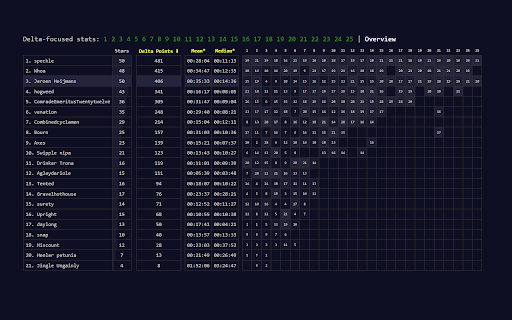
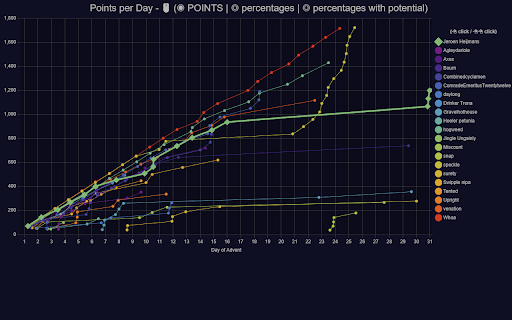

Inject charts in your private leaderboard page for Advent of Code - see https://github.com/jeroenheijmans/advent-of-code-charts Inject charts in your private leaderboard page for Advent of Code. This is a very adhoc extension, coded in true AoC fashion. No warranty, but lots of fun though!

Advent of Code to Markdown
Converts a given Advent of Code page to a GitHub-compatible Markdown file. Easily generate markdown from an Advent of Code problem description. Simply activate the extension to generate markdown from the current page and save it to a file.

Vimium
The Hacker's Browser. Vimium provides keyboard shortcuts for navigation and control in the spirit of Vim. *NOTE* Google does not allow Vimium to run on this Chrome Web Store page and the Chrome New Tab page, by design. Sorry about that! *NOTE* Chrome has some alarmist messaging around the permissions that Vimium needs to run. Really all it's asking for is that Vimium's javascript be loaded into every page. Don't be alarmed. Vimium never talks to any servers and does absolutely nothing with your data. Read the open source code if you're curious. For more information about rebinding your keys and how to use many of Vimium's features, see here: https://github.com/philc/vimium/blob/master/README.md Modifier keys are specified as , , for ctrl+x, meta+x, and alt+x respectively. Navigating the current page: ? show the help dialog for a list of all available keys h scroll left j scroll down k scroll up l scroll right gg scroll to top of the page G scroll to bottom of the page d scroll down half a page u scroll up half a page f open a link in the current tab F open a link in a new tab r reload gs view source i enter insert mode -- all commands will be ignored until you hit esc to exit yy copy the current url to the clipboard yf copy a link url to the clipboard gf cycle forward to the next frame / enter find mode -- type your search query and hit enter to search or esc to cancel n cycle forward to the next find match N cycle backward to the previous find match Navigating your history: J, gT go one tab left K, gt go one tab right g0 go to the first tab g$ go to the last tab t create tab x close current tab X restore closed tab (i.e. unwind the 'x' command) T search through your open tabs ]] Follow the link labeled 'next' or '>'. Helpful for browsing paginated sites. [[ Follow the link labeled 'previous' or ' open multiple links in a new tab gi focus the first (or n-th) text input box on the page gu go up one level in the URL hierarchy Vimium supports command repetition so, for example, hitting '5t' will open 5 tabs in rapid succession. ESC (or ) will clear any partial commands in the queue and will also exit insert and find modes.

GitHub Dark Theme
A Dark theme for all of GitHub based on Atom One Dark. # About this extension. This package will alternate appearance of all GitHub pages to dark theme with original GitHub themes. GitHub Dark Theme extension doesn't collect/share/care about your data at all. Notice: dark theme applying for GitHub pages. GitHub Dark Theme had never collected and will never collect any personal data, browsing history etc. In future GitHub Dark Theme may collect browser version, platform name, display settings and user's filter settings (except website list or any other data which can help identify user). This information is needed for decision on implementing new features, removing unused features or suggesting default settings for new users. It will happen only with your permission.

Gloc
Gives approximate LOC from repo page (private and public)
