
iohnddlphechakjdhcnjibeefgmeckdf
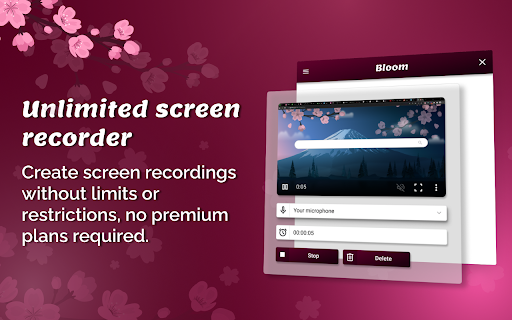

Improve your communication by creating unlimited free screen recordings. Bloom is a brand new chrome extension created to boost your productivity and improve communication impact by providing a quick and free access to screen recording. Unlike other chrome extensions, it doesn't require the permission to read and change data on all websites. Which means that it is only active right after you open it by clicking the extension icon. Unlike other screen recording extensions, Bloom does not have a limit on free screen recordings which means you can communicate openly without restrictions.

Screenity - Screen Recorder & Annotation Tool
The free and privacy-friendly screen recorder for everyone. Capture, annotate, edit videos and more - all with no sign in needed. Screenity is a powerful privacy-friendly screen recorder and annotation tool to make better videos for work, education, and more. You can create stunning product demos, tutorials, presentations, or share feedback with your team - all from your browser. 🎥 Make unlimited recordings of your tab, a specific area, desktop, any application, or camera 🎙️ Record your microphone or internal audio, and use features like push to talk ✏️ Annotate by drawing anywhere on the screen, adding text, arrows, shapes, and more ✨ Use AI-powered camera backgrounds or blur to enhance your recordings 🔎 Zoom in smoothly in your recordings to focus on specific areas 🪄 Blur out any sensitive content of any page to keep it private ✂️ Remove or add audio, cut, trim, or crop your recordings with a comprehensive editor 👀 Highlight your clicks and cursor, and go in spotlight mode ⏱️ Set up alarms to automatically stop your recording 💾 Export as mp4, gif, and webm, or save the video directly to Google Drive to share a link ⚙️ Set a countdown, hide parts of the UI, or move them anywhere 🔒 Only you can see your videos, we don’t collect any of your data. You can even go offline! 💙 No limits, make as many videos as you want, for as long as you want …and much more - all for free & no sign in needed! Best of all, the Screenity extension is open source. If you prefer, you can self-host Screenity by going to our GitHub repository: https://github.com/alyssaxuu/screenity Screenity Pro is an all-in-one platform to create, edit, and share videos with style - right from your browser. Pro includes: 📁 50GB cloud storage - share videos with a link 🎬 Multi-scene editing for tutorials, demos, or full stories 🎨 Customizable animated templates and camera layouts ✨ Keyframes and automatic zoom on click 🔡 Auto-generated captions with customizable styles 🖼️ Add frames, device mockups, backgrounds, and more 🇪🇺 EU-based infrastructure (no US data transfers) Pro is totally optional. The core extension will always be free, private, and open source. But if you want to support Screenity and help me as a solo indie developer, you can try Pro at screenity.io/pro ❤️ If you need any help, or want to become a Screenity expert, you can browse articles and guides in the Screenity help center: https://help.screenity.io/ You can also reach out with any questions or feedback at support@screenity.io Screenity is developed and maintained by Alyssa X: https://alyssax.com/

Cursorfly - Open Source Screen Recorder with Auto Zoom
Free & open-source screen recorder. Create beautiful recordings with automatic cinematic zoom & pan — 100% offline, no sign-up. FEATURES: - Automatic zooms and pans based on clicks - OpenSource. Completely free - 100% local processing - Record camera and microphone feeds along - Trim video segments - Choose a background or upload your own - Hide browser toolbars - Export in multiple aspect ratios - High-quality recording up to 4K - Optionally record system audio - Cross-platform support PRIVACY FIRST: ✅ No data collection - We don't collect any user data ✅ No external servers - Everything processed locally ✅ No internet required - Works completely offline ✅ You control everything - Videos saved directly to your device Feel free to extend and contribute on Github: https://github.com/anugotta/cursorfly-screen-recorder

Live Screen Recorder
Effortlessly Record Your Screen with the Live Screen Recorder Browser Extension Are you looking for an easy way to record your screen and create engaging videos? Look no further than the Live Screen Recorder browser extension! With the Live Screen Recorder, you can easily record your desktop screen or a single tab in your browser. You can also add your webcam video and microphone audio to your recordings, making them more personalized and engaging. And if you only need to record your webcam and microphone, the Live Screen Recorder has got you covered! We support both mp4 and webm formats, making it easy for you to share your recordings with others. And the best part? The Live Screen Recorder is available for free, so you can start using it right away without any hassle. Features: * Record a desktop screen or a single tab * Add webcam video and microphone audio * Record just webcam and microphone * Supports mp4 and webm formats * (Beta) Blur sensitive fields while recording For whom: * Teachers: Can easily record online lectures, tutorials, and presentations with the Live Screen Recorder, making it easier to connect with students and provide more engaging learning experiences. * Developers: Can record their screen to create tutorials and share their expertise with other developers, helping to improve the quality of their work and facilitate collaboration with others. * Designers: Can record their screen to showcase their design process and share their ideas with others, making it easier to collaborate with clients and colleagues. * Video professionals: Can use the Live Screen Recorder to create high-quality videos with screen recordings, webcam video, and microphone audio, helping to improve the production value of their work. So why wait? Try the Live Screen Recorder browser extension today and take your content creation to the next level!

Screen Recorder – Unlimited, No Watermark
Record unlimited HD screen video with mic, webcam and system audio. Download clear mobile-compatible MP4s, no watermark. Screen Recorder – Unlimited, No Watermark Record your screen easily with a fast, lightweight, and reliable Chrome extension. Capture a browser tab, a specific window, or your entire screen with no time limits and no watermark. Everything is completely free and designed to work smoothly. Whether you’re creating tutorials, recording meetings, saving lectures, or capturing gameplay, this tool gives you high-quality video and full control without slowing you down. Unlimited recording time with no restrictions, so you can record as long as you need. No watermark, giving you clean and professional-looking videos. High-definition screen recording for sharp and clear output. Audio recording support for both microphone and system sound. Export recordings in MP4 format, compatible with all major devices and platforms. Record a browser tab, application window, or full screen with ease. Fast and lightweight performance with no lag. Simple one-click start for quick and easy recording. Perfect For Students who want to record lectures and tutorials. Professionals who need to capture meetings, presentations, or demos. Developers who want to record bugs, workflows, or testing sessions. Content creators making videos for YouTube or social media. Your privacy is fully protected. This extension works entirely on your device. No data is collected. No recordings are uploaded. No tracking or analytics are used. Everything stays local on your system. Why Install This Extension Unlike many other screen recorders, this tool offers unlimited recording, no watermark, fast MP4 export, and a simple user experience without requiring sign-up or cloud storage. Install it and start recording instantly.
