
iocfaddbbienhagbkocjdlnfopcdcpde
Scrape group members and send bulk message, invite bulk members automatically on Telegram ABC Telegram Bulk Sender - Scrape Telegram group members and send bulk message, invite bulk members automatically on Telegram. Bulk Message Sender Group Data Scraper Invite member in Group

Telegram Member Scraper (by v-User)
Scrape members info from Telegram groups/channels (Pure js/no API/no behind the scenes activities) Super Easy: 1.Open a Group/Channel in Telegram Web 2.Open Member List section 3.Click on the extension start button -> All members info will be extracted and will be saved into your Downloads folder as a TXT file.

Telegram Scraper
A Chrome extension for crawling Telegram group messages Telegram Message Scraper is a powerful Chrome extension designed for crawling and monitoring Telegram group messages. Key Features: - Scrape messages from Telegram Web groups and channels - Monitor groups for new messages in real-time - Export messages to JSON format - View message history by group - Organize groups by type (groups, channels, private chats) - User-friendly interface Perfect for researchers, community managers, and anyone needing to track Telegram group activities.

Telegram Group Scraper
A chrome extension that scrapes Telegram group for member details. Effortlessly scrape and organize Telegram group member details with this powerful and easy-to-use Chrome extension. What Does It Do? The Telegram Group Members Scraper is designed to help users collect member details from Telegram groups hosted on the web app version of Telegram. Whether you're building contact lists, analyzing group participation, or organizing outreach campaigns, this tool makes it simple and efficient. Key Features: 1. Automated Member Extraction: Easily scrape the names and unique member IDs from Telegram groups. 2. Auto Scrolling: Automatically scrolls through large groups to load and capture all members. 3. User-Friendly Interface: Simple and intuitive workflow—start scraping with just a few clicks. 4. High Efficiency: Optimized to handle even large groups with thousands of members. Who Is It For? 1. Community Managers: Organize and manage member data for engagement. 2. Data Analysts: Collect group data for analysis. 3. Marketers and Outreach Professionals: Build contact lists for targeted campaigns. 4. Researchers: Gather data for group behavior studies. How to Use: 1. Install the Extension: Add the extension to your Chrome browser from the Chrome Web Store. 2. Navigate to a Group: Open the Telegram Web app and access the group you want to scrape. 3. Start Scraping: Activate the extension from the toolbar and let it do the work. 4. Export Your Data: Download or copy the scraped data for your projects. Privacy & Security This extension does not collect or store any personal data from your browser or Telegram account. All scraping is performed locally on your device. Disclaimer Please ensure you use this extension responsibly and comply with Telegram's Terms of Service and applicable laws when using the scraped data.

TG Sender - TG bulk message send and invite
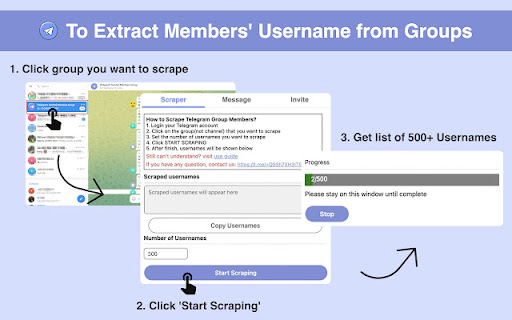
Scrape Telegram group members and send bulk message, invite bulk members automatically on Telegram This Chrome extension helps you scrape any group members, send messages to many people, and add members to Group automatically. Use the extension, you don't need one by one sending off messages to all your customers anymore. you boost your work. It is very easy to use and saves a lot of time for you. And this extension doesn't require your account and password and runs only locally on your browser, so services don't depend on any 3rd parties. Frequently Asked Questions: ➢ How to Scrape Group Members? 1. Login account on web.telegram.org and check K version 2. Click Group that you want to scrape 3. Set the number you want to scrape 4. Click START SCRAPING button to scrape ➢ How to Send Bulk Messages? 1. Input a list of usernames/Groups/phone numbers 2. Input the message/sticker 3. Set the interval between two messages 4. Click START MESSAGING button to send it automatically ➢ How to Invite Bulk Members to your Group? 1. Login account on web.telegram.org and check K version 2. Input a list of usernames or paste usernames from the clipboard 3. Set the interval between two Invites 4. Click START INVITING button to invite automatically ➢ How many messages should we send per day to keep your account safe? There are no restrictions on sending messages to your mutual contacts (contacts you have already chatted with) on TG; This means that you can send messages to as many people as you want with your TG account and you would not face any problems. But the story is different for sending messages to strangers (contacts you have no chat history with). In general, depending on the positive score of your TG account, you can send up to 50 messages to strangers in one day. ➢ How can I get new accounts to send more messages? 1. Upload a photo for your profile and complete the profile information 2. If your account gets older (since the date of its creation) 3. And the most important point: when you chat with different people on TG and they respond to your messages, your account will receive more positive scores If you collect more positive scores for your TG account by doing the above-mentioned activities, TG will find your account more authoritative and won't grow suspicions of your account activities. If you have more questions, feel free to join our group to discuss together, we have many partners here to discuss how to play with TG Marketing (the link to the group is inside the Extension) Note: Telegram Sender is an independent project and has no relationship to Telegram Inc.
