
inpcemkdignbegognhkloalkfcmogjfm
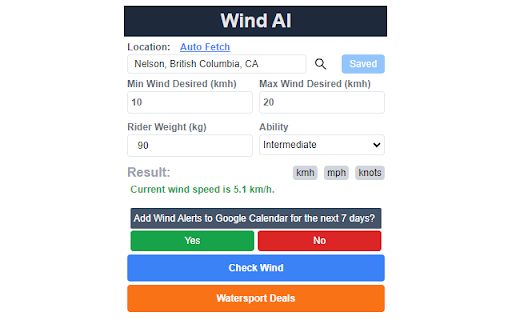
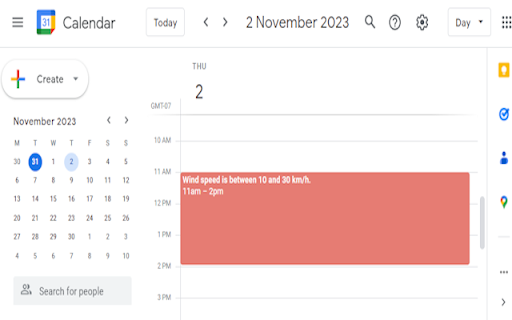
Checks wind forecast and adds to Google Calendar if over 5 km/h Wind AI provides 7 day wind sport forecasts for your location and adds them to Google Calendar. You can select your local town or city and get daily forecasts and suggested wing and kite sizes based on your skill level and weight. Our wind forecasts use artificial intelligence and leverages a powerful combination of weather models from national weather services. These local forecasts are great for kiteboarders, wing foilers, windsurfers or any other wind sport addict. Our weather models rely on a wealth of real-time data, including measurements from various sources such as airplanes, buoys, radar systems, and satellites. By incorporating this diverse and comprehensive data, our numerical weather predictions provide a deeper analysis than traditional weather stations, resulting in more accurate wind forecasts for getting you out to your best sessions.

Github JSON Editor
We normally have many Github repository multiple JSON files in it. Most times these JSON files are application configuration and we tend to edit them directly from Github. As Github's own editor doesn't have any sort of validation for checking the syntax of the JSON file being saved, we sometimes save these JSON files with syntax error which results in app runtime error. This chrome plugin helps you make sure you are not saving wrong JSON and keeps your JSON formatted. 1. Install this plugin from Chrome web store. 2. Open this plugin and save your settings like Github token, Username, Email etc. 3. Now open any JSON file on Github. You shall see a button labelled 'JSON Editor'. Click on that button 4. Plugin will open with that JSON filled in a new tab. 5. Now you can make any changes to JSON and finally click 'Save' button to commit your changes to your repository. Support for multiple settings based on host

SummarAI
Introducing SummarAI, the cutting-edge Chrome extension that empowers you to quickly and accurately summarize PDFs, text, and videos using advanced AI technology. With just a click, SummarAI extracts the most important information from your content, helping you save time and stay focused in the age of information overload. Swiftly summarize PDFs, text, and videos with a single click Utilize AI-powered algorithms for precise and accurate summaries Customize summary length to suit your needs Compatible with a wide range of content types and sources Ideal for students, researchers, professionals, and anyone who values brevity How it works: Install the SummarAI Chrome extension Navigate to the content you wish to summarize Click the SummarAI icon in your browser toolbar Choose your desired summary length and let the AI work its magic Read, share, or save your concise, AI-generated summary With SummarAI, you'll never again feel overwhelmed by endless streams of content. Whether you're a student trying to digest lengthy articles, a professional seeking to stay informed, or simply someone who values their time, SummarAI is the perfect tool to help you cut through the clutter and focus on what truly matters. Join the SummarAI community today and experience the future of content summarization! Note: SummarAI requires an internet connection to function, as it utilizes AI models hosted in the cloud. The extension respects user privacy and does not store any personal data or browsing history.

Chatin for Problem Analysis
This extension enables Design Science Research through Mindmeister. This extension integrates Mindmeister with LLMs such as GPT for Problem analysis in Design Science Research The source code and documentation is available in: https://github.com/onekin/Chatin

Tanuki Utilities
Provide useful utilities for GitLab users. * Change the GitLab favicon to a project icon; you can easily distinguish many GitLab tabs. * Move "Copy reference" button on top bar; the button is always shown for your easy access. This extension tries to change favicons in the **all** sites by default. You can specify which GitLab site (e.g. gitlab.com or your self-hosted site) you would like to change favicons. #### Change the GitLab favicon to a project icon
