
inmkhnhhpdoogbgefmlhclhaedmhpkdp

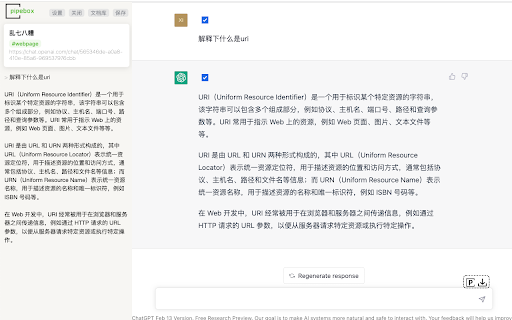


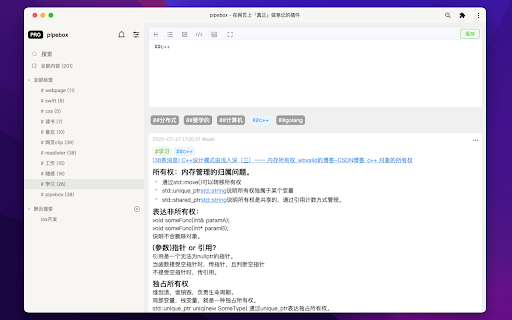
深度阅读,在线学习必备插件,网页内做笔记&高亮马克,强大的笔记管理后台 1.0.4更新: 支持显示/隐藏高亮菜单栏。 支持 chatGPT 对话内容图片导出&保存。 pipebox是一个侧边栏笔记插件。 支持选中内容高亮标记,可以一键呼出固定的侧边栏,通过markdown和高亮标记,记录自己阅读和学习过程中的想法。 尤其适合通过网页学习做笔记,或看视频的同时做笔记等场景。 同时pipebox拥有强大的卡片式笔记管理库,方便管理收集的内容。 为什么选择pipebox? 我们已经有了很多的网页笔记插件了。 「七种颜色」的花式高亮,「逼迫你打起精神」的阅读模式,「Never Read」的收藏夹,他们都在试图给你制造一种幻觉,让「学习」这件事儿变得看起来更容易更简单,仿佛高亮了收藏了点点鼠标知识就是我的了。 pipebox 主张,「表达是通向理解的唯一道路」,一定要自己写下来才可以理解。所以只提供最基础的高亮标记,但是通过固定在侧边栏的编辑器,可以方便的记录自己的想法,亦或是整理内容大纲,通过简单好用的markdown格式,让你不必在网页和笔记软件之间切来切去,使阅读和学习的体验更便捷连续,不会被来回的切换打断。 同时pipebox提供了简单好用的卡片式笔记库,可以方便的管理自己记录的内容,更好的集成到自己的工作流中去。 更多功能,内容管理,使用方法,请移步官网了解。https://pipebox.pro 问题反馈wx:41204034 注明来意~ Features: - 基于标签的卡片式内容管理 - 支持markdown格式 - 高亮马克,一键收集 - 支持图片粘贴&上传

有道云笔记网页剪报
一键保存精彩网页,多终端同步,永久珍藏 有道云笔记网页剪报 Chrome 插件帮助您轻松地将网页内容保存到有道云笔记中。支持右键划选部分网页,也可以自动提取正文进行保存。同时,还能方便地同步到有道云笔记桌面版、手机版,随时随地查看。

Cubox
Highlighter, Clipper, AI Reader. Read, annotate and take notes with AI assistant. One-click Saving, Clipping, Highlighting and Taking Notes. Cubox is an AI reader built for learning. With the Cubox browser extension, you will unleash the full potential of highlights and notes. • You can quickly select multiple sections of text, images, or links on a webpage with just one shortcut, and easily highlight or clip them. • In capture mode, you can multi-select, or click and drag to batch select adjacent content. • Select contents on webpage with mouse dragging, then highlight them with just one click. • It supports adding notes, changing colors, allowing you to fully experience all the highlighting features right on the webpage. • Get a quick understanding of the article’s summary through summarization. Use key questions to understand the main points of the article and their answers. • Automatically highlight with Ghost Highlight and mark your favorite sections with annotations. • Save the web page you are browsing with one shortcut. • Save web snippets by dragging, Capture, dropping, and right-clicking. • Suggest tags, website title, description, and cover image. • Update information for already saved content. • Automatically detect same saves. More features on https://cubox.cc/ Please visit the Cubox web app or download Cubox apps. Your collections will automatically sync across all your devices.

RSSHub Radar
Easily find and subscribe to RSS and RSSHub. - Discover and subscribe to the RSS feeds associated with the current page effortlessly. - Explore and subscribe to the RSSHub supported by the current page promptly. - Easily identify the RSSHubs supported by the current website quickly. - Supports one-click RSS subscription for various platforms including Follow, Tiny Tiny RSS, Miniflux, FreshRSS, Feedly, Inoreader, Feedbin, The Old Reader, Feeds.Pub, Local Reader... Made with ❤️ by DIYgod

Circle Reader
An extension that provides immersive reading to make you fall in love with reading on the web The best free reading assistant (reader mode) that enhances the web page reading experience. Ads are too distracting, the colors are too ugly, the fonts are too small to see clearly, the typography is too messy to find the text, does it really need to be so difficult to read the web? With just one click, Circle gives you the purest reading experience, escorting you to better reading. Circle reading assistant can extract the content of the webpage and rearrange the layout into a more suitable interface for reading. Using self-developed analysis engine and typesetting engine, the recognition effect and typesetting ability are smarter, faster and more friendly. If you are looking for a lightweight and intelligent reading aid product, you might as well try Circle Reading Assistant-the best reading aid of its kind! The reading assistant browser extension Circle, which is more powerful than the Safari reading mode, is an extension and improvement of the browser's own reading mode; it is the only magical tool for computers to read web pages, read novels, and watch news; it has shortcut key support, custom styles, Custom fonts, custom themes, automatic scrolling, automatic loading of the next page, reading aloud, article outline (outline), back to the top, reading by column, printing the formatted webpage in reading mode, supporting browser translation, etc. Reading auxiliary functions. The self-developed analysis engine provides faster analysis and smarter analysis capabilities. The self-developed typesetting engine automatically blocks advertisements and noise on html, and says goodbye to the format escape. The Circle reading assistant browser extension developed by pure js has been launched on Google Chrome browser, Firefox browser, Edge browser, 360 browser, Opera browser, etc. ★ Several distinctive functions of Circle Reading Assistant: ➤ Self-developed recognition engine: With the help of self-developed recognition engine, Circle's recognition effect is smarter and the recognition speed is faster. ➤ Self-developed typesetting engine: With the help of self-developed typesetting engine, Circle's typesetting effect is more friendly and the typesetting speed is faster. ➤ Letter paper effect: a reading experience like reading a letter. ➤ Multi-page analysis: On a page with a link to the next page, the content of the next page is automatically parsed and displayed on the current page. ➤ Reading by column: Originally read the webpage by column, the welfare of large-screen users, without wasting every inch of screen space. ➤ Read aloud: Tired of reading? Why not try the content! Free your hands to do other things. With the help of "multi-page analysis", what kind of bicycle is needed for listening to novels? ➤ Preset 5 colorful themes: simple white, eye-protecting green, elegant dark gray, and deep dark. Circle has always been what you like. ➤ Custom gradient background or picture background: The preset theme is not on your aesthetic point? It's ok! Customize themes as you splash ink. ➤ Customize various styles: Just reading is not possible, I have the final say on the style of the web page! The font size is bigger, the font is thicker, and the line spacing is higher. Circle does everything for you to read. ➤ Follow the system to switch themes: only support custom themes? nonexistent. How about switching different themes at different times? . ➤ Custom css: You don't have the effect I want, you are awesome ugly! Customize css to help you, understand that css Circle is your person. ★ Keep abreast of the trends of Circle's reading assistant ➤ Subscription account 👉🏻 Senior Ranhe ★ Description of required permissions ➤ contextMenus: Use this permission to implement the right-click menu module, you can quickly access the function of Circle in the right-click menu ➤ : This permission allows Circle to access webpages, thereby realizing the recognition and layout of webpage content, as well as access to screenshots and exporting as pictures and other functions ★ Contact and discussion ➤ Contact me by email 👉🏻 wenguang.fe@gmail.com If you approve of my work, please have a cup of coffee to show encouragement and support 👉🏻 https://circlereader.com/donate The source code is hosted on github 👉🏻 https://github.com/hewenguang/circle Installing Circle means you accept our user agreement (https://circlereader.com/docs/agreement.html) and privacy policy (https://circlereader.com/docs/privacy.html)
