
incikpedlilahccgpfpgknfpokibpfij
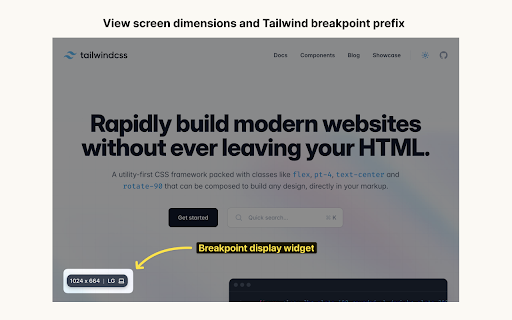


Display screen dimensions and tailwind breakpoint prefix. Display screen dimensions and Tailwind breakpoint prefix on all sites. This extension makes it easy to find the screen dimensions of your browser. This comes in handy when you are building your UI with Tailwind CSS and making it responsive. Enable dev mode to display the widget only in local environments (Localhost & 127.0.0.1) Extension built with chromekit.dev

Vercel
Use the Vercel Toolbar on production deployments Installing this extension allows you to use the Vercel Toolbar on your production Vercel deployments & unlocks an easy-to-use feature for taking screenshots when commenting on all of your Vercel deployments.

TailwindCSS Media Query Visualizer
Seamlessly visualize Tailwind CSS media queries, enhancing your UI experience. TailwindCSS Media Query Visualizer is a lightweight and user-friendly browser extension specifically created for web developers, designers, and testers working with Tailwind CSS. It allows you to view, manage, and switch between custom Tailwind CSS media queries effortlessly as you build and test responsive web layouts, making it easier to ensure that your design looks great on any device and screen size. 1. Manage & Instantly View Tailwind CSS Media Queries: Quickly inspect and manage your custom Tailwind CSS media queries in a neatly organized list, and instantly view the active media query in the corner of the extension icon. 2. Real-time Layout Preview: As you edit your Tailwind CSS media queries, the extension instantly applies the changes, updating your web layout in real-time, so you can see how your design looks on various devices without refreshing the page. 3. Enable/Disable with a Single Click: Effortlessly enable or disable the extension to test your responsive design using native browser tools or focus on the default screen size. 4. Edit Media Queries in JSON format: The extension provides an in-built JSON editor for advanced users who prefer to work with their media queries in plain JSON format for faster and more precise editing. 5. Automatic Saving: Your custom Tailwind CSS media queries are securely saved using the Chrome storage, ensuring you have access to your settings whenever you need them. TailwindCSS Media Query Visualizer is an invaluable tool for anyone working on responsive web design projects using Tailwind CSS. With this essential browser extension for web developers and designers, you can streamline your workflow and easily create and test your responsive designs.

Toolwind - Devtool for Tailwind css
Enhance Tailwind CSS workflow: Easily add, modify, remove, and copy classes with built-in Tailwind IntelliSense Introducing Toolwind: Tailwind CSS DevTool Chrome Extension 🎨 Elevate your Tailwind CSS development experience to new heights with Toolwind, the ultimate Chrome extension designed for seamless class management. 🚀 Toolwind empowers developers and designers to streamline their workflow, effortlessly adding, editing, deleting, copying Tailwind classes, and even incorporating their own custom Tailwind configurations right from their browser. Say goodbye to the hassle of switching between your code editor and documentation – Toolwind brings the power of Tailwind CSS directly to your fingertips. ✨ Effortless Class Management 📚: Toolwind simplifies the process of working with Tailwind CSS classes. Browse a comprehensive library of classes, and add them to your code with just a click. Forget about the manual search and typing – Toolwind accelerates your development by reducing repetitive tasks. ⏩ Real-time Class Editing ✏️: Tailoring your designs has never been easier. Modify existing classes directly within the extension. Adjust attributes, values, and variations to achieve the perfect styling without the need to navigate back and forth between your code and documentation. 🎯 Quick Class Deletion 🗑️: Cleaning up your code is a breeze with Toolwind. Delete unwanted or unused classes from your HTML or CSS effortlessly, maintaining a clean and organized project structure. 🧹 Copy to Clipboard 📋: Copying classes should be as simple as it sounds. Toolwind allows you to swiftly copy classes to your clipboard, ready to be pasted into your codebase. Say goodbye to manual copying and pasting – Toolwind improves accuracy and efficiency. ✂️ Customization with Custom Tailwind Configuration ⚙️: Tailwind CSS offers an array of customization possibilities, and Toolwind ensures you make the most of them. Adjust breakpoints, spacing, colors, and more, all while previewing the changes in real time. Integrate your own personalized Tailwind CSS configuration to perfectly align with your project's design requirements. 🛠️ Intuitive UI 🖼️: Toolwind's user interface is designed with simplicity and functionality in mind. Navigating and utilizing the extension is a seamless experience, whether you're a seasoned developer or new to Tailwind CSS. 🤖 Search and Filtering 🔍: With a vast collection of Tailwind classes, finding the right one can be daunting. Toolwind’s search and filtering capabilities let you quickly locate specific classes, components, or utilities. 🔎 Say hello to an extension that revolutionizes the way you work with Tailwind CSS. Toolwind saves you time, enhances your efficiency, and enables you to create stunning designs with ease. Embrace the future of Tailwind development – install Toolwind and take control of your CSS workflow directly from your Chrome browser. 🌟

Tailwind Viewport Sizer
This extension shows the current viewport size including the TailwindCSS size. You can also set the viewport size using the popup. Tailwind Viewport Sizer is a handy extension designed to provide you with real-time insight on your current viewport size, including the Tailwind CSS breakpoint names (sm, md, lg, etc.). A beautiful badge that fades after a few seconds let you know what the viewport size is, while you're resizing the browser window, to make sure you're building for the right devices. Personalize the badge by changing it's background color, text color, font size, and the length it stays visible. TailwindCSS developer bliss. ❤️ Updates v1.1.1 - Add the ability to create custom breakpoints. - Fix an annoying issue where you couldn't interact with the website canvas where the breakpoint pill was.
