
immljjkkkljkapekbjjbcgkfgcageeml


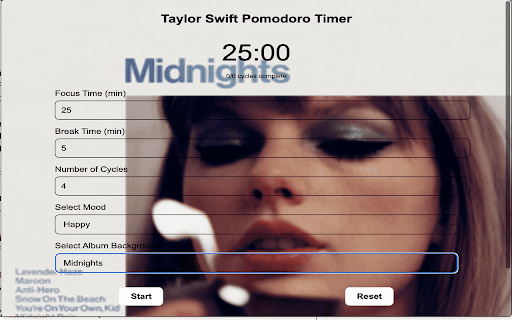
A Taylor Swift-themed Pomodoro timer for productivity and fun! 🚀 Taylor Swift Pomodoro Timer: Boost Productivity with Music, Quotes, and Trivia! 🎓 Study better, 🎶 work faster, and 💻 stay focused—all with a Taylor Swift twist. The Taylor Swift Pomodoro Timer helps you stay focused and energized while celebrating your love for Taylor Swift. Fully customizable and packed with unique features, this timer is perfect for Swifties looking to boost their productivity and crush their goals. Created by Revaant Srivastav. ★ NEW: Choose from any one of Taylor's albums to be the theme for your extension (Debut, Fearless TV, Speak Now TV, Red TV, 1989 TV, Reputation, Lover, Folklore, Evermore, Midnights, or TTPD Anthology) ★ Fully customizable work and break times Adjust work and break durations to match your workflow. You can also set the number of cycles for maximum productivity. ★ Mood selector with curated playlists Choose from happy, focused, chill, or motivated moods, and enjoy a playlist tailored to your work session length and vibe. ★ Motivational Taylor Swift quotes Stay inspired throughout your day with iconic Taylor quotes to keep you going, no matter how tough the task. ★ Fun trivia during breaks Take a mental break with Taylor Swift-themed trivia, discovering new fun facts with every session. ★ Built-in notifications to guide your workflow Receive notifications to let you know when it’s time to work, take a break, or move on to the next cycle. ★ Designed for Swifties, by a Swiftie This timer is crafted with fans in mind to combine productivity and Taylor’s magic. If you've enjoyed this extension, please leave a review. As an indie developer, it helps out a ton :) Perfect for Swifties of all ages: 🎓 Students: Stay focused while studying with playlists and motivational quotes to keep you going. 💼 Professionals: Boost productivity while enjoying Taylor-inspired features to energize your workflow. 🎨 Creatives: Find inspiration in Taylor’s music and themes to power your next masterpiece. 🎶 Swifties: Celebrate your fandom with a timer that’s as iconic as Taylor’s music. Install now to experience productivity with a Taylor Swift twist! Get ready to "shake it off" and tackle your tasks with the ultimate Swiftie productivity tool! Keywords: Taylor Swift Pomodoro Timer, Swifties, productivity tool for fans, Taylor Swift productivity, Pomodoro timer for students, Taylor Swift trivia, work timer with music, Taylor Swift quotes, focus timer, study tool for Swifties, customizable Pomodoro timer, Taylor Swift-inspired app, Chrome extension for fans, Taylor Swift timer, Taylor Swift, Taylor Swift app.

Taylor Swift Wallpapers
Welcome Swifties! Elevate Your Browsing with the Ultimate Taylor Swift Chrome Extension. by Gameograf Style your browser with Taylor Swift Wallpapers – a Chrome extension featuring 5 full HD photos of the global pop icon on every new tab! Celebrate the eras of Taylor Swift with Taylor Swift Wallpapers, a Chrome new tab extension showcasing five stunning full HD images of the music superstar. Whether you’re a fan of her country roots or pop anthems, this extension brings beauty, artistry, and Swiftie spirit to every new tab. HD Wallpaper Rotation: Enjoy 5 full HD Taylor Swift images that change with each new tab. Popular Shortcuts: Quick access to YouTube, Amazon, ChatGPT, Netflix, and more. Custom Shortcut: Add your most-visited site for personalized navigation. Search Bar: Uses your default search engine right from the new tab. Clock & Date: Stay current with real-time clock and date display. More Tools & Info: Easy links to privacy policy, uninstall instructions, feedback form, and more Gameograf extensions. About Us Gameograf.com crafts unique Chrome new tab extensions and themes tailored to your interests. Explore our ever-growing library of categories—from anime & manga, music artists, cars & bikes, sports teams & athletes, celebrities, to K‑pop—and find the perfect background every time. Google Chrome Affiliate Policy Disclosure This extension opens https://gameograf.com in a new tab to inform users about the downloaded extension, improve user experience, and provide access to related extensions. It may include affiliate links to services or products, all of which require user consent before any action and aim solely to benefit the user.

Meowdoro Tracker - Pomodoro Work Timer & Productivity Tool
Pomodoro productivity timer for work. Maximize your focus and productivity! Meowdoro Tracker is a Pomodoro timer chrome extension with customizable timers, and a soothing design that helps you stay focused, avoid burnout, and work smarter. Stay focused and achieve your goals effortlessly! What is the Pomodoro Technique? The Pomodoro technique is a time management method that breaks work into focused sessions (typically 25 minutes) followed by short breaks (5 minutes). After four cycles, take a longer break (15–30 minutes). This scientifically backed method improves concentration, efficiency, and work-life balance, making it especially helpful for those with ADHD or trouble staying focused. Pomodoro Timer Features: - Stay productive with customizable focus & break sessions. - Perfect for ADHD & deep work – Reduce distractions & build focus. - Adapt the technique to fit your workflow. How to Install Meowdoro Tracker? Click the "Add to Chrome" button. A welcome page will guide you through the setup. Pin the extension – This is crucial! The timer runs inside the extension, so if you don’t pin it, you might not see it.

Pomodoro Timer App
Use Pomodoro Timer App - productivity pomodoro clock & study tracker. Set custom pomodoro timer online for focus and time management 🍅 Stay focused in Chrome with a clean and structured online pomodoro timer app built for real productivity. This extension alternates deep work sessions and restorative breaks using a proven rhythm that supports consistent concentration. If you are searching for a reliable tomato timer app or an efficient pomodoro method timer, this tool delivers clarity without unnecessary complexity 🔔 How Pomodoro app improves your workflow: - Encourages consistent pomodoro clock routines - Supports the proven tomato method technique - Simplifies pomodoro online focus sessions - Reduces tab overload from multiple active tools - Provides integrated online stopwatch functionality - Allows 15 minute or 30 minute countdown set-up The extension opens as a compact pop-up app from the toolbar icon and works across the entire browser, ensuring that your pomodoro timer online session remains synchronized everywhere. Even if you switch contexts, the countdown continues smoothly. Unlike a basic online timer, this solution integrates directly into Chrome and keeps everything aligned with your workflow ⏰ 🚀 Key functional advantages of the Pomodoro timer app include: 1. Browser-wide synchronized session tracking 2. Automatic state switching after each interval 3. Visual badge countdown on the extension icon 4. Forced pop-up display at interval completion 5. Stable performance in multi-tab environments 🎯 On the app Setup screen, you define focus and break duration in minutes. The interface is minimal, similar to a streamlined pomodoro app but optimized for speed. This makes it ideal for those who need a precise pomodoro study timer or a flexible timer for 20 minutes setup ✨ 🔄 Once started, the extension enters Focus Time Active mode. This is not just a simple 15 minute timer or 30 minute timer, but a structured pomodoro technique timer aligned with disciplined workflow cycles. The pop-up displays the remaining minutes and provides quick controls to switch states or stop the session completely. During app active focus, you can: ⭐ Monitor synchronized countdown ⭐ Stop the entire session and reset ⭐ Switch immediately to break mode 📌 When the focus interval ends, the extension automatically opens the completion screen, even if the pop-up was closed. This behavior mirrors a reliable alarm watch online but remains fully integrated into your browser. The state changes visually, and the badge disappears until the next interval starts. This makes it more advanced than a simple online timer or timer 10 minutes tool. 📚 Break Timer Active mode uses a blue badge to distinguish timer pomodoro clearly from focus mode. The minutes decrease in sync between the pomodor timer app pop-up and the icon display. If you searched for a pomodoro technique clock, this extension provides the clarity and structure you expect. At the end of each interval, additional quick-add timer online controls allow extending the current state by small increments. This is ideal if you need a flexible cronometro style extension or prefer something closer to an online spot watch app experience. The added minutes do not overwrite your original configuration, preserving structured cycles 🔄 How to Get Started With Pomodoro App 1️⃣ Install the extension from Chrome Web Store 2️⃣ Click the app icon and set focus and break minutes 3️⃣ Press Start to activate your structured cycle 4️⃣ Follow visual cues and automatic transitions 5️⃣ Repeat sessions for sustained productivity 💬 Q&A Section ❓ What makes this different from a simple online Pomodoro timer App 💡 It works across all browser tabs, forces completion pop-ups, and includes countdown icon synchronization for precision. ❓ Is this similar to a pomodoro tracker 💡 Yes, but streamlined. It focuses on timing accuracy rather than statistics overload. ❓ Can it replace a standalone pomodoro clock app 💡 Absolutely. The badge system and automatic switching replicate a physical clock while staying digital. ❓ Is it comparable to a basic online stopwatch website or stopper online watch 💡 It goes further by automating structured focus and rest cycles instead of just measuring elapsed time. Whether you are looking for a pomodoro online tool, a refined Pomodoro Timer App, or a distraction-free alternative to scattered productivity apps, this Chrome extension delivers stability, clarity, and disciplined flow. It combines the simplicity of an online pomodoro timer App with the intelligence of a browser-integrated workflow system, helping you focus deeply and rest intentionally every single cycle 🚀

Pomodoro Timer PRO
Pomodoro Timer is a free and great tool that can help you boost your productivity and quality of your work. Capabilities: 1. Run after installation 2. Setting up work and break time 3. Manual start, stop and restart the timer 4. Blacklist/Whitelist switcher 5. Configure the list of sites that will be blocked/allowed during the work mode 6. Auto-block the site, if the tab has already been opened 7. Long break after each 4th pomodoro 8. Timer deactivation after 15 minutes of inactivity 9. Ability to select notification sound or disable sound completely v1.0.0 - More fresh design - Now by default after starting the browser the timer will be stopped. You can change it on Options page - Timer deactivation after 15 minutes of inactivity - Added notification sounds with ability to disable or change sound I will be glad to listen to all the comments and wishes.
