
imkilagmimmnfcicabegllpcfbjkhdci
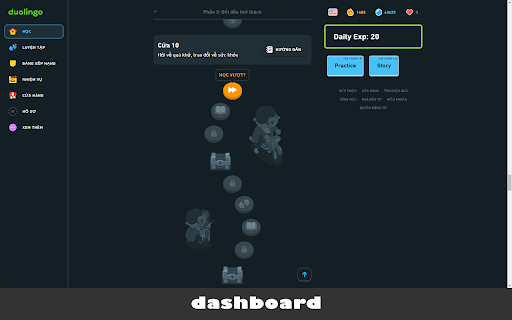


Extension for Duolingo to support some features like: remove tournament board, short-cut in practice and more... Click on extension icon in toolbar to update setting of extension. Add up some features when access Duolingo exam: change dashboard UI, add shortcuts in dashboard, exam and story context. Note: This extention will make your learning more difficult with no hints any more and you must use keyboard to enter answer without vocabularies. `Esc`: To ignore the current question. * Only show custom panel for your EXP and spent study time today * See config options of this extension for more options * Automatic shortcuts for wordbanks and other elements * Auto-click "Next" button for more focus on the exam [Source of project]: https://gitlab.com/nmhillusion/duolingo-chrome-extension/

Duolingo TTS Controls
Provides playback controls for some of the challenges on Duolingo. For more detailed information, screenshots, or if you have any support request, visit the development page of the extension here: https://github.com/blmage/duolingo-tts-controls - Adds controls to each sound of the listening / speaking / translation challenges. - Full controls are available by hovering over the buttons or using the keyboard shortcuts, and feature: - a rate (speed) slider, - a volume slider, - a seek bar, - a play/pause button, - a stop button, - a "pin" button (to define the current position as the new starting position). - Strives to blend seamlessly in Duolingo's UI, and to be compatible with custom themes such as Darklingo++. The selected control panel is identifiable by the keyboard icon that is added next to its buttons. In order to use the keyboard shortcuts, the selected control panel must be focused by pressing [ Ctrl ]. Once focused, the keyboard icon becomes highlighted, and you can use: - [ Ctrl ] to focus back the answer input, - [ Tab ] to select (and focus) the next control panel, - [ ] to decrease / increase the playback rate (speed) (or [ Ctrl ] + [ ← ] / [ → ]), - [ ↓ ] / [ ↑ ] to decrease / increase the playback volume, - [ ← ] / [ → ] to move the position backward / forward, - [ 0 ] .. [ 9 ] to set the position at 0 .. 90% of the duration, - [ Home ] to set the position at the start, - [ End ] to set the position at the end (think of it more or less as a stop button), - [ Space ] / [ k ]to play / pause the sound (or [ Ctrl ] + [ ↑ ]), - [ p ] to "pin" the current position (the sound will now start from there each time it is played) (or [ Ctrl ] + [ ↓ ]). Shortcuts behind parentheses are provided as alternatives for when the main ones are not available. This can happen for example when a "keyboard-aware" word bank is available for the current challenge. - The extension is deeply tied to the inner workings of Duolingo, meaning that significant changes on their side could (temporarily) break it. If that happens, you can either: - wait for me to fix it (you can open an issue on the support page if there is none about it yet), - if you're a developer, try to fix it yourself, then open a related PR on the development page. - Due to hard limitations with the underlying technology (sounds are not accessible via Ajax requests, preventing us from using the Web Audio API), the volume can not be raised over 100%. Duolingo is a registered trademark of Duolingo, Inc. This extension is not affiliated with or endorsed by Duolingo, Inc.

Duolingo Spaced Repetition
A Chrome Browser Extension to Add Spaced Repetition to Duolingo Spaced repetition is an evidence-based learning technique that has been proven to increase the rate of information retention. It works by presenting the user with new and more difficult lessons more frequently, while older and less difficult lessons are shown less frequently in order to exploit the psychological spacing effect :brain: It is commonly used for studying languages, however good tooling currently only exists for flashcard based studying systems such as Anki and SuperMemo. The Duolingo Spaced Repetition extension aims to bridge the amazing power of Duolingo with the proven methodology of spaced repetition by introducing a new study mode! :sparkles: Simply install the extension and you will see a new study mode button for spaced repetition. Use the new study mode and it will auto select your study lessons based on what evidence shows will help you retain information the best! :tada:

Duolingo Hard Mode
Replaces multiple-choice questions in Duolingo with typing input. Learning a language requires active recall, but Duolingo relies heavily on word banks and multiple-choice questions. I decided to fix that. 🔥 Introducing Duolingo Hard Mode – an open-source Chrome extension that: ✅ Converts word bank challenges into text input ✅ Supports translation, gap-fill, tap-complete, select-transcription and more to come challenges ✅ Maintains Duolingo’s original styling for a seamless experience ✅ Enforces real typing-only learning

Becky G Duolingo
Replace all the cartoony images on Duolingo with Becky G! Do you want to improve your language learning experience? When learning a language on Duolingo, cartoony images will be used in various places such as when selecting a level, for certain questions and during loading screens. Install this extension to replace these images with a random image of Becky G, a near fluent speaker of Spanish! Options are provided to configure which images get replaced. This extension does not collect any personal information and is not affiliated with Duolingo.
