
imhdlkegjegakidnjoebonfmhklflnpl


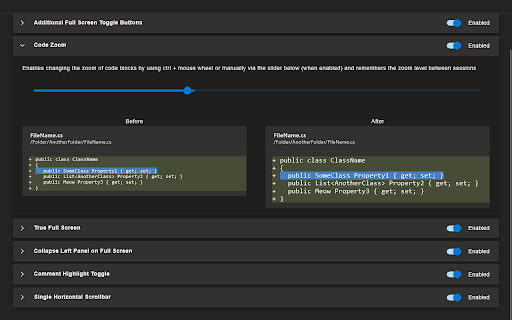

Improves the Azure DevOps pull request (PR) view to make code reviews easier All of the below features can be enabled/disabled via the extension's options page Features: Additional Full Screen Toggle Buttons Adds a button to view in full screen mode when viewing a single commit and when creating a new PR. Operates similar to the full screen mode when viewing the files in a PR. Keyboard shortcut 'z' is also supported. Code Zoom Enables changing the zoom of code blocks by using ctrl + mouse wheel or manually via the options page and remembers the zoom level between sessions True Full Screen Toggles the browser's full screen mode when full screen mode is toggled via a button or the keyboard shortcut 'z' Collapse Left Panel on Full Screen Collapses/expands the left panel when full screen mode is toggled via a button or the keyboard shortcut 'z' Comment Highlight Toggle Adds a button that toggles the visibility of code comment highlights and remembers the visibility between sessions Single Horizontal Scrollbar Removes the horizontal scrollbars on individual files when viewing the files in a PR. Side-by-side view is not affected. Single Vertical Scrollbar Removed - This is now the default behavior of Azure DevOps, so it's no longer required

Tanuki Utilities
Provide useful utilities for GitLab users. * Change the GitLab favicon to a project icon; you can easily distinguish many GitLab tabs. * Move "Copy reference" button on top bar; the button is always shown for your easy access. This extension tries to change favicons in the **all** sites by default. You can specify which GitLab site (e.g. gitlab.com or your self-hosted site) you would like to change favicons. #### Change the GitLab favicon to a project icon

Numici - annotate, collaborate and synthesize
Use Numici to organize, highlight, annotate and synthesize content in web pages and documents collaboratively or individually. Organize content in Numici Taskspaces - collaborative workspaces for content by project or topic. Use Numici extension to highlight, annotate and tag text and images in web pages, including PDF documents rendered by web sites. Use Numici cloud application to annotate documents, email and notes. Collaborate with your team in conversations around highlights and annotations. Follow and join conversations in context from Slack and Microsoft Teams. Synthesize and curate content across web pages and documents as a digest in Numici Taskspace. Create posts that include one or more annotations in the web page along with a deep link to the web page and share on social media (Facebook, LinkedIn, Twitter and WhatsApp) or in enterprise applications like Slack. Share the digest through email, PDF or a link. Digests can be private (only users with access can view it) or public (anyone with the link can access). Use the purpose-built search to find instantly what you are looking for across annotations and content in documents and web pages. Use of Numici extension requires an account with Numici. Once you add the extension to Chrome, you will be taken to the Numici website (https://www.numici.com/) where you can sign up for a free account. Numici extension requires access to third-party cookies to check if the user is already logged in to a Numici account. If you block third-party cookies, you will need to add "[*.]numici.com" to the section "Sites that can always use cookies" in Chrome Settings -> Cookies and other site data. If you want to use "Sign-in with Google" to login to Numici, then you will also need to add "accounts.google.com" to the same section.

Syntax Highlighter for Azure DevOps
Enhances code readability by adding syntax highlighting to code views and diffs within Azure DevOps, including pull requests. Make your Azure DevOps code reviews faster and easier to read. This extension adds syntax highlighting to partial file diffs in Pull Requests, helping you quickly understand code changes at a glance.

Open in GPT
Open selected text directly in ChatGPT with a customized prompt. This extension enables you to quickly open selected text in ChatGPT by right-clicking. Customize ChatGPT's behavior by setting a pre-filled prompt to provide contextual information. This ensures ChatGPT behaves like you want it to behave and enables you to make it solve repetitive tasks for you -- Automate the automation 🚀 • Answer questions in a specific manner (e.g. only ever answer with A, B, C, or D) • Give general context for tasks like summarizing a paragraph • Resolve code errors • Get language assistance • Translate text • Generate content in specific ways • Anything that you find yourself always copying into ChatGPT manually ... Click the extension icon to configure your custom prompt. Select text and right-click, then choose "Open selection in ChatGPT!" (Alternatively, press ALT + S). If you're working with other programs, use ALT + C to populate the prompt from your clipboard instead of selecting text. If there is a new version of ChatGPT and this plugin doesn't work with it please send me an email and I will also release an update :) Last Fix: 06.10.2024
