
imdcoobppemokhnfjpgcahmcbeonepao

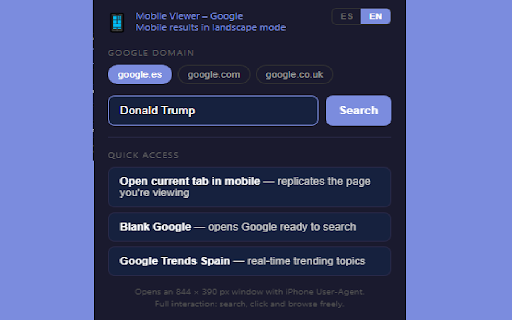

🇺🇸 / 🇬🇧 Built for SEO professionals, journalists, content strategists, and anyone who needs to quickly check how Google ranks and displays results on mobile without going through Chrome DevTools every time. Opens a mobile landscape window to view Google search results as they appear on mobile devices. Full description Mobile Viewer lets you instantly preview Google search results as they appear on mobile devices — no DevTools, no manual setup. With a single click, the extension opens a real browser window sized to a mobile landscape viewport (844 × 390 px) and spoofs the User-Agent header to iPhone. Google serves its actual mobile version, so you see exactly what users see on their phones: trending boxes, featured snippets, carousels, and mobile-specific rankings. Key features: One-click mobile search: type your query and open it directly in mobile view. Full interaction: it's a real browser window — search, click, scroll, and navigate freely. Language toggle: switch between English (EN) and Spanish (ES) results instantly. Google domain selector: choose between google.es, google.com, and google.co.uk. Open current tab in mobile: replicate any page you're viewing in mobile format. Quick access to Google Trends: jump straight to real-time trending topics. Clean separation: User-Agent rules apply only to the mobile window and are removed automatically when you close it. __________________________________________________________________________________________________________________________________________________________________________________________________ 🇪🇸

Switch to Mobile View
One click mobile viewport preview for any page. Modern web audiences don’t sit still. They bounce from 27-inch monitors at work to pocket-sized screens on the train, and they expect every site to feel tailor-made for both. For designers, developers, marketers, and even everyday power users, that raises a daily question: “How will this page look on a real phone?” Chrome’s own DevTools can answer it—after you dig through menus, panels, and a thicket of device frames. Switch to Mobile View shrinks that journey to a single click or shortcut, Tap the toolbar icon (or press Alt + M) and the current page is instantly constrained to a handset-sized viewport. A soft grey backdrop isolates the page from the rest of the browser window, making your content the star while visually reminding you that Mobile View is active. A small badge hovers in the corner displaying the current device preset—starting with iPhone 14, The extension ships with three of the most commonly requested breakpoints—iPhone 14 (390 × 844 px), Pixel 7 (412 × 915 px), and iPad mini (768 × 1024 px). Each preset adjusts the meta viewport tag, element widths, and scroll behaviour to mimic the feel of the chosen device. Quality-assurance teams can script keyboard shortcuts into automated test suites for faster responsive testing. Content creators and marketers preview newsletters, landing pages, and social embeds to ensure legibility on small screens. Educators and students exploring responsive design concepts get an approachable, permission-safe sandbox. Whether you are fine-tuning a checkout flow minutes before launch or teaching a classroom full of aspiring developers, this extension slots into your workflow with almost zero learning curve.

Mobile View: Test responsive designs fast
Test your responsive designs on multiple devices at once. See your website on multiple devices at once with live updates, even for locally hosted sites. Hot module reloading ensures instant code changes across all devices, while synchronised scrolling and navigation lets you test seamlessly across any website. Perfect for: ----- ✅ Full-Stack & Front-End Developers ✅ UX/UI Designers ✅ Anyone using Polypane/Blisk/Responsively/Sizzy Get started in seconds: ----- ✅ Install Mobile View from the Chrome Web Store. ✅ Click the extension icon to activate it. ✅ Select devices and breakpoints for continuous testing. ✅ Start developing - changes appear instantly! Join the future of responsive design testing and quality assurance. Works with all your favourite frameworks. Try Mobile View today and revolutionise your development process!

Calendrier Footmercato
Cette extension vous permez d'ajouter les matchs de footmercato.com/programme-tv directement sur votre agenda Google. "Calendrier Footmercato" est une extension de navigateur qui permet aux fans de football de ne plus jamais manquer un match de leur équipe préférée. Cette extension ajoute un bouton "Ajouter au calendrier" sur le site de Footmercato, permettant aux utilisateurs d'ajouter facilement les matchs de leur choix à leur calendrier Google en un seul clic. L'extension est facile à utiliser, sécurisée et ne collecte aucune information personnelle de l'utilisateur. Elle est compatible avec Google Calendar, le calendrier le plus utilisé dans le monde, et permet aux utilisateurs de recevoir des rappels pour chaque match. Ne manquez plus aucun match important avec "Calendrier Footmercato" ! Téléchargez l'extension dès maintenant et profitez pleinement de votre passion pour le football.

SendTabs
Consolidate and share multiple tabs with a single link SendTabs is like airdrop for your browser tabs. It is the easiest way to share your browser tabs in one clean link. Instead of messaging multiple URLs one by one, simply select your open tabs, add a label, and share a single organized link with anyone. Recipients can preview tab contents and open everything with one click, making collaboration and information sharing seamless. Access your complete history of shared tab groups in your personal profile, ensuring you never lose track of important collections. Perfect for sharing research, project resources, shopping lists, or travel planning with colleagues, friends, and family. Install SendTabs to transform how you share browser tabs - because sometimes one link is better than many. Key Features: - Group and share multiple tabs with one link - Preview tab contents before opening - Open all tabs with a single click - Access your complete tab sharing history - Free to use with Google sign-in
