
dcpddgaaniooehfkelklejfldofihfgh
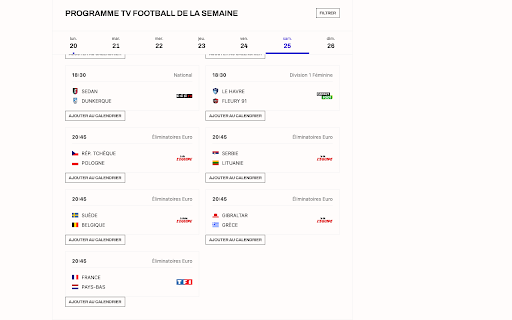

Cette extension vous permez d'ajouter les matchs de footmercato.com/programme-tv directement sur votre agenda Google. "Calendrier Footmercato" est une extension de navigateur qui permet aux fans de football de ne plus jamais manquer un match de leur équipe préférée. Cette extension ajoute un bouton "Ajouter au calendrier" sur le site de Footmercato, permettant aux utilisateurs d'ajouter facilement les matchs de leur choix à leur calendrier Google en un seul clic. L'extension est facile à utiliser, sécurisée et ne collecte aucune information personnelle de l'utilisateur. Elle est compatible avec Google Calendar, le calendrier le plus utilisé dans le monde, et permet aux utilisateurs de recevoir des rappels pour chaque match. Ne manquez plus aucun match important avec "Calendrier Footmercato" ! Téléchargez l'extension dès maintenant et profitez pleinement de votre passion pour le football.

TUAT Sirius Calender Extension
東京農工大学のLMSの課題ページに「カレンダーに追加」ボタンを追加します. 東京農工大学のLMSの課題ページに「カレンダーに追加」ボタンを追加します.

BestBlurays Companion
Shows the BestBlurays information on Letterboxd pages. BestBlurays Companion shows you, at a glance, the best Blu-ray and UHD release of a film — right where you're already browsing. When you open a film page on Letterboxd, the extension adds a compact panel above "Where to watch" with: • Best available format (UHD Blu-ray, 1080p Blu-ray, DVD, streaming, etc.) • Best video release • Best audio release • Best English-friendly release • Upcoming release • A direct link to the film's bestblurays.com page • A direct link to the main release on Blu-ray.com If a film isn't yet in the bestblurays.com catalog, the panel still helps — it gives you a one-click Blu-ray.com search The panel inherits Letterboxd's visual style, so it feels like part of the page rather than something bolted on. Supported Sites for Now • Letterboxd (letterboxd.com/film/…)

LiveScore.BZ - Live Football Scores
Live scores from all around the world. Live matches from all football leagues have fast and accurate updates for minutes, scores, halftime and full time football results, goal scorers and assistants, cards, substitutions. This extension offers livescore.

Youtube Thumbnail Size Grid Controller
Fix YouTube's layout: Display 1-16 videos per row. Reduce scrolling, hide Shorts, and customize the sidebar. YouTube Thumbnail Size Grid Controller: Your YouTube Experience, Your Rules. Take complete command of your YouTube experience. This powerful extension transforms YouTube’s chaotic layout into a clean, customizable dashboard that perfectly matches your viewing style. Whether you want a dense, information-rich grid or a minimalist, distraction-free feed, the choice is finally yours. Custom Video Columns: Adjust your feed to display anywhere from 1 to 16 videos per row. Full-Width Layout: Automatically removes wasted whitespace on the sides of the screen, utilizing your monitor's full potential. Independent Shorts Density: Set a specific number of columns for the Shorts shelf (up to 9) to save space, or sync it perfectly with your main video grid. Remove Distractions: Clean up your feed by hiding specific sections like Shorts, Mixes, News, Movies, and Live Streams. Custom Blocklist: New! Take control of the algorithm. Enter specific keywords (e.g., "Sports," "Reaction," "Gaming") to automatically hide any shelf or video section containing those terms. Hide Channel Icons: Remove the avatar icons below thumbnails for a cleaner, text-focused look. Filter by Date: Keep your feed fresh by filtering out videos older than 1 day, 3 days, or 1 week. Smart Dimming: Don't want to hide older videos completely? Use the Visibility Slider to "dim" them to your preferred opacity. They remain in the background and instantly brighten when you hover over them. Quick Access Toolbar: A convenient toolbar embedded directly in the YouTube header lets you toggle time filters and visibility settings instantly without opening the main menu. Compact Sidebar Mode: Forces the sidebar into a "Solid Flyout" state—keeping the mini-guide visible while the full menu floats over content, saving massive screen real estate. Disable Hover Previews: Stop videos from auto-playing or animating when you move your mouse over them. Real-Time Updates: All changes apply instantly as you adjust them. No refreshing required. Theme Support: A modern, professional interface that seamlessly adapts to Dark and Light modes. Why use this extension? YouTube’s default layout is designed to keep you scrolling. YouTube Thumbnail Size Grid Controller is designed to put you in control. Whether you are a power user craving more data on-screen or a minimalist looking for a focused browsing experience, this is the ultimate toolkit to make YouTube truly yours.
