
ilpenipjmmoleeldoimempacbnkpnboh
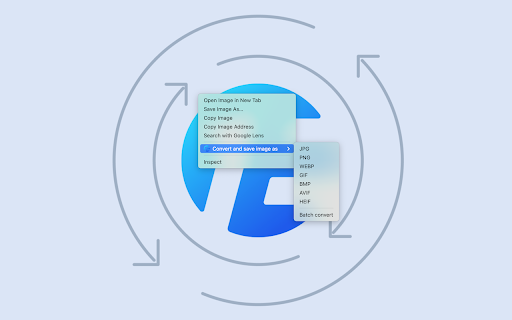

Convert and save images with a simple right-click. Support for popular formats including JPG, PNG, WEBP, GIF, BMP, AVIF, and HEIF. Enhance your image handling capabilities with our convenient right-click menu for images. This feature allows you to effortlessly convert images to various formats, including JPG, PNG, WEBP, GIF, BMP, AVIF, or HEIF, and save them directly to your computer. For more control over your conversions, simply click the extension icon in the toolbar. Here, you can fine-tune the output size and quality of your images before conversion. By default, the original size and highest image quality are maintained. Developed by EdgeOne.ai, this application offers a quick and free online solution for image format conversion. For your privacy and security, all processed images are automatically deleted after a few hours. Need to streamline your workflow? If you're interested in automatically converting website images via API or optimizing your website's performance, we're here to help. Reach out to us at https://edgeone.ai/contact for personalized solutions tailored to your needs.

Take Webpage Screenshots Entirely - FireShot
Take FULL webpage screenshots. Capture, edit and save them to PDF/JPEG/GIF/PNG, upload, print, send to OneNote, clipboard or email. FireShot helps you: • Save receipts, tickets, and order confirmations • Capture long articles, ChatGPT, research, and documentation • Share design reviews, bug reports, and product ideas • Keep permanent records of web pages that may change or disappear 🔒 Screenshot is done instantly and stored locally. It never leaves your computer, so it's 100% safe for storing a sensitive information. FireShot can work offline. 🏆 Awarded as "The Best Free Google Chrome Extension (Full Page Screenshot Tool)" by PCMAG.COM 🛑 No spyware and unnecessary permissions - you're just in a couple of clicks away from an ideal screenshot. 1️⃣ Save screenshot to disk as PDF (with links), PNG, and JPEG 2️⃣ Capture entire page, visible part of the web page or just a selection 3️⃣ Automatically capture all tabs to PDF or image 🔥 (https://getfireshot.com/demos/capture-all-tabs.php) 4️⃣ Provide a list of URLs for an automatic batch capturing process 🔥 (https://getfireshot.com/demos/capture-website-urls.php) 5️⃣ Attach screenshot to Gmail 6️⃣ Copy screenshot to clipboard 7️⃣ Print ### An upgrade is available. Activate it directly from the menu and: ✓ PDF with direct links and text, can be saved as a single page or split to pages ✓ Capture specific elements, such as scrolling areas on web pages (https://getfireshot.com/selection.php) ✓ Capture all tabs in one click and save to single PDF (https://getfireshot.com/demos/capture-all-tabs.php) ✓ Edit: crop, resize, add text and arrow annotations, blur areas and apply other effects ✓ Send to OneNote (Pro version) ✓ Save captures to disk as PNG, GIF, JPEG, BMP ✓ Upload to Twitter, ImageShack, Flickr, EasyCaptures, custom FTP or HTTP servers ✓ Copy to clipboard ✓ Print ✓ E-Mail ✓ Export captures to external editor ✓ Add page information to screenshot (URL, title, time, domain, etc)

Save Image as PNG, JPG, WebP, BMP, AVIF
Convert and save images as JPG, PNG, WebP, BMP, and AVIF (when supported), with quality and hover-dimension controls. Save and convert images in just a few clicks. Right click any image on a webpage or upload your own to convert and save it as JPG, PNG, WebP, BMP, and more. Adjust quality and view dimensions before saving for full control.

Save As Image Type
Right-click any image to convert and save it as a different format. Supports PNG, JPEG, WebP, BMP, and GIF. Save As Image Type adds a simple right-click menu to convert and save any image on the web in your preferred format. **Supported output formats:** • PNG — Lossless with transparency • JPEG — Compressed, great for photos • WebP — Modern format, small file sizes • BMP — Uncompressed bitmap • GIF — Classic web format **Key features:** • Works with ALL source image types • 100% local processing — no images are uploaded anywhere • Preserves the original filename • Handles transparency correctly (white background for JPEG) • Lightweight — no popups, no settings pages, no bloat • Zero data collection — see our privacy policy **How to use:** 1. Right-click any image on a webpage 2. Select "Save Image As…" from the menu 3. Choose your target format (PNG, JPEG, WebP and more) 4. Save the converted image Perfect for designers, developers, and anyone who needs to quickly convert WebP images to PNG or JPEG without leaving the browser.

Save image as Type
Right-click on any image to convert and download it. Save image type: JPG, PDF, PNG, or GIF from the context menu. Save image as Type is a Chrome extension that converts and downloads any web image in the format you choose. Right-click on any picture and save it as jpg, png, pdf, gif or webp - without leaving the page. Unlike the default browser behavior, this image format converter gives you real control over output type. No uploads to external servers. No registration. Just right-click and pick your format. 1️⃣ Install the extension from Chrome Web Store. 2️⃣ Open any web page that contains images. 3️⃣ Right-click on the picture you want to download. 4️⃣ Hover over Save image as in the context menu. 5️⃣ Select the output format from the submenu. 6️⃣ The file is converted and saved to your device instantly. - save as jpg - compact photo format, great for sharing and email - save as png - lossless quality, preserves transparency - save as pdf - convert picture to pdf, ready to print or attach - save as webp - smaller files with excellent visual quality - save as gif - universal format; animated gifs are saved without re-encoding This image type converter works entirely inside your browser. Pictures are never sent to any server. All conversion happens locally - private by design. ➤ save image as type with one click - no popups, no redirects ➤ convert image to pdf directly from the context menu ➤ download web image as jpg, png, gif or webp in seconds ➤ animated gif files are preserved in full - animation stays intact ➤ change image format without installing extra software ➤ works on any image visible in Chrome, including background images save image as jpg is the most common request from web users. But sometimes you need to save picture as png for lossless output, or convert image to pdf when sharing a document. This chrome image downloader covers all cases in one extension - switch between formats without extra tools. 📍 5 output formats - jpg, png, pdf, webp, gif 📍 right-click image download - integrated directly into context menu 📍 optional filename prompt before each download 📍 local processing - image data never leaves your browser 📍 no account or sign-in required 📍 Manifest V3 - latest Chrome extension standard 📍 54 interface languages supported Converting image format is often frustrating - you find a picture you need, but it is in the wrong type. save image as type solves this. No external tools, no websites, no conversion queues. Right-click, choose the type, done. • designers collecting visual references and saving web images as png or jpg • developers managing image assets and needing to convert image format on the fly • content creators downloading pictures for posts and videos • SEO specialists saving and analyzing web images in different formats • researchers organizing pictures for reports and presentations • students saving images for assignments and projects • social media managers working with visual content daily • e-commerce teams converting product photos to the required image type save image as pdf is especially useful for professionals who need to archive web content or send pictures as documents. save image as gif works perfectly for capturing memes and animations from social platforms. Whatever the use case - this image converter extension handles it. No tracking. No analytics. No external servers. All processing runs directly in Chrome. Your pictures go straight to your device - save photo as pdf or jpg without any data leaving your machine. English, Español, Français, Deutsch, Русский, Українська, Português, Italiano, Nederlands, Polski, Svenska, Norsk, Dansk, Suomi, Türkçe, العربية, 中文, 日本語, 한국어, Bahasa Indonesia, Tiếng Việt, ภาษาไทย, עברית, हिन्दी and 30 more. ⭐ The most complete image type converter for Chrome. save image as jpg, png, pdf, gif or webp - all from the right-click menu on any image, on any page.
