
iloejakienoloancdngipcgdpjjbdlec
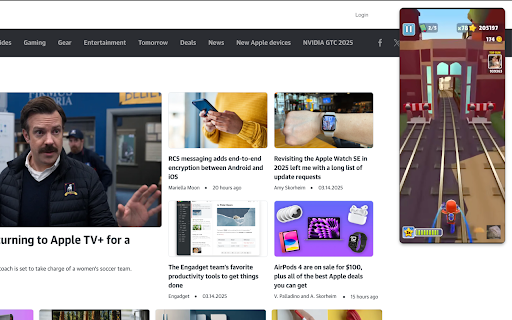
A Chrome extension called Surfer that adds a video overlay to web pages Watch Subway Surfers or Minecraft Parkour videos while browsing the web with this non-intrusive video overlay extension. Surfer is a fun Chrome extension that adds a video overlay to any webpage you're browsing. Watch entertaining Subway Surfers or Minecraft Parkour gameplay while reading articles, shopping online, or doing research!

Sound Booster Max
A Chrome extension to increase and boost the volume on web pages. Boost 6X your audio up to 500% with Sound Booster Max – the best volume booster extension for Chrome! Whether you're watching videos on YouTube, listening to music on Spotify, or in a video call, get louder, clearer, and distortion-free sound with just a few clicks. 🚀 🔊 Sound Booster Max: Volume Booster Extension for Chrome 🔊 Why Choose Sound Booster Max? 🔊 Boost Audio by 6X upto 500% – Get the maximum volume without any distortion! 🎥 Works on YouTube, Netflix, Spotify, and more – Perfect for all your favorite platforms. 🧑💻 Simple and Lightweight – The extension is super easy to use and won’t slow down your browser. ⚡ Seamless Experience – Enjoy louder sound across all tabs with no lag or performance drop. 🔧 User-Friendly Interface – Adjust the volume quickly with a simple slider. Sound Booster Max is a lightweight, high-performance sound booster that works on every website, enhancing your audio experience instantly. Whether it’s for movies, music, or video calls, this volume booster Chrome extension is your go-to tool for clear, powerful sound. Key Features 📈 6X Volume Boost upto 500% increase in volume – Get loud, crisp sound even on low-volume devices. 🎧 Perfect for streaming videos, music, and calls on platforms like YouTube, Netflix, Spotify, and more. 🖥️ Lightweight Extension – Enjoy boosted sound without slowing down your browser. 🌍 Works on all websites – Get great sound everywhere you browse. ⚙️ No distortion – Clear, clean audio at all volume levels. Install Sound Booster Max now for free and enjoy the ultimate sound experience on Chrome! 🎶 FAQ Q: How much can I boost the sound? A: You can boost the volume 6X up to 500% for loud and clear audio. 🔊 Q: Does it work on all websites? A: Yes! It works on YouTube, Netflix, Spotify, Amazon, and many more platforms. 🌍 Q: Is it free to use? A: Yes! Sound Booster Max is completely free to install and use. 🎉 Q: Will it slow down my browser? A: No, this extension is lightweight and won’t affect your browser’s speed. ⚡ At Sound Booster Max, we may collect the URLs of websites you visit. This allows us to ensure that the extension functions properly across different sites and continues to deliver the best possible experience for you. You can find the full details of our privacy practices in our policies below: https://volumeboostermax.com/privacy-policy 🔒 Rest assured, any data we collect is used only to improve your experience and will never be sold to third parties.

Side Browser
A Browser extension for Chrome and Firefox that allows you to open a side panel to browse the web while you work. Side Browser – The Best Sidebar Web Experience Side Browser is a lightweight Chrome extension that lets you open any website directly in a sidebar — perfect for multitasking and staying productive. You can read Reddit, check Gmail, browse Twitter, or watch YouTube — all without switching tabs. ⚡ Fast and responsive design 💾 Auto-saves your last opened page 🧩 Works perfectly with most web apps Stay focused, stay efficient — with Side Browser.

Poster
A Chrome Extension for sharing your online surfing with your friends Reddit without the website. Browser-native Pinterest. A completely different way to share the sites you love. Poster is a social network that sits on top of the web as a browser extension, allowing you to share sites with your followers in a single click. Your home feed stays up-to-date with pages your friends and family are interested in, and when you stumble on a link that a followee has liked, we send you an unobtrusive notification letting you know. We never spam your email, blast you with ads or track your browsing activity. It’s completely free to use. The days of copying and pasting URLs into messaging applications are over. Poster is here. Poster is a product of Loomis Technologies, Inc., a St. Louis, Missouri based development studio. If you have feature requests and/or bug alerts, send a note to hello@loomistechnologies.com. We are actively working on Poster and would love to get your feedback.

Custom Scrollbar
Custom Scrollbar is a Chrome extension that allows users to customize the appearance of scrollbars in their browser Discover a new level of personalization for your web experience with Custom Scrollbar for Google Chrome! Tired of standard scrollbars that feel as bland as a diet without color? 🍞🙄 Install Custom Scrollbar and make your browser stylish and expressive as you've always dreamed! Choose from over 20 different designs - from classic minimalism to vibrant neon fireworks. The choice is yours! Here are just a few of the options we have: 1. Classic white ⚪ 2. Black with sleek lines ⚫ 3. Minimalistic gray 🌑 4. Subtle night mode 🌙 5. Fun pastel shades 🌈 6. Bright neon colors 💡 7. Geometric shapes 🔷 8. Marble effect 🏛️ 9. Silky gloss ✨ 10. Forest shades of green 🌲 You can customize the design to your liking to find your perfect style. 💡 Simply download the extension from the Chrome Web Store, choose your favorite style, and enjoy a fresh look for your web browsing! Convenience and beauty - what could be better? 😉 Don't wait any longer, add a splash of color to your online life with Custom Scrollbar! Your browser deserves an upgrade that will lift your spirits and make online surfing more enjoyable!
