
ilhlgpdndaddmmmlnhdeapblelmjmlpl

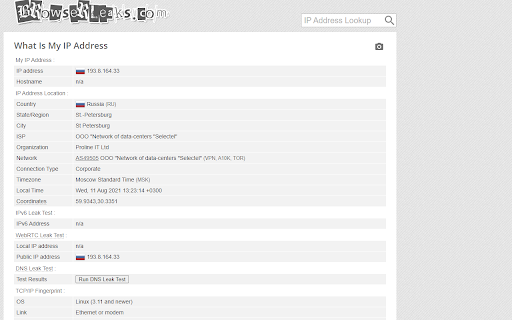
Anti browser leaks: language, time, location, webrtc. You can check from https://whoer.net/ 🌟 Attention Extension requires permission to run in private window This extension is a Purchase app. This SERVICE is provided by EXP and is intended for use as is. This page is used to inform website visitors regarding our policies with the collection, use, and disclosure of Personal Information if anyone decided to use our Service. If you choose to use our Service, then you agree to the collection and use of information in relation to this policy. The Personal Information that we collect is used for providing and improving the Service. We will not use or share your information with anyone except as described in this Privacy Policy. The terms used in this Privacy Policy have the same meanings as our Terms and Conditions 🌟Information Collection and Use For a better experience, while using our Service, we may require you to provide us with certain personally identifiable information, including but not limited to email, name. The information that we request is will be retained by us and used as described in this privacy policy. We may employ third-party companies and individuals due to the following reasons: + To facilitate our Service; + To provide the Service on our behalf; + To perform Service-related services; or + To assist us in analyzing how our Service is used. We want to inform users of this Service that these third parties have access to your Personal Information. The reason is to perform the tasks assigned to them on our behalf. However, they are obligated not to disclose or use the information for any other purpose. We value your trust in providing us your Personal Information, thus we are striving to use commercially acceptable means of protecting it. But remember that no method of transmission over the internet, or method of electronic storage is 100% secure and reliable, and we cannot guarantee its absolute security. We may update our Privacy Policy from time to time. Thus, you are advised to review this page periodically for any changes. We will notify you of any changes by posting the new Privacy Policy on this page. These changes are effective immediately after they are posted on this page. If you have any questions or suggestions about our Privacy Policy, do not hesitate to contact us.

Browserabdruck - Durchblickt
Nimm deine digitale Souveränität selbst in die Hand, indem dir transparent Tracking Methoden angezeigt werden. Diese Erweiterung informiert praxisnah was ein Browserabdruck (english: browser fingerprint) ist, und zeigt an, ob die aktuell besuchte Webseite einen Abdruck erstellt. Über einem Popup wird angezeigt, ob ein Canvas, WebGL oder Audio Abdruck erfasst wurde. Zusätzlich wird noch die Verwendung von Sensor, Akkustand und Standort Tracking angezeigt. Canvas-, WebGL-, und Audiofingerprinting kann auf https://coveryourtracks.eff.org/ getestet werden. Die Sensorfunktionalität kann auf https://codepen.io/bantic/pen/qbxgBd oder https://sensor-js.xyz/demo.html getestet werden. Es könnte ein Force Refresh (STRG+F5) nötig sein. GPS kann auf https://html5.komplett.cc/code/chap_geolocation/simple.html oder https://www.w3schools.com/html/html5_geolocation.asp getestet werden. Akkustand kann auf https://pazguille.github.io/demo-battery-api/ oder https://googlechrome.github.io/samples/battery-status/ getestet werden. Warnung: Ich empfehle nicht, dieses Add-on dauerhaft zu installieren. Es hat sich gezeigt, dass eine Website theoretisch einen Fingerabdruck der Add-ons erstellen kann, die ein Benutzer installiert hat, indem sie die Skripte überprüft, die im globalen JavaScript-Namespace werden (dieses Add-on führt eigenen Code im Namespace aus, was für Add-ons üblich ist). Durch die dauerhafte Installation dieses Add-ons könnte eine aggressive Anti-Datenschutz-Website eine zusätzliche Kennung zu Ihrer Online-Identität erhalten. Verwenden Sie es nur zu Informations- und Forschungszwecken :)

Spoof Timezone
Change the time zone setting for web pages in the browser to a randomly selected or user-specified time zone. The extension alters the timezone information that the browser reveals to web pages to protect your actual timezone from being identified. You can ensure the extension spoofs the correct timezone by setting your preferred one on the options page. Additionally, there is an option to generate random timezones, which can be useful in preventing fingerprinting scripts from identifying your browser based on your actual time zone. To test the current timezone use the right-click context menu item. The extension can also automatically detect your timezone based on your IP address starting from version 0.1.4. Use the right-click action button's menu to access this option. Moreover, there is an option to check and update the timezone on start-up, which can be enabled from the options page. The latest version of the extension includes improvements such as faster injection into iframes and automatic timezone detection that now respects daylight shifting. This extension now works on manifest v3.

Canvas Blocker - Fingerprint Protect
This browser extension safeguards user privacy by preventing malicious scripts from using the HTML canvas element for user fingerprinting. It introduces slight changes to the data generated by the canvas element when specific methods are invoked, rendering it unusable for fingerprinting. In comparison to similar extensions, this one is lighter and employs a more efficient method to obstruct fingerprinting across all frame elements (top and subframes). The extension operates in three modes: 1. Random noise 2. Random noise (per page) to maintain a consistent identity within the current page session 3. Fixed noise to sustain a constant yet unique identity continuously Key Features: 1. Minimal footprint fingerprint defender 2. Ability to block or disable fingerprinting on specific hostnames 3. Notification when canvas fingerprinting is detected 4. Option to disable notification for select or all hostnames 5. Compatibility with cross-origin (CORS) and sandboxed iframes (such as Disqus and Hangouts) Notes: This extension doesn't entirely block the canvas element. Instead, it modifies two methods to prevent the JavaScript engine from creating a unique identification key from this element. What is Canvas Fingerprinting: Canvas fingerprinting is a method among several browser fingerprinting techniques used for tracking online users. It enables websites to identify and monitor visitors by leveraging the HTML5 canvas element rather than browser cookies or similar means. This technique functions by exploiting the HTML5 canvas element. When a user visits a webpage, the fingerprinting script initially writes text using the preferred font and size and adds background colors. Subsequently, the script calls the Canvas API's ToDataURL method to retrieve canvas pixel data in dataURL format, essentially a Base64 encoded representation of binary pixel data. Lastly, the script hashes the text-encoded pixel data, creating a unique fingerprint.

SessionBox One - Multi-Login Anti-Detect Tool
Elevate multitasking: Unleash SessionBox One's power for managing multiple accounts across all sites. Create & Manage multiple accounts on any platform with SessionBox One. 🌐 Perfect for digital marketers, affiliates, and professionals handling multiple website accounts. 🔥 Revolutionize your online workflow with SessionBox One - the fusion of SessionBox Legacy and Workstation power. ⚙️Unlimited profile generation, built-in proxy support, and Selenium automation. 👥 Collaborate and share your sessions, enjoy our brand-new enhanced UX/UI. 📢 Note: Installation of the accompanying app via the extension is required for full functionality
