
ilcnadaaninblgbekoaihdhoiecaflie

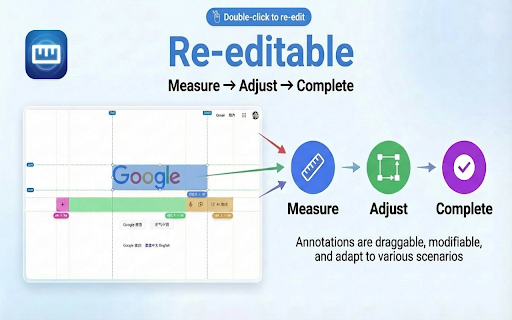

A page ruler which can snaps around web elements for easier measurement. Provide convenience for front-end development and ui design **A smart web ruler with element snapping for easier frontend development and UI design.** ### ✨ Features - **Smart Snapping**: Hold `Alt` (or `Option` on Mac) while moving the cursor to automatically detect and snap to web elements. Supports snapping to **edges, 4 corners, and 4 edge midpoints**, displaying dimensions instantly. The snap preview uses a contrasting color to distinguish from measurement boxes. - **Easy Measurement**: Click and drag to create a measurement layer that snaps to element edges automatically. - **Flexible Editing**: Double-click any layer to enter edit mode: move, resize, or fine-tune. - **Esc**: Exit edit mode - **Backspace**: Delete the selected layer - **Status Indicator**: The extension icon changes based on status (colored = active, gray = inactive) for easy identification. - **Shortcuts Help**: Hover over the `?` button in the toolbar to view all available shortcuts. - **Customization**: - **Individual Colors & Opacity**: Each measurement box can have its own color and opacity; editing when selected only affects the current item - **Global Mode**: When enabled, changing color or opacity affects all existing measurement boxes simultaneously - **Single Mode**: When enabled, only one measurement box can exist at a time; new boxes automatically clear old ones - **Size Position**: Configure where dimension labels appear (center, corners, etc.) - **Dashed Background**: Choose between solid or dashed background for measurement boxes - **Reference Lines**: Automatic horizontal and vertical reference lines with X, Y coordinate labels - **Crosshair Display**: Configure mouse crosshair display mode - **Quick Controls**: - Press `f` (configurable): Toggle toolbar visibility - Press `r` (configurable): Toggle reference lines - Press `Shift`: Toggle dimension labels - `Alt + z` (customizable): Global shortcut to toggle the extension - Double-press `z` (configurable): Quickly activate/deactivate within the page (after first launch) - **Local File Support**: Enable "Allow access to file URLs" in `chrome://extensions` to measure local HTML files. - **Mobile Simulation**: Works in DevTools mobile simulation mode (ensure `device type` is set to `no touch`).

Screen Ruler - Measure and Inspect the Web
Web inspector for designers & developers. Measure elements, extract CSS & colors, capture screenshots & more. Screen Ruler is the perfect companion for web developers and designers wanting to validate the implementation of their websites. Once activated, it allows you to view the sizes, margins, paddings, tag names, IDs, and classes simply by hovering over any web content. You can also select an item to measure distances to others. - Toggle the extension by clicking the icon, selecting from the right-click context menu, or using the shortcut `Alt/Option + Shift + R`. - Hover over items on web pages to display their sizes, margins, paddings, tag names, IDs, and classes. - Select an item by clicking on it directly; this will turn the highlight red. To deselect, click again, press Escape or select a different item. - To select the parent, use `Alt/Option + Up`. Use `Alt/Option + Down` to reverse your selection. - View the computed CSS of the currently selected item in the side panel. Click the "Copy CSS" button to copy the computed CSS to your clipboard. - Measure the pixel size of any element. - Measure the pixel distance between any two elements. - HTML tag names, class names and IDs. - Parent/child selection shortcuts. - Responsive selections resize with your browser window. - Access from the context menu. - Computed CSS inspect. - Copy CSS to clipboard. - Page rulers for precise measurements (horizontal and vertical guides with crosshair). - Color picker tool to sample and copy colors from anywhere on the page. - Element Screenshots: Capture cropped screenshots of selected items using `Ctrl/Cmd + Shift + S`. - Accessibility Issues: Automatically detect and highlight WCAG contrast failures in your selection with actionable recommendations. - Works on any web page. - Customize keyboard shortcuts by visiting `chrome://extensions/shortcuts`. Screen Ruler PRO A PRO tier is also available which unlocks additional features. - Floating Inspector: See detailed properties when you hover, including position, size, rendered font, colors and more. - Responsive Mode: Test your designs across different device viewports with an interactive device emulator and custom dimensions. - Box Shadow Visualization: Interactive breakdown of multi-layer box shadows with an exploded view. - Animation Analysis: Visualize CSS animation timing curves and copy animation properties. - Asset Extraction: Extract and download images, SVGs, and vector assets. - Color Extraction: Extract and copy color palettes from selected content with hex, RGB, and HSL values. - Layout Grid Overlay: Overlay a customizable layout grid for perfect design alignment. - CSS Selector Search: Find and highlight items using CSS selectors. - Typography: Analyze and extract all typography styles used in your selection. - X-Ray Mode: Reveal the underlying structure of the page by outlining all content. PRO requires a one-off payment for lifetime access. Made For - Developers: Spot layout issues or identify alignment problems. Whether you're tweaking margins and paddings, or just making sure everything lines up correctly, this tool becomes an indispensable addition to your development toolkit. - Designers: Ensure your designs have been implemented with pixel-perfect accuracy. It acts as a bridge between design and development, allowing you to check if every component aligns exactly as you intended. - Designed specifically for stability in Google Chrome 116+. - Installable on any Chromium browser; however, for the best experience, make sure your browser supports all the required APIs (like Side Panel and Offscreen). If there are any issues with installation, update your browser to the latest version and try again.

Page Ruler
Page Ruler: Drag guidelines and inspect element properties for perfect UI practice in browser. Page Ruler: Pixel-Perfect Layouts, Simplified.Stop guessing and start measuring. Page Ruler is a lightweight, high-performance toolkit for developers and designers who demand precision. Overlay guides, snap to elements, and audit CSS properties without ever opening your browser’s heavy dev tools. Drag-and-Drop Guides: Pull horizontal or vertical rulers from the margins to check alignment in seconds. Instant Inspect Mode: Hover over any element to see its dimensions, padding, and font styles instantly. Deep Property Detection: Get the data that matters—color hex codes, font families, and $z-index$—at a glance. Tailored to Your Workflow: Customize guide colors and line weights to keep your workspace clear and focused.

Ruler Measurement
Make your measurement easy with Chrullex (CH-rome RUL-er EX-tension) Powerful measure plugin for chrome. No more junk and party worked solutions. Measure height and width on page with grid lines. Fully draggable and resizable. Features: - Press ctrl + mouse click to allow multiple rulers. - Press ctrl + q to remove all ruller from page. - Press arrow right/left to rotate. - Press ctrl + i to toggle offset info. - Press alt + q to toggle run state. - Customize extension through option page Check out the new Themes option. Check out the new Unit option, that allows to change measure units! If you find a bug, have any suggestions for improving the extension or just want to thank the author feel free to mail me.

Simple Ruler Beta
Measure it! THIS EXTENSION IS FOR BETA TESTING This simple and easy to use tool allows you to measure elements on the web page. Click to start selection, click again to complete it. See the width and height of the area you selected. You can change the color of background and selection in the Options tab.
