
fkfkjailjcijmghkonghlclbjkopjbgh
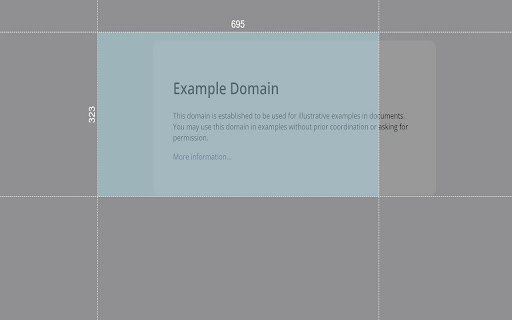


Make your measurement easy with Chrullex (CH-rome RUL-er EX-tension) Powerful measure plugin for chrome. No more junk and party worked solutions. Measure height and width on page with grid lines. Fully draggable and resizable. Features: - Press ctrl + mouse click to allow multiple rulers. - Press ctrl + q to remove all ruller from page. - Press arrow right/left to rotate. - Press ctrl + i to toggle offset info. - Press alt + q to toggle run state. - Customize extension through option page Check out the new Themes option. Check out the new Unit option, that allows to change measure units! If you find a bug, have any suggestions for improving the extension or just want to thank the author feel free to mail me.

Measuremate — Pixel Ruler for Web Design
Measure distances between any elements on any website. Pixel ruler + CSS inspector for pixel-perfect design handoff. Measure distances between any elements on any website. Pixel ruler, CSS inspector, and alignment guides — everything you need for pixel-perfect design handoff, right in your browser. Measuremate is a measuring tool built for frontend developers, web designers, and QA engineers who need precise pixel measurements without leaving the browser. Lightweight, private, and fast. 🔍 INSPECTOR MODE — Click any element to inspect it. See dimensions, distances to neighboring elements, and full CSS details. Hover to preview before selecting. 📐 GUIDES MODE — Place vertical and horizontal ruler guides anywhere on the page. Snap to element edges, measure between guides, and verify alignment like in Figma. Switch between modes with a single keystroke. ━━━━━━━━━━━━━━━━━━━━━━━━ WHAT YOU CAN DO ━━━━━━━━━━━━━━━━━━━━━━━━ 📏 MEASURE DISTANCES between any two elements — spacing, gaps, padding, margins. On-page dimension lines show exact pixel values. 🎯 INSPECT THE CSS BOX MODEL with visual breakdown of content, padding, border, and margin (including negative margins). 🔬 VIEW DETAILED CSS by category — Layout (display, position, flex, grid, z-index), Text (font, color, line-height, letter-spacing), and Attributes. 🌳 NAVIGATE THE DOM TREE — browse from root to any element, hover to preview, click to inspect. 📐 DROP VERTICAL OR HORIZONTAL GUIDES on any page with a single keystroke. Use arrow keys for 1px precision, Shift+arrows for 10px jumps. 🧲 SNAP TO ELEMENTS — guides and cursor automatically snap to element edges and centers. Cmd+Shift+M (Mac) / Ctrl+Shift+M (Win) — Toggle Measuremate on/off 1 — Switch to Inspector mode 2 — Switch to Guides mode M — Show/hide the control panel V — Drop a vertical guide at cursor H — Drop a horizontal guide at cursor S — Toggle snap-to-alignment Q — Clear all guides Arrow keys — Move cursor/guides 1px (Shift for 10px) Esc — Clear selection ━━━━━━━━━━━━━━━━━━━━━━━━ WHO IT'S FOR ━━━━━━━━━━━━━━━━━━━━━━━━ • Frontend developers verifying pixel-perfect implementation against designs • Web designers checking spacing, alignment, and typography on live sites • QA engineers validating responsive layouts across breakpoints • Teams doing design handoff from Figma, Sketch, or other design tools • Anyone who needs a fast, clean ruler for the web ✓ Clean UI — does nothing until you activate it. No interference with the pages you browse. ✓ Lightweight — under 500 KiB, no bloat, no telemetry. ✓ Privacy-first — zero tracking, zero data collection. ✓ Works on any website, including SPAs and iframes. ✓ Figma-like distance measurements you already know how to read. ✓ Keyboard-first workflow for power users. 1. Click the Measuremate icon in your toolbar (or press Cmd/Ctrl+Shift+M) to activate 2. Hover over any element to preview its dimensions 3. Click to select — see distances to nearby elements appear on the page 4. Open the Main Panel with M to see full CSS, box model, and DOM tree 5. Press 2 to switch to Guides mode and drop alignment rulers ━━━━━━━━━━━━━━━━━━━━━━━━ FREE AND PRO ━━━━━━━━━━━━━━━━━━━━━━━━ We ship updates regularly. Feature requests and bug reports are always welcome.

PixelZoomer
PixelZoomer takes a website screenshot and provides a measuring tool, a zoom and an eye dropper. PixelZoomer takes a screenshot of the current website and provides various tools for pixel analysis. You can zoom into websites (up to 3200%), measure distances and pick colors with an eye dropper. - pixel perfect ruler - zoom/pan tool (100% to 3200%) - eye dropper (HEX and RGB values) - undo/redo - open screenshot image in tab

Measure Everything
Measure Everything is a powerful tool for measuring distances between DOM Elements on a webpage. Just click an element and then hover your mouse pointer over another element in order to get instant distance measurements. You need to activate the extension by clicking on its icon before using it or pressing the hotkey Alt+Shift+M. Consider pinning the icon of this extension for easier use. Any feedback and reviews are welcome.

Simple Ruler Beta
Measure it! THIS EXTENSION IS FOR BETA TESTING This simple and easy to use tool allows you to measure elements on the web page. Click to start selection, click again to complete it. See the width and height of the area you selected. You can change the color of background and selection in the Options tab.
