
fogkjckfkdcnmnnfmbieljpkmmihhpao


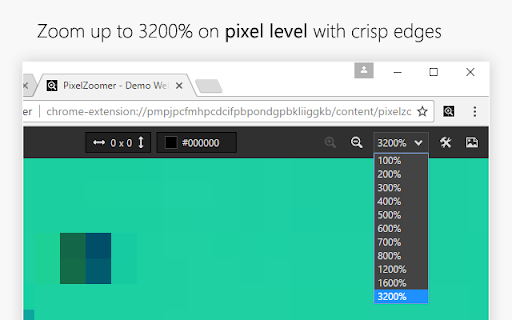
PixelZoomer takes a website screenshot and provides a measuring tool, a zoom and an eye dropper. PixelZoomer takes a screenshot of the current website and provides various tools for pixel analysis. You can zoom into websites (up to 3200%), measure distances and pick colors with an eye dropper. - pixel perfect ruler - zoom/pan tool (100% to 3200%) - eye dropper (HEX and RGB values) - undo/redo - open screenshot image in tab

Grid Ruler
Create grids and measure their distance easily. It allows web developers to create vertical and horizontal grids, Photoshop style. It has a ruler to measure distance between your grids too. - click & drag from main vertical/horizontal ruler to create grid guides. - click on intersection of vertical ruler and horizontal ruler to go into measurement mode. - while in measurement mode, hold `Shift` key to get a straight line.

VisBug
Open source web design debug tools built with JavaScript: a FireBug for designers. - Point, click, move, resize & tinker - Edit or style any page, in any state, like it's an artboard - Inspect styles, spacing, distance, accessibility and alignment - Nitpick layouts & content, in the real end environment, at any device size - Leverage adobe/sketch skills - Edit text, replace images - Design within the chaos: use production or prototypes and the odd states they produce, as artboards and design opportunities - Design while DevTools simulates latency, i18n, media queries, platform constraints, CPUs, screensize, etc - Make more decisions on the front end of your site/app (a11y, responsive, edge cases, etc) - No waiting for developers to expose their legos, just go direct and edit the end state (regardless of framework) and execute/test an idea Give power to designers & content creators, in a place where they currently feel they have little to none, **by bringing design tool interactions and hotkeys to the browser**

Tape
Measurement tools, rulers and grids Tape is a tool for pixel-perfect website development. It lets you put down guides that snap intelligently to the page content (and stick to it if it moves on scroll or resize), and helps you easily measure positions and sizes of elements. It knows about borders and padding, and will even snap to the baseline of text. There is on-screen help, the ability to display user-defined column and row grids, a built-in magnifying glass for pixel-perfect measurement, and all guides can be quickly toggled on and off with a single keystroke. Unlike some extensions it will not interfere with any webpage you visit unless you click the Tape icon. Once installed: Click icon to activate. Read help, or press Space to dismiss it. Mouse over document, observe that rules snap to useful positions (including baselines!), and use keys as follows: H – drop Horizontal rule here (or remove if there's one here already) V – drop Vertical rule here (or remove if there's one here already) B - drop Both horizontal and vertical rules here arrow keys – fine adjustment (+shift, +alt for larger adjustment) S – toggle snapping on and off. P – toggle pointer events on and off O – set origin to current position. C / R – set column or row grid L or backquote – toggle loupe. (To refresh loupe image, press L twice.) Space – toggle help Press ESC to toggle everything on and off. Press X to reset all guides on a page.

Measure-it
Draw a ruler across any webpage to check the width, height, or alignment of page elements in pixels. Draw a ruler across any webpage to check the width, height, or alignment of page elements in pixels. Customize the overlay and selector from extension options.
