
ilbffjohgdabjlcnionhkmljmoidcojh
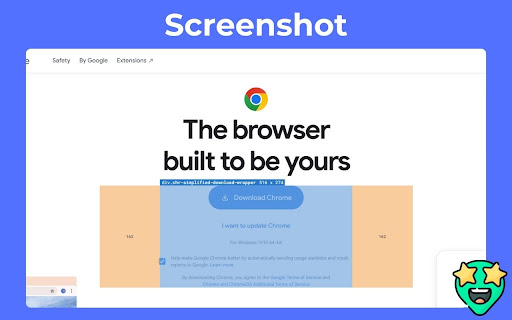

Inspect padding, margin, tag, class, and size by hovering over elements. Inspect HTML elements visually — instantly. Element Inspect is a powerful Chrome extension designed for web developers and designers to effortlessly inspect and debug layout properties by simply hovering over any element on a webpage. With Element Inspect, you can see: 1. Tag name 2. Class names 3. Element dimensions (width × height) 4. Padding and margin values All displayed in a smart overlay directly on the page — no more digging through the DevTools! Whether you're refining pixel-perfect layouts, fixing spacing issues, or learning how a site is structured, Element Inspect gives you an instant, visual understanding of how elements are styled and spaced. Key Features: 1. Hover-based inspection without clicking 2. Clean overlay showing box model properties 3. Works on any webpage (no setup required) 4. Lightweight, fast, and privacy-focused Great for developers, designers, and learners Save time, stay focused, and inspect like a pro — directly on the live page.

No-Inspect Web Editor - text & Images
Replace the need of using inspect element. Perfect for designers, managers & marketers. No tech skills needed! Discover the Instant Web Editor, a user-friendly and straightforward extension that simplifies the process of editing web content, without any bloat features. Experience unparalleled ease of use, as all you need to do is enable "Toggle Global Edit Mode" to get started. With the Instant Web Editor, effortlessly: 1. Toggle Edit Mode: Activate the simple global check to edit any webpage instantly. 2. Click & Replace Images: Select an image, and a prompt will allow you to swap it with another using just the image URL. No need to dig into the HTML! 3. No Inspect Element: Forget about complicated Inspect Element tools, our extension makes web editing accessible for everyone. We're continuously working on enhancing the Instant Web Editor experience, with more features in the pipeline. We value your feedback and are always open to reviews to make this product even better. Transform your workflow with the Instant Web Editor, tailored for UI/UX designers, product managers, marketers, and anyone looking for a seamless way to edit web content. No tech skills required – just install, toggle, and edit!

Element Inspector
Hover to inspect CSS properties of any element. Ideal for developers debugging and optimizing web styles. Element Inspector Hover to Instantly Reveal CSS Properties & Copy Styles Like a Pro! A must-have tool for front-end developers, designers, and debuggers. Effortlessly inspect element styles, copy full CSS rulesets, and optimize web layouts—no DevTools required. Perfect for analyzing complex sites, frameworks, and iframe-embedded content. Key Features: ✅ Real-Time CSS Inspection Hover over any element to instantly see its ID, classes, and computed styles. Visual highlight shows exact boundaries of hovered elements. ✅ One-Click CSS Code Export Copy an element’s full CSS ruleset (including inherited properties) with a single button. Paste directly into your code editor for rapid prototyping or debugging. ✅ Iframe & Dynamic Content Support Works seamlessly inside embedded iframes and AJAX-loaded components. ✅ Keyboard Shortcuts Toggle inspection mode instantly with Ctrl+Shift+S (customizable via Chrome settings). ✅ Persistent Preferences Remembers your activation state across sessions and pages. ✅ Zero Data Collection All processing happens locally—no tracking or external servers. Why Developers Love It: Speed Up Debugging: Identify layout issues faster than DevTools’ manual element picker. Simplify Collaboration: Share precise CSS rules with team members via clipboard. Lightweight: Uses minimal memory compared to full DevTools sessions. Install now and supercharge your CSS workflow! 🛠️

Outliner - HTML Element Inspector
Professional HTML element inspector with custom outlines. Perfect for web developers to visualize page structure. An essential tool for modern web developers to visually inspect, analyze, and debug HTML elements with ease. Element Outline lets you instantly highlight elements on any webpage using fully customizable outlines, making it effortless to detect layout issues, spacing problems, and hidden components—without ever opening DevTools. Why you'll love it: - Real-time Element Inspection – Instantly see structure and nesting - Customizable Outline Styles – Choose colors, thickness, and patterns - Precise Element Measurements – Identify padding, margins, and dimensions - One-Click Activation – Highlight elements across the page in a flash Whether you're debugging layouts, auditing UI consistency, or just want a clearer view of your DOM structure, Element Outline is your go-to extension to speed up development and boost productivity.

Open Web Inspector - AI Element Inspector
AI-controllable web element inspector with natural language interface. Type 'Make this text red' and get perfect CSS instructions! 🎉 **Stop Fighting with Web Inspectors - There's Finally a Better Way!** Remember the last time you right-clicked "Inspect Element" and got lost in a maze of developer tools? Or when you needed to quickly check why that button looked weird, but ended up spending 20 minutes digging through Chrome DevTools? Open Web Inspector is the game-changing Chrome extension that makes web inspection feel as natural as pointing and clicking. But here's the kicker - it's the world's first inspector that actually talks to AI assistants. Seriously. Picture this: You're chatting with an AI assistant about your website, and you say "Make this text red." Instead of getting generic advice, the AI can actually SEE your webpage, inspect the exact element you're talking about, and give you the perfect CSS code. ## 💡 **The "Aha!" Moment** You know that frustrating moment when you're staring at a website thinking "How did they DO that?" - whether it's a cool button effect, a perfect layout, or just figuring out why your CSS isn't working? With Open Web Inspector, you just hover your mouse over ANY element on ANY website, click once, and BAM! You've got everything - the HTML, the CSS, the computed styles, even a screenshot. No more digging through endless developer tools or trying to remember obscure keyboard shortcuts. **"It's Like Having X-Ray Vision for Websites"** - Hover over anything and see an instant red highlight - One click reveals all the secrets - HTML structure, CSS styles, everything - Works on literally ANY website (yes, even that competitor site you've been studying) **"Finally, An Inspector That Doesn't Hate Me"** - Clean, beautiful interface that doesn't overwhelm you with 47 different tabs - Live CSS editing that actually shows changes in real-time - Keyboard shortcuts that make sense: Ctrl+Shift+E to start, Escape to stop **"The AI Integration is Mind-Blowing"** - Your AI assistant can control this inspector directly - Type "analyze this button" in your AI chat, and it actually CAN - Get AI-friendly code summaries that make perfect sense **"The Screenshot Feature Saves Me Hours"** - Capture perfect element screenshots with one click - No more "crop tool gymnastics" in image editors - Everything goes straight to your clipboard - just paste anywhere ## 🎯 **Perfect If You're Tired Of...** ❌ Getting lost in complicated developer tools ❌ Right-clicking and hoping for the best ❌ Explaining website problems without being able to show them ❌ Spending forever just to check one CSS property ❌ Feeling like web inspection requires a computer science degree ✅ **Now you can inspect any website element in literally 2 clicks** ## 🔥 **The Magic Happens When...** You realize you can inspect ANYTHING: - That perfect navigation bar on your favorite website - The exact font and colors your competitor is using - Why your layout breaks on mobile (spoiler: it's probably padding) - How they made that cool hover effect work - The secret behind that smooth animation **Plus, for the AI enthusiasts:** Your ChatGPT, Claude, or any AI assistant can now "see" and understand your webpage structure. It's like giving your AI actual eyes. Seriously. If you can use a computer mouse, you can master this in 30 seconds: 1. Click the extension icon (or press Ctrl+Shift+E) 2. Hover over stuff - see the red highlight? That's it working 3. Click anything to inspect it 4. Marvel at how simple this actually is Want to stop? Hit Escape. Want to take a screenshot? Click the camera icon. Want to edit CSS live? Just start typing in the CSS panel. **Other Extensions:** Usually break on half the websites you visit, or haven't been updated since 2019. **Open Web Inspector:** Just works. On every website. Every time. With a smile. ## 🎁 **Bonus: It's Built for the Future** While other tools are stuck in 2015, Open Web Inspector is ready for the AI-powered web development world we're heading into. When every developer has an AI assistant (and trust me, that day is coming fast), you'll already have the perfect tool for the job. ## 🔒 **The Technical Stuff (For the Nerds)** - Zero dependencies, pure vanilla JavaScript - Works on Chrome 60+ (basically every Chrome ever) - Open source and actively maintained - Smart CSS prefixing means it won't break your existing styles - Lightweight: loads fast, uses minimal resources **"Will it slow down my browser?"** Nope. It only loads when you use it. **"Can I trust it with sensitive sites?"** Absolutely. Everything happens locally in your browser. ## 🚀 **Ready to Transform How You Inspect Websites?** Look, we could keep listing features, but here's the bottom line: This extension will save you time, reduce frustration, and make web development actually fun again. **Plus, you'll be ready for the AI-powered future of web development that's happening RIGHT NOW.** Join thousands of developers, designers, and curious humans who've already discovered the better way to inspect websites. **Install Open Web Inspector today and see what you've been missing.** *Your future self will thank you. Your AI assistant definitely will.* **P.S.** - Still not convinced? Install it and try inspecting this very Chrome Web Store page. You'll be amazed at how much you can learn in just 60 seconds. 😉
