
iknmmehfdgalgcoochimadmdpacikojd
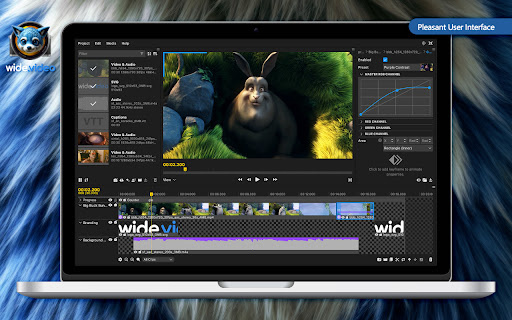


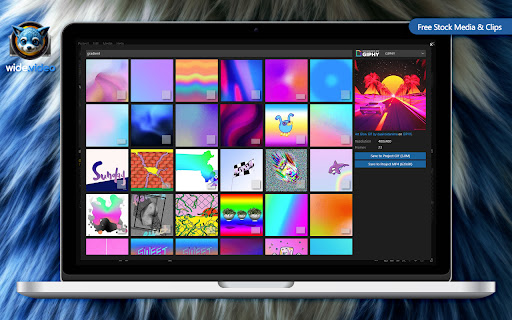
wide.video, a free online video editor, offers seamless creativity in your browser. Experience absolute privacy, with all processing conducted locally. No uploads, no installations. Enjoy effortless HD or 4K editing with support for modern formats including H.264, H.265, AV1, Rive, or Lottie.

AI Viral Studio - AI Image & Video Editor & Social Media Helper
AI-Powered Meme Creation and Social Media Sharing The ultimate Chrome extension for content creators, marketers, and businesses. Instantly generate AI-powered images, create engaging memes, and schedule posts across all major social media platforms with just one click. ViralStudio lets you design, edit, and post directly from your browser, saving you time and maximizing your reach. Perfect for growing brands, viral marketing, and high-volume content production, ViralStudio is your all-in-one creative command center. (Posting and Scheduling Coming Soon!) Built to merge powerful AI image generation (similar to Midjourney or DALL·E) with mass posting capabilities, ViralStudio offers a fully integrated editor where users can create original images, modify existing ones, and prepare them for Instagram Reels, YouTube Shorts, TikTok, Facebook, and more. Users can easily add text, adjust sizes, crop, and edit media — and once finished, immediately schedule or publish content to multiple accounts without ever leaving the Chrome browser. ViralStudio also features a customizable settings panel, gallery storage, output size/quality options, and intuitive memory of user preferences to streamline repetitive tasks. Its minimal, high-speed UI is carefully engineered for responsiveness, even when handling large galleries of images and videos. Silent MP4 creation, background audio addition, and upcoming video editing capabilities are designed specifically for creators looking to dominate short-form content platforms with ease. Whether you're building memes, branded ads, or viral videos, ViralStudio delivers a professional-grade toolkit inside a simple, accessible browser extension.

FlexClip AI URL to Video
This plug-in uses AI to excerpt the main text content of the web page and generate a video with one click. Utilize AI to excerpt the main text content of the web page and generate a video with one click. This AI URL-to-video extension is launched by FlexClip, a one-stop video creation platform with millions of global users. The extension is dedicated to helping users effortlessly transform blog posts, articles, news reports, and other web content into compelling videos. Key Features: AI-Powered Content Extraction: Use advanced AI algorithms to extract the core text content from web pages instantly. AI Text to Video: Transforms the extracted content into a dynamic video with AI, 10x faster than the traditional approach. Automatic Media Resource Matching: AI will analyze your content and find visuals from millions of stock videos and photos to match it. AI Voice Generator: Convert subtitles to lifelike voices with one click. 400+ voices across 140+ languages and dialects are available. Interactive Editing Capability: Users have the flexibility to edit the generated video, including modifying the text, replacing videos and images, and customizing the overall look of the video. How to use: 1. Install FlexClip AI URL to Video extension. 2. Open the page you want to generate a video from and access the extension. 3. Automatically get the link or paste the URL and navigate to FlexClip online AI video generator. 4. Log in to your account and start generating the video. 5. Adjust the generated scenes and add them to the editor. 6. Export the video and directly share it on different social media platforms. Try out this AI-powered tool to make your video creation journey smoother! If you've enjoyed our service, please consider leaving a review. We'd be grateful for your support in sharing the excellence you've encountered. If you have any questions or suggestions, please feel free to contact us through the website below: Official website: https://www.flexclip.com/ Contact: https://www.flexclip.com/contact.html

Video Tools Ultimate
A set of tools to enhance video playback and control experience. 🛠️ Video Tools Ultimate – The Only Video Enhancer You’ll Ever Need! Take full control over your online video experience with Video Tools Ultimate – a powerful, all-in-one extension packed with essential features to enhance, customize, and control video playback like never before! 🚀 Features: ✅ 🎥 Video Loop – Set start & end times to loop specific parts of a video. ✅ 🖼️ Picture-in-Picture – Watch videos in a floating mini-player while multitasking. ✅ 🎭 Hide Video UI – Remove controls & overlays for a distraction-free experience. ✅ 🔊 Volume Boost – Increase volume up to 300% beyond default limits. ✅ 🎨 Video Enhancer – Adjust brightness, contrast, saturation, and save custom presets. ✅ ⏩ Video Speed – Speed up or slow down video playback with precise controls. ✅ ⏩ Video Skipper – Set custom keybindings to skip forward/backward by chosen seconds. ✅ ⏪ Frame Scrubbing – Step frame-by-frame forward or backward with buttons or keys. 🎯 Why Choose Video Tools Ultimate? 🔹 Fully customizable – Configure shortcuts & playback settings to fit your style. 🔹 Works on most video sites – YouTube, Netflix, Vimeo, and more! 🔹 Lightweight & fast – No lag, no ads, just seamless video control. 🔹 Easy-to-use UI – Simple, intuitive popup menu for quick access. 🚀 Upgrade your video-watching experience now with Video Tools Ultimate! 📌 How to Use: 1️⃣ Install the extension. 2️⃣ Click the 📺 Video Tools Ultimate icon in your browser. 3️⃣ Select a feature & take full control over video playback! 📩 Feedback & Support Have suggestions or found a bug? Let us know! Your feedback helps improve Video Tools Ultimate for everyone. 🔹 Try it now & revolutionize your video experience! 🎬🔥 🚀 Work in Progress Disclaimer ⚠️ Note: Video Tools Ultimate is a work in progress, and some features may not work on all websites. Sites with multiple playable videos on the same page may experience limited functionality, and not all media players are currently supported. We are continuously improving compatibility and adding support for more video platforms. If you encounter issues, feel free to provide feedback! 🚀

Cap Cut Video Editor
Trim and edit videos in your browser. Preview changes, and download your edited clips. Edit videos right from your browser with CapCut Video Editor — a lightweight, easy-to-use tool for trimming, adding text, and downloading video clips. Whether you're editing a tutorial, meme, or presentation, this extension gives you the tools to create clean cuts and overlays instantly. 🚀 Key Features: ✂️ Trim videos to your desired start and end points 📝 Add custom text overlays to any video 📥 Download edited clips as .mp4 files 🖱️ Right-click to edit any video on supported pages 🔘 Toggle overlay buttons directly from the extension popup 💾 Settings sync across tabs via Chrome Storage 🧠 How It Works: Visit any page with a direct video (e.g. .mp4) Hover for the ✂️ edit button or right-click the video Launch the in-browser editor, trim, add text, and download your clip ⚠️ Note: This extension works with direct video URLs only (e.g. .mp4, .webm). Videos on platforms like YouTube are protected and not supported.
