
nkhcnkgodkchhoeebpolddblmoijkffn
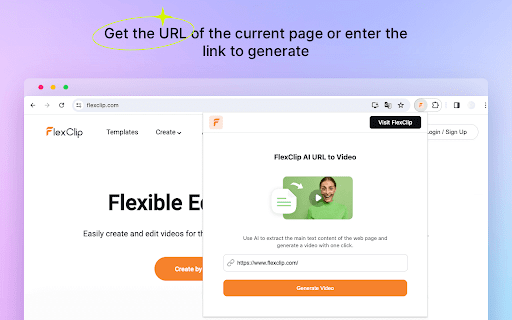
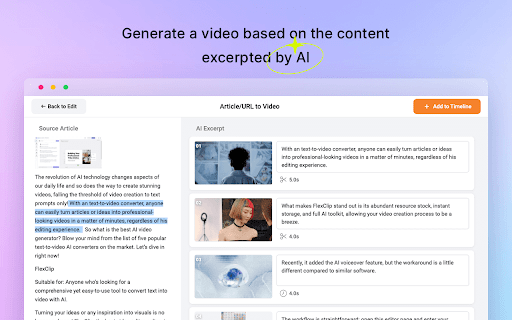
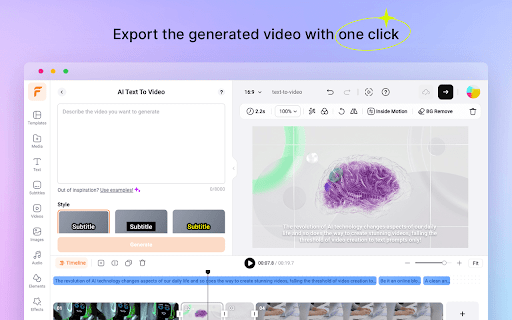
This plug-in uses AI to excerpt the main text content of the web page and generate a video with one click. Utilize AI to excerpt the main text content of the web page and generate a video with one click. This AI URL-to-video extension is launched by FlexClip, a one-stop video creation platform with millions of global users. The extension is dedicated to helping users effortlessly transform blog posts, articles, news reports, and other web content into compelling videos. Key Features: AI-Powered Content Extraction: Use advanced AI algorithms to extract the core text content from web pages instantly. AI Text to Video: Transforms the extracted content into a dynamic video with AI, 10x faster than the traditional approach. Automatic Media Resource Matching: AI will analyze your content and find visuals from millions of stock videos and photos to match it. AI Voice Generator: Convert subtitles to lifelike voices with one click. 400+ voices across 140+ languages and dialects are available. Interactive Editing Capability: Users have the flexibility to edit the generated video, including modifying the text, replacing videos and images, and customizing the overall look of the video. How to use: 1. Install FlexClip AI URL to Video extension. 2. Open the page you want to generate a video from and access the extension. 3. Automatically get the link or paste the URL and navigate to FlexClip online AI video generator. 4. Log in to your account and start generating the video. 5. Adjust the generated scenes and add them to the editor. 6. Export the video and directly share it on different social media platforms. Try out this AI-powered tool to make your video creation journey smoother! If you've enjoyed our service, please consider leaving a review. We'd be grateful for your support in sharing the excellence you've encountered. If you have any questions or suggestions, please feel free to contact us through the website below: Official website: https://www.flexclip.com/ Contact: https://www.flexclip.com/contact.html

NotebookLM AI Sidebar
Use NotebookLM AI Sidebar to import web links into a notebook and add YouTube videos and shorts with one click! 📒 The NotebookLM AI Sidebar Chrome extension is a powerful tool designed to streamline note-taking and research. With AI-driven features, it allows users to easily create and manage structured links. Whether you're gathering documents, generating insights, or add webpages into a notebook, Notebook LM makes in-depth research seamless and efficient. This extension allows you to effortlessly create documents in NotebookLM and easily add various articles to existing documents. 🛠️ Quick Start Guide: 1. Install the extension by clicking 'Add to Chrome' from Google Chrome Store 2. Click the icon in the top right corner of the browser tab. 3. Start creating or adding sources to your projects effortlessly! Why Choose This Extension? 1️⃣ Instantly create a notebook lm sidebar with just a click 2️⃣ Easily add sources to existing projects, add YouTube links or YouTube shorts 3️⃣ Enhance your investigation experience with artificial intelligence-powered assistance 4️⃣ Seamlessly integrate with Google for a smoother workflow 5️⃣ Improve productivity and organization with notebook lm sidebar features 6️⃣ Quickly access, edit, remove and manage your notebooks anytime 7️⃣ Optimize information gathering with notebook lm sidebar 8️⃣ Maximize efficiency using the extension 9️⃣ Find the perfect notebook lm sidebar alternative for your workflow 🔮 Discover a smarter way to organize with NotebookLM! 📚 Take a Audio Deep Dive 👍 Easily compile documents for deep research 💡 Generate insights using notebooklm capabilities 🤝 Discover how to use effectively for various purposes 📱 Podcast Feature 🔄 Transcribe, summarize, and analyze podcasts 📈 Get structured insights from audio discussions 🎤 Enhance learning with the AI podcast generator 💡 What is this extension? 🦊 This NotebookLM AI Sidebar Chrome Extension is an advanced powered tool designed to help users organize, easily create new projects and seamlessly add sources and also generate insights with ease. Whether you're working on deep research or need an ai-powered assistant, it is the ultimate solution. 🛠️ How to Use It? 1️⃣ Install the extension from Google Chrome Store 2️⃣ Click on the icon of this extension to right corner of the broweser tab 3️⃣ Start adding documents or creating new notebook instantly 🔍 Explore Alternatives 🚀 Looking for a NotebookLM alternative? Explore similar AI Notebook solutions with comparable features, ensuring flexibility and efficiency. 💻 Enhance Your Research with Google LM 📡 Use artificial intelligence-powered tools to generate summaries ✨ Organize your notes with Notebook Google KLM 📃 Collaborate effectively using LM Notes 🌟 AI notebook lm for Smarter Research 🏷️ Improve productivity with NotebookLM Podcast tools 🖋️ Leverage the notebook lm for structured insights ⚛️ Utilize NotebookLM for academic and professional work 🎧 AI Podcast Generator & Learning 🗣️ Convert discussions into structured notes 💬 Learn how to generate artificial intelligence podcasts with google lm 🔑 Access key insights quickly using google lm features 💡 Google AI Podcast Generator 💡 Automate podcast transcription and summarization ⏳ Save time with artificial intelligence-generated text from discussions 📀 Enhance learning and research with AI-driven insights 🧠 AI Revolution 🚀 Google ai notebook transforms how you interact with information online. This NoteboolLLM solution provides intelligent assistance for: ➤ Summarizing complex topics ➤ Identifying key concepts ➤ Generating insights from multiple sources ➤ Creating connections between different pieces of information ➤ Producing comprehensive reports and analyses 💪 Boost Productivity with Google AI 📅 Stay organized with intuitive NotebookLM features 💰 Get instant insights from NotebookLM 🎚️ Simplify research with an advanced notebook ai 🔄 Source Management Made Simple Wondering how many sources can handle or how to download sources from extension? The extension offers robust documents management: ➤ Add unlimited documents to your projects ➤ Organize sources by topic, project, or custom categories ➤ Easily download and export source materials ➤ Track documents origins automatically ➤ Cite sources properly with built-in citation tools 💰 Great Value at Any Level Concerned about cost? Rest assured that the extension offers tremendous value: ➤ Free tier with essential features ➤ Affordable premium options for power users ➤ Enterprise solutions for teams and organizations ➤ Special pricing for educational institutions ➤ Flexible payment options to suit any budget 📱 Cross-Platform Compatibility The Google AI app works across your devices: ➤ Chrome browser on desktops and laptops ➤ Mobile browsers for on-the-go access ➤ Tablet compatibility for flexible use ➤ Consistent experience across all platforms ➤ Automatic syncing between devices 🔒 Privacy & Analytics To improve the extension, we collect anonymous usage statistics (e.g., which features are used and how often) linked to a randomly generated device identifier. No personal data, Google account info, notebook content, or browsing history is ever collected or shared. 🌐 Can I Use Offline? 📢 Currently, Its requires an internet connection. However, users can save content for offline access within their browser. 📝 How many sources notebooklm? ✈️ Google lm allows users to add multiple sources without restrictions ⛄ Ideal for deep research, content creation, and knowledge organization 💾 How to download sources from notebook lm? 🌊 Access your sources in google lm site 🦊 Use the built-in export function to download sources 🐶 Organize and store your data efficiently 📌 Can ai notebook generate content based on my sources? 💡 Yes! The ai can create summaries, reports, and even creative content based on your collected sources. 📌 Can I use Notebook LM for academic research? 💡 Absolutely! The extension is perfect for academic research with proper citation and source tracking capabilities. 📌 Does Notebook LM support multiple languages? 💡 Yes, the extension supports dozens of languages for truly global research capabilities. 📌 Is my data secure with NotebookML? 💡 Yes! Your data is protected with industry-standard encryption and Google's robust security practices. 🚀 Install the Chrome extension now and take your research experience to the next level with Notebook LM!

JoggAI - AI-Powered URL to Video
Make an engaging video with your product in a few clicks. What is JoggAI? JoggAI is an AI-powered video creation tool that allows you to instantly generate high-quality videos just by entering a product URL. Whether you’re an e-commerce seller, content creator, marketer, or social media influencer, JoggAI helps you effortlessly create engaging videos to boost conversions and brand visibility! Key Features One-Click URL to Video Simply enter a product page URL and JoggAI will automatically analyze the content and generate a dynamic video—no manual editing required! AI-Powered Editing JoggAI extracts key information, selects the best video templates, adds captions, and applies effects, creating stunning videos with minimal effort. Optimized for E-Commerce • Automatically fetches product images & details to generate promotional videos. • Compatible with Amazon, SHEIN, Shopify, and other e-commerce platforms. • Creates TikTok, Instagram, and YouTube Shorts videos to increase engagement and sales Multiple Video Styles Supports promotional videos, short-form content, and social media ads, catering to different marketing needs. One-Click Social Sharing Easily export and share your videos on TikTok, Instagram Reels, Facebook, YouTube Shorts and more to maximize your content’s reach. Perfect for Various Use Cases • E-commerce Marketing (Product showcase videos) • Content Creation (Turn articles into engaging videos) • Ad Production (Create social media ads effortlessly) How It Works? Install the Chrome Extension Enter a product URL Click the “Generate Video” button AI analyzes the content and creates a video automatically Preview, customize & export your video That’s it! Why Choose JoggAI? Saves 90% of Video Editing Time - AI-powered automation for fast video creation Optimized for Multi-Platform & Multi-Format - Perfect for social media marketing No Editing Skills Required - Anyone can create high-quality videos in seconds Install the JoggAI Chrome Extension now and revolutionize your video creation! Visit the JoggAI website to unlock more features https://www.jogg.ai/

Topview AI extension: Turn Your Product Into Viral Videos
Convert any URL into engaging videos in a few clicks. Boost your content strategy with Topview AI — perfect for social media! Convert any URL into engaging videos in a few clicks. Boost your content strategy with Topview AI - perfect for social media! Effortlessly convert any URL into engaging videos in just a few clicks. Enhance your content strategy with Topview.ai - perfect for social media sharing! Topview.AI's Viral Video Agent helps you instantly convert any product into scroll-stopping social videos. No video editing skills needed. Perfect for e-commerce, marketers, and anyone who wants their product to go viral! 🔹 Why use it Leveraging Topview AI technology for video creation offers several key benefits: 🌟 Create Product demo, or video, or ads in minutes, not hours. 🌟 Easy to use UI, no editing skill needed. Generate a video with several clicks, AI does everything for you. 🌟 Save time & money, create a video or ads without a camera. 🌟 And get more converting by instantly engaging hook. 🌟 Publish Agent video to TikTok, Instagram, and more social media platform in one click. 🔹 Key features 🌟 Viral Video Agent: Recreate viral videos for your product. 🌟 Avatar 4: Create life like talking avatars from a photo and script. 🌟 Product Avatar: Create an avatar interacting with your product using one image. 🔹 What for: 🌟 Amazon/Shopify/shoppee/aliexpress URL to Video: extract product info from your website, download images & videos, make a video base on the webpage. 🌟 Landing Page to video 🌟 Website to video 🌟 Article to video: rewrite engaging script from article, and generate videos base on the images from article and the stock AI avatar 🔹 How to Use the Extension to Convert a URL to Video with AI 1. Navigate to the website you want to create a video from, and click on the Topview extension icon in the top right corner of your browser. 2. Hit the "Convert Webpage to Video" button to let the AI analyze the webpage content. 3. After the analysis is complete, simply generate the video with one click. We can help u to make video creation from any webpage quick and easy.

Text to Video - AI Video Creator | Pictory
Convert any text or URL into a professional AI-generated video with captions, visuals, and voiceovers — powered by Pictory 🎬 Turn Any URL or Text into a Video Instantly The Text to Video Chrome Extension by Pictory lets you transform any online article, webpage, or script into a complete video, all without leaving your browser. 📋 Paste a URL or text, and our AI automatically extracts the main ideas, writes a script, selects visuals, and adds captions and voiceovers. Whether you’re a marketer, educator, or content creator, you can turn blogs, research papers, or news articles into ready-to-publish videos in minutes. ⚙️ How It Works Step 1 – Capture a URL or Enter Text While browsing any webpage, click the Pictory Chrome Extension. The extension automatically captures the URL. Step 2 – Choose Video Type Select your preferred video style: 💡 Explainer 📣 Marketing 💼 Internal Communication 🎓 Tutorial This helps the AI tailor the tone and flow of your script. Step 3 – Generate Your Script Click “Generate Script.” Pictory AI will summarize the webpage or process your text input to create a concise, editable script optimized for video storytelling. Step 4 – Edit and Customize You’ll be redirected to your Pictory workspace, where you can: • Review and edit the generated script • Adjust visuals, captions, and audio • Apply your brand kit (logo, fonts, colors) • Choose voiceovers and music Step 5 – Generate and Download Video Preview your project and download a high-quality video, ready to share across social platforms, websites, or presentations. ✨ Key Features 🔗 URL to Video: Convert any online article or web page into a summarized AI video. 📝 Text to Video: Paste any text, and Pictory turns it into visuals, captions, and voiceover. 🧩 AI Script Summarizer: Automatically extract key ideas from long-form content. 🎨 Fully Customizable: Edit scenes, captions, visuals, and add your brand kit. 🎙️ Voiceover and Subtitles: Choose professional AI voices and auto-generate subtitles. ⚡ One-Click Workflow: Seamlessly integrated with your browser and Pictory account. 👥 Who It’s For 📈 Content marketers repurposing blogs and news articles into videos. 🎓 Educators turning lessons or research into visual explainers. 🏢 Corporate teams creating internal communication videos. 🎥 Creators and entrepreneurs sharing insights on YouTube, LinkedIn, and TikTok. 💎 Why Choose Pictory Pictory’s award-winning AI video platform powers this extension, enabling effortless text-to-video and URL-to-video conversion. 🌍 Trusted by over one million professionals worldwide, it combines script generation, video editing, and brand management in one seamless workflow. 🔒 Privacy & Permissions This extension requires minimal access: • Reads the active webpage only when you click the extension • No background tracking or data storage • Processes text securely via your authenticated Pictory account
