
ikcpbmlbgoknannnfcnfhmohpcnlphmn
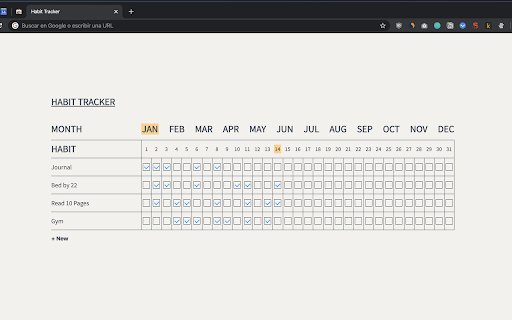
Add personal habits based on your goals and keep track of them. - Basic extension for keeping track of habits. - Upload a habit. - Check the completed days.

Time Tracker - Web Habit Builder
Track time, analyze your habits and block addictive sites Time Tracker - Web Habit Builder is a free, privacy-first web habit builder that automatically logs screen time, provides accurate analytics, and blocks distracting sites — keeping all data strictly local and under your control. 🚀 ⏱️ Track and Audit Time: Automatically monitor active web usage with a high-accuracy engine and active tab state detection. No account required. It ensures every second is correctly recorded for a truthful view of your screen time, featuring a 3-day rolling granular timeline with second-by-second precision for deep, exact activity auditing. 📊 Analyze Digital Habits: Gain deep insights through multidimensional reports. Visualize productivity by Site, Category, or Tab Group. Works fully offline with zero data leakage. 🛡️ Block Addictive Sites: Reclaim your focus with an integrated website blocker. Set flexible time limits and rules to break addictive browsing cycles and maximize deep work. 🔍 Precision "Virtual Sites": Beyond domain tracking, define specific sub-page URLs (like a YouTube video or Notion doc) for granular monitoring once configured. 🔒 DATA OWNERSHIP AND TRANSPARENCY 🏠 Local-Only Storage: 100% of your history stays on your machine. The extension does not collect, store, or transmit your data to any remote servers. ☁️ User-Controlled Sync: You have the option to sync across devices using your own WebDAV, GitHub Gist, or Obsidian accounts. These connections are entirely managed and authorized by you. ⚖️ MIT Licensed: Transparent and audit-ready code under the MIT License. No hidden tracking, no subscriptions. 📥 One-Click Import: Easily migrate from Webtime Tracker or Web Activity Time Tracker without losing your history. 💻 Cross-Browser: Native support for Chrome, Firefox, and Edge with automatic Dark Mode.

My Habits - Daily Reminder
Simple tool that won't let you forget anything important. Set reminders to take medicine, drink water, and pills. My Habits is your go-to browser extension designed to help you stay on top of your daily routines and essential tasks. Whether it's remembering to take your medicine, drink water, or keep up with any other habit, this simple yet powerful tool ensures that you won’t forget anything important. ✅ Easy-to-Set Reminders Quickly set up reminders for any activity with just a few clicks. Tailor them to your schedule and lifestyle. ✅ User-Friendly The extension boasts a clean, straightforward interface that makes setting and managing reminders a breeze, even for those who aren't tech-savvy. ✅ Non-Intrusive Alerts Receive gentle notifications right in your browser without interrupting your workflow. Stay on track without feeling overwhelmed by constant interruptions. ✅ Flexible Scheduling Choose the exact time and frequency for your reminders. Whether it’s a one-time alert or a recurring reminder, My Habits accommodates your schedule seamlessly. My Habits extension is indispensable for a wide range of individuals seeking to enhance their daily organization and wellness. Here are some key groups that benefit significantly from using our tool: 1. Busy Professionals Professionals juggling various responsibilities can use reminders to ensure they don’t overlook important tasks, meetings, or deadlines. Alerts can help remind them to take breaks, hydrate, and maintain healthy habits amidst a busy schedule. 2. Students Set reminders for study sessions, assignment deadlines, and exam preparations. 3. Individuals with Health Conditions People with chronic conditions or those recovering from illness can benefit from reminders to take their medications on time. Regular reminders for activities like checking blood sugar levels or scheduling medical appointments can be crucial for ongoing health management. 4. Habit Builders People aiming to establish new habits, such as regular exercise, reading, or mindfulness practices, can use daily reminders to stay consistent. Those trying to break unwanted habits can set reminders for positive actions that replace their usual patterns. 5. Forgetful Individuals Individuals who frequently forget tasks or events can benefit from structured reminders to keep them on track. Having a system that remembers important activities for them can reduce stress and improve daily life quality. 6. Fitness and Wellness Enthusiasts Fitness buffs can set reminders for workouts, hydration, and nutrition tracking. Reminders for meditation, breathing exercises, or breaks can support mental well-being. 7. Travelers Travelers can use reminders to keep track of itineraries, important documents, and essential tasks while on the move. Reminders for hydration, medications, and exercise can be especially useful during travels. In an increasingly fast-paced world, the ability to remember and adhere to daily tasks and routines is more challenging than ever. Extension like My Habits serves as reliable tools to: ✅ Reduce Cognitive Load: By offloading the need to remember every detail, users can focus on more significant tasks and reduce mental fatigue. ✅ Promote Consistency: Regular reminders encourage the maintenance of healthy habits and routines, leading to long-term benefits. ✅ Enhance Productivity: Structured reminders help in efficient time management and task completion, boosting overall productivity. ✅ Support Health and Wellness: Frequent prompts for self-care activities contribute to better physical and mental health. ✅ Daily Reminder isn’t just about keeping you on schedule; it’s about improving your quality of life by helping you stay organized, healthy, and mindful every day. In our busy lives, it's easy to forget the little things that matter. "My Habits - Daily Reminder" acts as your personal assistant, gently nudging you to stay on top of your commitments. Whether it's your daily vitamins, staying hydrated, or any other regular activity, this extension is designed to keep you organized and mindful. Install My Habits - Daily Reminder today and take the first step towards a more organized and healthy routine!

Focus To-Do: Pomodoro Timer & To Do List
Focus To-Do combines Pomodoro Timer with Task Management, it is a science-based app that will motivate you to stay focused and get things done. It brings Pomodoro Technique and To Do List into one place, you can capture and organize tasks into your todo lists, start focus timer and focus on work & study, set reminders for important tasks and errands, check the time spent at work. It's the ultimate app for managing Tasks, Reminders, Lists, Calendar events, Grocery lists, checklist, helping you focus on work & study and tracking your working hours. Focus To-Do syncs between your phone and computer, so you can access your lists from anywhere. How it works: 1. Pick a task you need to accomplish. 2. Set a timer for 25 minutes, keep focused and start working. 3. When the pomodoro timer rings, take a 5 minute break. Key Features: - ⏱ Pomodoro Timer:Stay focused and get more things done. Pause and resume Pomodoro Customizable pomodoro/breaks lengths Notification before the end of a Pomodoro Support for short and long breaks Skip a break after the end of a Pomodoro Continuous Mode - ✅ Tasks Management: Task Organizer, Schedule Planner, Reminder, Habit Tracker, Time Tracker Tasks and projects: Organise your day with Focus To-Do and complete your to do, study, work, homework or housework you need to get done. Recurring tasks: Build lasting habits with powerful recurring due dates like "Every Monday". Reminders: Setting a Reminder ensures you never forget important things ever again, you can set up recurring due dates to remind you each and every time. Sub-tasks: Break down your task into smaller, actionable items or add a checklist . Task Priority: Highlight your day’s most important To-Do with color-coded priority levels. Estimated Pomodoro Number: Estimate the workload or set a goal. Note: Record more detailed about the task. - 📊 Report: Detailed statistics of your time distribution, tasks completed. Support the calculation of the total time of Focus Time. Gantt Chart of the Focus Time. Statistics on completed To Do. Statistics on time distribution of project. Trend chart of the completed To Do and the focus time. - 🖥📲 All-Platform synchronization: View and manage your goals wherever you are for better goal achieving. Support seamless synchronization within iPhone、Mac、Android、Windows、iPad、Apple Watch. - 🎵 Various Reminding: Focus Timer finished alarm, vibration reminding. Various white noise to help you focus on work & study. Contact Us: focustodo@163.com, reply within 24 hours. Website: http://www.focustodo.cn Pomodoro ™ and Pomodoro Technique ® are registered trademarks of Francesco Cirillo. This app is not affiliated with Francesco Cirillo. Users have been focused on our app for 200 million hours, join us and we help you to be focused and increase your productivity, reduce procrastination and anxiety.

New Tab Todo List: Checklist, Notes, Outliner
Beautiful and sharable checklists, notes, and to-do lists. Collaborate and outline in real-time. Turn your New Tab into a Todo List! ✏️ A lightning fast new tab productivity page and dashboard with stunning backgrounds, todo, tasks, lists, and more. Make your new tab / start page the way it should be: Fast, customizable, beautiful and productive! Make lists, outlines, todos, and more. With the New Tab Todo List extension for Chrome, just open a New Tab to capture your ideas, goals, and daily tasks. New Tab Todo List is a friendly space for your lists, outlines, and teams. Use it as your simple to-do list and task manager. You can instantly make a list and share it with your friends, family, and team. Simple, clean, and beautifully designed with relaxing themes and backgrounds. New Tab Todo List declutters your thoughts so you can focus on your tasks, ideas, and getting things done. Use New Tab Todo List to capture your ideas, goals, daily tasks and stay organized. A homepage you will fall in love with! Checklists, tasks, todos, quick notes, calendar and more. Replace your new tab with a personal productivity tool featuring to-do, task lists, team outliner, and inspirations. • New Tab into a beautiful task list • Collaborate with others, with real-time syncing • Share your task lists instantly using a share link • Easily invite friends and teammates to New Tab Todo List • Work together in a shared team space • Task lists with a natural editing interface • Edit to-do lists like a word doc and document • Mark any items as complete, whether bullet, number, or checkbox. • Infinitely nested lists with indent / outdent • Tag and filter tasks using #hashtag and @mentions • Works on phones and tablets, with live real-time syncing between devices • Automatic syncing between your phone, tablet and computer • Simply click to edit, like a text document • Easily expand and collapse outlines and lists • Inspirational wallpapers and photos • Beautiful and minimal interface • Simple, instant and FREE • Feel good, get motivated, seize the momentum and get things done! Yes, New Tab Todo List is completely free. Soon you will have the option to upgrade to New Tab Todo List Pro, which will have additional features like themes, sticker packs, and customizations. ➜ CAN I USE New Tab Todo List WITH MY TEAM? Yes. Create a space and invite your team instantly. It helps keep your lists and team organized. Members will have full access to lists in space. Use New Tab Todo List as your collaboration tool to help each other get stuff done. Meeting notes, task lists, collaborative documents and processes are now in one place in your shared New Tab Todo List space. Unleash your team’s potential ➜ CAN I COLLABORATE WITH OTHERS? Yes. New Tab Todo List allows you to edit lists dynamically with anyone through a share link in real-time. Your task lists are in sync across all devices live and in real-time. Collaboratively edit together in real-time with teams and groups. Simply select and share the edit link. Stay organized and make progress with your team projects using New Tab Todo List. Your team is on the same page!
