
ikckgihkcenlmafeeheiadmdlpfppaij

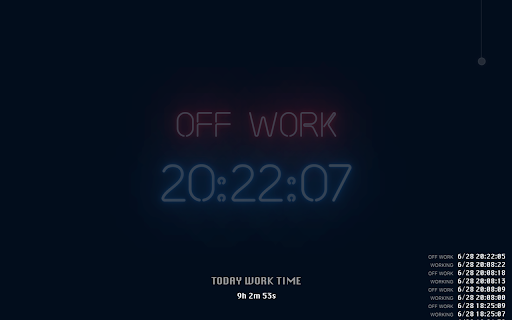

Displays a beautiful neon interface showing working status and time in a new tab, you can control and count working time, etc. This is a new tab page plugin that uses neon light effects to display and record information such as work status and work hours. The main function: 1. Display the clock (with a nice neon effect) 2. Display working status 3. You can use the pull light effect to control the working state 4. Record the working status and calculate the working hours today 5. display top visit site on page

Clear New Tab
Remove everything from the new tab page while keeping your theme background, or use any image, GIF, or video as a custom wallpaper. Want a blank new tab and nothing more? Try this extension: https://chromewebstore.google.com/detail/odjfoclbnmllekbhpbgopiiaelcpeimb 🌄 Theme background When Clear New Tab is installed and "Theme background" mode is selected, the backgrounds of themes you install from the Chrome Web Store will automatically download and appear in the new tab. If the theme background appears too large or small, you can fix it by setting "Background size" to "Cover the screen." 🖼️ Your own background Upload your own background (image, GIF, or video) or choose a custom color to display in the new tab page. 🔁 Cycle through different backgrounds Clear New Tab can cycle through your backgrounds, showing a different one each time you open a new tab. 🎨 Random solid color Display a randomly generated solid color background each time you open a new tab. 📅 Schedule a background In "Scheduled" mode, Clear New Tab lets you display specific backgrounds at the dates and times you choose. ---------------------------------------------------------------- ❓ FAQ There's no search bar. How do I search the web? Use the address bar for web searches. The bookmarks bar doesn't show in the new tab. Why does Clear New Tab hide it? Clear New Tab doesn't hide it; if an extension replaces the default new tab, Chrome automatically hides the bookmarks bar. To make it always visible, press Ctrl + Shift + B. How can I eliminate the "white flash" before a background loads? Adjust the "Color of the area around the background" setting. Ensure that "Settings context" is set to "Global." The theme background doesn't fit the screen. How do I fix it? Select "Cover the screen" or "Fit to the browser window" in the "Background size" dropdown. Custom HTML links aren't working. How do I fix them? Add target="_top" to the tag. Example: Microsoft ---------------------------------------------------------------- 🛠️ Known Issues Clear New Tab data may be automatically removed by the browser. The extension uses IndexedDB to store user data, which the browser may delete if it detects insufficient free space. ---------------------------------------------------------------- 🔐 Permissions Replace the page you see when opening a new tab Allows the extension to display a background image on the new tab page. Read and change your data on clients2.google.com and clients2.googleusercontent.com Allows the extension to download a theme CRX package containing the theme background and other data, such as background-repeat and color of the area around the background. Manage your apps, extensions, and themes Allows the extension to detect when a theme is installed and provides information about the installed theme (e.g., theme ID, theme name). The theme ID is used to download the CRX package. Read data you copy and paste Allows the extension to paste an image or image link in the "Paste image or its link" input using the "Paste" button. ---------------------------------------------------------------- 🐱 GitHub: https://github.com/loftyshaky/clear-new-tab 🧩 Follow my Facebook page (more extensions): https://www.facebook.com/browservery ---------------------------------------------------------------- Ads When using Clear New Tab, you may encounter affiliate links on the extension's settings page.

Digital Clock
Date and time of your location Digital clock. Date and time of your location. Searching possibility.

e-clock
Make new tab page truly yours. Distraction free minimalistic clock that looks and behaves the way You want. Lets you customize backgrounds, colors, fonts, clock format and more.

Big Clock | Hour
It is a add-on that displays the current hour and minute in the toolbar as a large readable add-on icon. Big Clock - Display Hours and Minutes in the Browser Toolbar. Big Clock is an add-on that provides legible and customizable hour and minute display in the browser toolbar. Available as two separate add-ons, Big Clock | Hour and Big Clock | Minute, this application shows the user the current hour and minute instantly through the toolbar icons. Dark and Light Mode Support: You can use it in dark or light mode depending on your browser theme. Colored Icons: The icons are black or white depending on the selected theme color, the toolbar display is always stylish and harmonious. Clock Display Format: You can set 24h or 12h clock display according to your preference. Multi-Language Support: The plugin offers multi-language support for use in different languages. Customizable Design: Customize the text and background color, and add a unique style to your browser with the option of analog or digital clock view. Popup Page: Keep track of time in more detail with the display of hours, minutes, seconds and current date on the popup page. Customizable Date Display: Set the date display format according to your preference. Visual Options: Decorate the popup background or clock background with customizable images. Import images from hard disk or URL. Clock View in Separate Window: Option to open a separate window to see the clock view in a larger window. Synchronized Use: Use Big Clock Hour and Big Clock Minute plugins together and settings are synchronized automatically. Plain and Simple Operation: It offers a simple and straightforward usage experience with its user-friendly interface. Keep track of time in style in your browser's toolbar with Big Clock. Especially if you use it to hide the taskbar of your operating system, this is for you. Install now for a professional and customizable clock experience!
