
ikbgfchmbnooojaalbipinbekdkofpjm

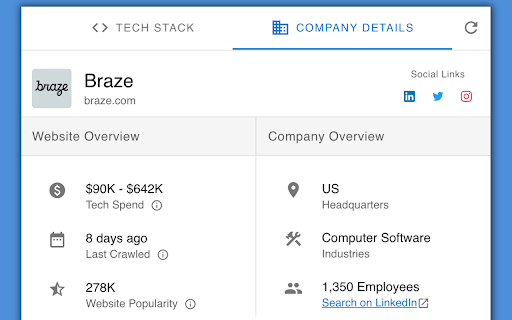

Inspect websites and see what technologies they use! See the technology stack of any website, and how much they spend on their tech stack. We analyze a website's code and tell you what technologies are running with high accuracy. Also see what a website spends on their tech stack, and company details like employee size, headquarter location, and more. NerdyData indexes over 900 different technologies including E-Commerce platforms, CRM tools, Content Management Systems, advertising networks and more. NerdyData is a free alternative to Wappalyzer, Whatruns, and BuiltWith. Download full reports of all the websites that use a certain technology by visiting https://www.nerdydata.com

WhatRuns
Discover what runs a website. Frameworks, Analytics Tools, Wordpress Plugins, Fonts - you name it. WhatRuns extension is one click away for you to find technologies used on any website you visit. From Developer Tools and Ad Networks to Wordpress Plugins and Themes, we detect even the new and upcoming tools and services. Not just that - you can follow websites so that you get notified when they use new technologies or remove existing ones. How do you know what runs a website? Every technology leaves a pattern on the websites it is being used. WhatRuns' algorithm recognizes these patterns to detect the tech stack of a particular website. What all things you identify on a website? WhatRuns detects almost everything that runs a website - frameworks, web technologies, CMSs (and its plugins), themes and fonts to name a few categories. How is WhatRuns different from extensions like Wappalyzer, BuiltWith, Datanyze and Ghostery? While all of these are good old products, WhatRuns is less heavy on your browser, has a better detection accuracy and recognise even the latest technologies and plugins compared to our counterparts. We also uncover fonts, Wordpress plugins and themes used on websites, which nobody else does at the moment.

Shovel
Designed for developers, product managers, and tech enthusiasts who need quick, precise tech stack insights -Rapidly identify technologies embedded in web pages -Custom search terms for flexible, on-the-fly technology lookup -User-defined search parameters -Scans outerHTML for precise technology detection -Complements existing tech detection tools by finding nuanced, hard-to-catch technologies -Perfect for quick technical reconnaissance and competitive analysis Quick Tech Insights, No Bloat -Lightweight and focused -Works when other tools fall short -Instant scanning of HTML source Key Limitations -Requires active page open -Does not search iframe content

Sputnik
OSINT web extension Sputnik is an extension to quickly and easily search IPs, Domains, File Hashes, and URLs using free Open Source Intelligence (OSINT) resources. • Text - Select the artifact you wish to search and right click • Links - Right click on links, audio, images, videos • Select an OSINT tool • In most cases, you will be redirected straight to results • For tools that require user interaction such as captchas: • The highlighted artifact will be saved to your clipboard • You will be directed to the submission page

Vortimo OSINT-tool
OSINT Swiss army knife:bookmark/record pages, store screenshots, scrape and enrich entities. Finds text on every page + highlight. NB: All data stored locally and does not leave your computer. As seen on the desktops of researchers, investigators, journalists and intelligence analysts. If you do real investigative work using a browser you will understand why the features of this extension is SUPER helpful for investigations. We use this tool ourselves every day for investigations too. Comprehensive manual for this extension here: https://www.vortimo.com/osint-tool-extension/ Main features of this extension (if you're still reading): ============================================ Keeps track of every site you visit: > Easily (one button) saves current webpage as MHTML file locally on your computer - exactly how it appeared. > Automatically saves URL + screenshot of every page you visit. > Allows you to capture any part of the screen, save it and find it later. > You can bookmark sites for easy retrieval later. > You can search for pages you've been to using title / URL or bookmark. We have this feature so you don't lose pages you've been to - you can easily mark pages or areas in pages for further investigation / research. Generically extracts objects from pages: > Names, email addresses, phone, hashtag, alias, GPS coordinates, IP address and others. > Filter on type, value of object, see where it occurred in pages you've been to. > Can copy list of objects to clipboard to easily paste into reports, databases, other tools. > Allows you to search for any of the extracted objects. We have this feature so you can easily feed extracted information into other tools of your choice. Enrich objects / images / pages: > Using a list of OSINT tools you can enrich any of the objects extracted (like Dehashed, Epieos, Domaintools etc. etc). > In the page itself, no need to switch to other tool. > Reverse image search on images using Yandex/Google/Bing/TinEye. > Exif on images using Vortimo's own online Exif viewer (yay). > Find old instance of the pages you're on using WayBack machine and other tools. > Find pages that use same tracking codes using BuiltWith and other tools. We have this feature so you can easily and without switching tools/pages learn if there is interesting information on the Internet about an item of interest. Graphs. We have them: > Show a graph of how you navigated from one site to another. Keeps track of your journey. > Show graph of how extracted objects (email, phone, alias, hashtag, blah) are related to each other, via sites that you've visited. We have this feature because you can never remember how you got to a page, and now you can go look see. We show the object graph so you can see which names or any other extracted object is more relevant than others. Also, because it's cool. Thumbnail view: > See every site you've been to as a small picture. Bird's eye view of your investigation. > Instagram, but for sites you've been to ;) We do this because we want to make it easy for you to find a single site in a list of 400 sites. And you are probably better at pattern recognition than you are at reading text. Find ++ / Advanced search: > You give a list of names (or any other text) and we highlight it in ALL pages you go to in future. > This also works on infinite scrollers (like IG/FB) where new content is loaded dynamically. > When text is seen on page, a visual 'bell' sound on the left of the screen. > Can have lists of text to highlight and in 4 different colors (customizable) and bells. We have this feature because it is very useful when you immediately need to know if a POI appears in sea of text while you've browsing many, many pages. Import / export: > You can import and export you graphs, sites... everything you've collected > You can share the files with your collogues! We do this because - we use this tool ourselves and you need to save and share you work. The tool does a LOT! Best you check out the documentation. Enjoy the software. And thanks for reading all of this text!
