
ijnhpobnmoedhgifhodnagnkeoopnfkn
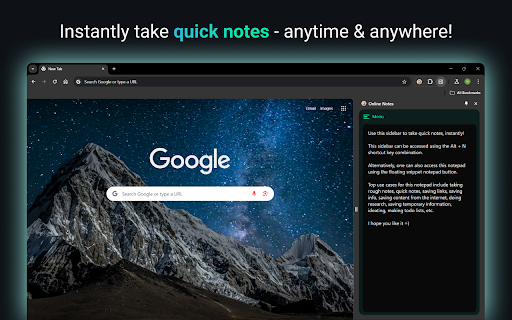
Memo Notepad helps you quickly take rough notes, without ever switching the context. Memo Notepad: Speedy Notes Inside Your Browser Writing a quick idea should not derail your flow. Memo Notepad lets you jot thoughts without leaving the page. This guide shows how the extension saves time, powers focus, and keeps every note one tap away. One-Tap Access Press Alt + N. A tidy pad slides into the Chrome side panel. No tab hunt, no desktop shuffle. Context Stays Visible Your article, spreadsheet, or dashboard remains in view. You type notes while the source material stays on screen. Feather-Light Code The package weighs under 150 KB. It loads in under 50 milliseconds on most machines, based on internal benchmarks. Keyboard First Every major action has a shortcut. Mouse fans can still click the floating button. Features Sidepanel editor - Write while you read; no window juggling Auto-save every second - Never worry about hitting “Save” Local storage first - Notes stay on your device for privacy How To Install and Start Writing - Open the Chrome Web Store. - Search Memo Notepad Chrome Extension. - Hit Add to Chrome. - Press Alt + N on any page and begin typing. Tip: Pin the icon to the toolbar for visual reassurance, though shortcuts remain faster. Students Burning Through Readings Highlight a quote, press the shortcut, paste it, add your thought. Stay in the same tab the entire lecture. Product Managers in Meetings Keep Jira open, list action items in the side panel, copy straight into tickets later. Zero formatting chaos. Writers Catching Sparks Spot a compelling phrase on Twitter? Capture it instantly. The browser note becomes the seed of your next blog. Everyday Shoppers Plan a grocery list while browsing recipes. Drag the note into a delivery app when you finish. Where are notes stored? By default, in Chrome local storage on your machine. Can I change the shortcut? Open Chrome Extensions → Keyboard Shortcuts and set any key combo you prefer. Ready To Try It? Adding Memo Notepad takes less than a minute and could save you hours this year. Write a thought right where it appears. Reduce tab overload. Keep focus sharp. Install now and let ideas flow without friction.

Notepad Extension
Notepad Extension is a browser extension that allows users to save notes while browsing the web without switching tabs or windows. Notepad Extension is a simple and convenient way to save notes while browsing the web. Quickly jot down important information, ideas, or reminders without changing tabs or windows. Click on the extension icon in your browser's toolbar to open the pop-up window, where you can type in your note. Notes are saved as you type.

Note pad online
Note pad online — your quick, private online notepad in the browser side panel. Open this notes extension with a single click, jot anything down, close it. Notes save automatically and stay on your device. No account, no sign-up. 📝 What this online notepad does ➡️ Create multiple notes, each with a title and rich-text body ➡️ Format with bold, italic, headings, bullet lists, numbered lists, and task lists ➡️ Tag notes and filter the list by tag ➡️ Mark favorites and filter to just those ➡️ Search across all your notes ➡️ Word count for every note ➡️ Sort by newest or oldest ➡️ Built-in emoji picker ➡️ Export to TXT, Markdown, or JSON ➡️ Lives in the browser side panel — always one click away 🔒 Private by design Everything you write is stored locally on your device via Chrome's storage API. Your notpad data is never sent to a server, never shared, never sold. No account required. Because notes live on your device, they do not automatically sync between computers. To move notes to another machine, use Export (Markdown works great). 🎯 Who this notes extension is for 🔹 Students taking class or study notes 🔹 Writers and bloggers brainstorming ideas 🔹 Professionals tracking to-dos and meeting notes 🔹 Researchers collecting quick excerpts while browsing 🔹 Anyone who wants a clean note pad online without yet another login ⭐ Why people like it ✅ Opens instantly in the side panel ✅ Autosaves as you type ✅ Works offline ✅ No login, no ads, no upsell ✅ Lightweight — doesn't slow your browser ✅ Clean interface, just the tools you actually use 💡 Tips ⭐ Pin the icon to your toolbar for one-click access ⭐ Use tags like #work, #ideas, #recipes to organize ⭐ Star anything you reference often ⭐ Export to Markdown to move notes into Obsidian, Notion, or any other app 🚀 Getting started 1. Install Note pad online 2. Click the icon to open the side panel 3. Start writing — autosave kicks in immediately 4. Close anytime; everything stays saved ❓ FAQ Q: Do I need an internet connection? A: No. Everything works offline. Notes are stored on your device. Q: Do my notes sync between computers? A: No — notes are stored locally for privacy. Use Export to move notes between devices. Q: How do I delete a note? A: Open the note's menu and choose Delete. To remove text inside a note, highlight it and press delete or backspace. Q: What about my data if I uninstall? A: Export first if you want to keep your notes. Uninstalling may clear extension storage.

Text Editor
Plain Text Editor: a simple online notepad to quickly edit the text, jot bloc note and make txt file effortlessly. Looking for a good text editor that combines simplicity with convenient functionality? This extension provides a wide range of features – whether you need a simple text editor for writing ideas or online notepad for quick notes. With instant access and ability to save, it’s the perfect tool for writers, developers, students and professionals. 🚀 How to Get Started with this online text editor? 1️⃣ Add the extension to Chrome in seconds 2️⃣ Click the notepa icon to launch your workspace 3️⃣ Begin typing or paste existing content into the field 4️⃣ Use formatting tools for headings, lists and emphasis 5️⃣ Export in multiple formats 🌟 How is this software useful? Not all text editors are simple. This good text editor is useful because: ▸ Zero Installation Required – Works instantly in your browser as an online note pad ▸ Minimal & Lightweight – A basic text editor focused on simplicity and efficiency ▸ Multi-Format Export – Save as txt, word ▸ Instant Auto-Save – Never lose work with this reliable text online editor ▸ Word Count + Stats – Track progress in the panel ▸ Offline Mode – Keep working in edit pad without internet 🔥 Powerful Features of This Tool ⚡ Symbol Count – Real-time tracking for writers and content creators into edit pad ⚡ Saving Files State – Access your files anywhere ⚡ Quick Search – Find and replace words instantly ⚡ Minimal Lag Typing – Enjoy smooth, responsive editing for a seamless writing experience ⚡ Quick Formatting Tools – Bold, italicize, underline with and strikethrough one click ⚡ Session Recovery – Automatically restores unsaved work in your note pad online ⚡ Multi-Tab Editing – Efficiently manage several files in one session ⚡ Column/Block Editing – Advanced features for writers 🧑💻 Who Should Use Tool? ✅ Content Creators – A notes pad for drafting blogs, scripts, and articles ✅ Academic Users – A notepad - for research notes and paper writing ✅ Business Professionals – A solution for contracts and reports ✅ Everyday Users – A notepa replacement for shopping lists and reminders ✅ System Administrators – A software for editing config files and logs with precision ✅ Technical Writers – A lightweight plain text editor for creating documentation ✅ Personal Organizers – Ultimate tool for shopping lists, journals and recipe collections 📁 Effortless File Management System 📄 Make txt file with a single click 📄 Generate professional word documents via online text editor 🛠️ Create & Modify TXT Files in Seconds Skip bloated word processors – this .txt file maker enables you to: ⚙️ Create txt file online instantly ⚙️ Edit the text without limitations ⚙️ Save locally your notes 🔝 Superior to notepad online & Alternatives If you currently use notepad, software editpad, you'll appreciate: ➖ No notepad installation required ➖ File format support (TXT, WORD) in notepad ➖ Real-time features for textedit ➖ Zero Latency Typing – Experience blazing-fast response 📝 Perfect for Your Needs ✏️ A bloc note for quick thoughts ✏️ A textedit alternative for Mac users ✏️ A notepadd replacement for Windows ✏️ This online editor text adapts to your requirements ✏️ A writing studio for authors drafting novels, short stories 📌 Frequently Asked Questions: ❓ What is this text editor? 💡 This is a simple text editor - a lightweight tool that works right in your browser. It gives you all the essential otepad functions for writing and organizing notes without any installations on your computer. A text edit enables instant in-place editing. ❓ Can I create a plain .txt file? 💡 Yes! You can quickly make txt file with one click. Notepad supports saving a file in the following formats: txt, word. ❓ How do I save my notes? 💡 You can download notes in different formats at the touch of a button. ❓ Can I use it offline? 💡 Yes, after loading the page the editor works without internet. ❓ Can I recover accidentally deleted symbols? 💡 Notepad allows you to undo the last action, as well as repeat the canceled action. ❓ What languages does it support? 💡 The software supports more than 50 languages. 🛫 Get Started with this tool today! Experience the plain text editor online solution that combines the simplicity of textedit with powerful modern features. Perfect for anyone who needs to make txt file quickly or work with formatted documents. Why compromise with outdated software? This basic text editor combines security and sophistication in one package. The editpad: the ultimate tool for fast and secure text editingInstall now and transform software!

Advanced Notepad
Simple Notepad yet filled with rich features. Format text, create multiple notes, autosave, remote backup. Faster than ever. Chrome Advanced Notepad is a simple yet powerful notepad filled with rich features. 1) Quick Notes Don't want to create a note to store temporary text? No worries, you can store the notes in Quick notes and erase them whenever you want to. 2) Multiple Notes You can create multiple notes. No need to worry about storage. 3) Auto Save No need of a Save button, Advanced Notepad stores the notes without you doing anything. It will store as and when you create a note or you start editing it. 4) Format Notes You can format your notes. Create unordered/ordered lists, make the text bold, underline, italic or strike it out. 5) Remote Backup Backup your notes on cloud and restore it on any computer. Powered by JSONbin.io You could read more around privacy policy at https://8bit.codes/privacy v2.2 - Increased base font size of notes - Increased size of the Notepad - Fixed Date/Time format issue on creating notes vs updating. - Delete now will request for confirmation before you delete a note. - Editor will now show the last active note as default opened when closed and opened next which will help you continue with your workflow with ease. - Fixed JSONbin.io Cloud Backup feature for notes. - Highlight / Remove Highlight for text v2.0 - Fixed a few bugs - Resized the window, now it's more bigger than earlier. - Longer file names, use a line break to decide the file name once you start typing in the notes. - Notepad will now show Created At & Updated At timestamps for the new notes created (Updated will show up for the older notes too). - Fonts are darker and more clearer. v1.1 - Set the note file name to default if no text found in the note.
