
ijljhpdhecidmiaimeaalnfgoogcmmme

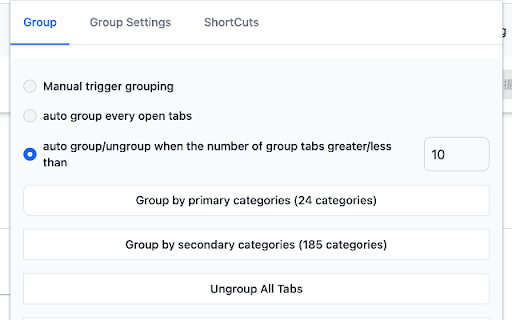
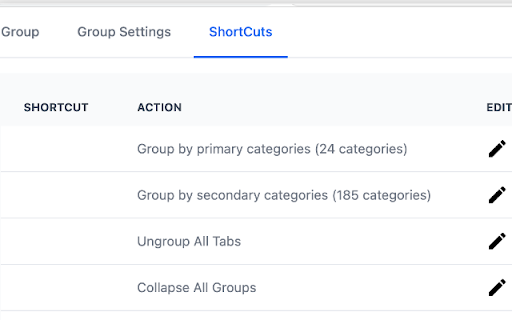
This extension can help you quickly and intelligently classify multiple tabs. When you open multiple browser tabs, switching and searching between multiple tabs is very troublesome. After using this extension to classify all tabs, it allows you to gather at the same time In the same thing, the efficiency is greatly improved. This extension supports a variety of custom operations, which can manually trigger classification or automatically classify tabs.

Close Duplicate Tabs
Find and close duplicate tabs fast, with optional auto-close and smart tab grouping. MAJOR UPDATE: Now with automatic tab grouping & automatic duplicate tab closing! Check options to enable settings! Too many duplicate tabs can quietly slow down your browsing and make it harder to stay organized. Close Duplicate Tabs helps you spot duplicate tabs quickly and clean them up in one click. Use the popup to review duplicates before closing them, or turn on automatic duplicate cleanup for a more hands-off workflow. The extension also supports a keyboard shortcut, tab-count hover summaries, optional automatic tab grouping, URL matching controls for # fragments and ? query strings, and an exclusion list for domains you do not want to deduplicate. - One-click duplicate cleanup - Optional auto-close for new duplicates - Popup review with per-URL manual close - Keyboard shortcut for closing all duplicates - Hover summary with tab count and duplicate count - Optional smart tab grouping by domain - Matching controls for # fragments and ? query strings - Exclusion list for domains to ignore - No data collection v3.2 * Using latest Chrome APIs * Auto Group Tabs based on their domain. * Auto close duplicate tabs so you save on memory. v2.5 * Top domains listed on hovering over the extension icon. v2.3 * Now see titles for duplicate tabs, not long URLs * Special case handling for websites that "replace" tabs behind the scenes. Short version: more accurate duplicate tracking. v2.0 * Options page, with list of upcoming capabilties * NEW: Reorder (sort) pages by URL v1.8: * Lists open tab count, and duplicate tab count * List duplicate URLs, and their counts * Groundwork for options v1.6: * Now identifies & closes duplicates across windows * More accessible colors for duplicate count badge

Tab Organizer
Intelligent tab management with auto-grouping and powerful search 🎯 Stop Drowning in Tabs – Take Control with Tab Organizer! Are countless browser tabs overwhelming your workspace and slowing you down? Tab Organizer is your ultimate productivity companion, effortlessly grouping, sorting, and tidying your browser tabs—all in just a few clicks. Automatically organizes your tabs into intuitive groups based on content and usage. Stay laser-focused with a clean, structured workspace. Save and restore your entire browsing session, including multiple windows and tab layouts. Jump right back into your workflow without missing a beat. Instantly identify duplicate or rarely-used tabs and get actionable suggestions for keeping your browser fast and clutter-free. Easily merge, split, or move tabs between windows. Ideal for multi-screen setups and complex workflows. Keep tabs (literally!) on your browser health with an always-visible dynamic tab counter. Supports Arabic, Bengali, Chinese, Dutch, English, French, German, Hebrew, Hindi, Indonesian, Italian, Japanese, Korean, Punjabi, Portuguese, Russian, Spanish, Turkish, and Vietnamese. 👤 Ideal For: - Power users and developers managing multiple projects - Students and researchers organizing extensive sources - Anyone aiming to boost their productivity and workflow - Users craving a simplified, seamless browsing experience 💡 Why Choose Tab Organizer? - Sleek, user-friendly interface - Lightweight & optimized for peak performance - Privacy-focused – zero data collection - Regular updates & dedicated support - Pro-level efficiency with smart keyboard shortcuts 🚀 Download Tab Organizer today and reclaim control of your browser! Free • No Ads • Built for Maximum Productivity

Group Tabs By Domain
Take charge of your browsing experience with Group Tabs by Domain – the essential Chrome extension designed to streamline your tab management process. Say goodbye to tab clutter and hello to enhanced productivity, all without spending a dime or enduring pesky ads. 🔄 Automatic Tab Grouping: Seamlessly categorize your tabs by website domain, ensuring a clutter-free workspace and effortless navigation. 🎯 Customizable Grouping Threshold: Tailor your experience by setting the minimum number of tabs required before automatic grouping kicks in, providing flexibility to match your browsing style. 📌 Exclude Pinned Tabs: Keep important tabs readily accessible by excluding them from the grouping process, maintaining a clear distinction between vital information and everyday browsing. 📉 Auto Collapse Groups: Maximize screen space and minimize distractions with automatic collapsing of inactive tab groups, creating a cleaner browsing environment. 🔝 Move Active Group to End: Easily locate your most recently used tabs by ensuring the active tab group is always moved to the end of the tab bar, simplifying access to important content. 💡 Temporarily Disable Extension: Gain control over when the extension operates by toggling it on or off as needed, providing flexibility and convenience. ----------------------------------------- Release Note for v0.0.1.1 ----------------------------------------- 🔑 Enhanced Keyboard Binding: Fixed the keyboard binding for quick access to our extension. Now, simply press Ctrl + Shift + K to group tabs. 🚀 Improved Group Navigation: When a group is uncollapsed, the extension will now automatically activate the most recently accessed tab within that group. This enhancement eliminates the need for an extra click and streamlines tab navigation, particularly in groups with multiple tabs, saving valuable time and effort. ----------------------------------------- Release Note for v0.0.1.2 ----------------------------------------- Bug fix for activating last tab within specific group

Tabber - Tab Organizer
Simplify your browsing by grouping unused tabs into organized groups Drowning in tabs? Free your browser with Tabber. Save, organize, and group unused tabs without keeping them open. Reclaim your focus and speed up your browser — without losing anything important. 🔹 Virtual Workspace for Your Tabs Tabber looks and works like a virtual-browser just for your saved tabs. It’s intuitive and fast. 🔹 AI-Powered Tab Grouping Too many tabs to sort manually? Let Tabber group them by topic using built-in AI — instantly and effortlessly. ⭐ Smart Tab Grouping Automatically group tabs by content or domain — or let AI detect topics for you. 🖼️ Tab Previews Visual thumbnails help you find what you need faster. ☁️ Sync & Backup Access your saved tabs on any device. Revert to previous backups if needed. 🎨 Custom Themes Adjust interface colors and set custom backgrounds. ⚡Sites features Some sites have extra features, like letting the extension fetch YouTube video data to save your progress. Our commitment is to deliver exceptional software without compromising your privacy. Cloud synchronization is performed only with your consent and is completely optional for the extension to work. We securely store your information in the cloud, ensuring that your work is both backed up and easily accessible from any location. Your data is exclusively yours, and we retain it solely to enhance your user experience. Tabber adheres to the stringent SOC 2 Type II standards, undergoes annual third-party penetration tests, and employs top-tier 256-bit AES encryption and Transport Layer Security (HTTPS) protocols to thwart any unauthorized attempts to access your Tabber data. Feel free to reach out to our support team at tabber@neulen.dev, and we'll respond promptly to address your inquiries. By installing the Tabber extension, you are in agreement with the Terms of Use (tabber.top/terms) and Privacy Policy (tabber.top/privacy) outlined by Tabber.
