
iihdimlicacgcnignahdlbmefffoejma
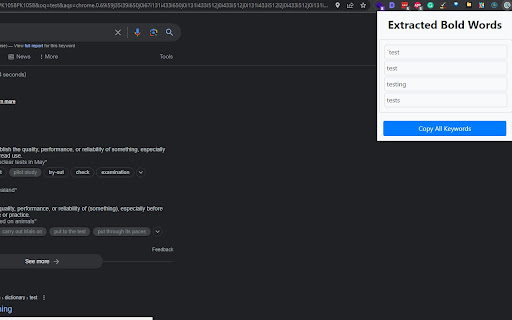
Extracts and copies em tags content from the current webpage Google Search Results Bold Keywords Extractor Chrome Extension Google Search Results Bold Keywords Extractor is a simple Google Chrome extension that extracts text wrapped in tags from the current web page and copies it to the clipboard. The extension works by injecting a content script into every page the user visits. The content script searches for all tags on the page and extracts the text within them. The extracted text is then copied to the clipboard using the clipboardWrite permission. Features Extracts text wrapped in tags from the current web page Copies the extracted text to the clipboard Works on all web pages Easy to use Usage Once Bold Keywords Extractor is installed, it will automatically run on every web page you visit. To use the extension, simply click on the emTagExtractor icon in the Chrome toolbar. The extension will then extract all tags on the page and copy the text within them to the clipboard. Contributing If you find a bug or have an idea for a new feature, feel free to open an issue or submit a pull request!

SEO Checker by Sekhlo
Analyze on-page SEO, technical signals, schema, performance, links, SSL, and AI-readiness. Optional APIs add DA/PA and AI tips. SEO Checker by Sekhlo is a professional suite for analyzing on-page SEO, technical signals, structured data, and performance. Specifically optimized for traditional search engines and AI-powered answer engines (AEO/GEO). 💎 15+ Link Data Points: Detailed insights including Domain Authority (DA), Page Authority (PA), PageRank Score, Spam Score, and Link Propensity. 🔗 Advanced Backlink Breakdown: Analyze NoFollow, Redirect, and External link distribution individually. 📈 DA History Visualization: Track authority trends over the last 12 months with the new interactive bar chart. 📡 Sekhlo Toolbar: Real-time visibility of DA, DR, Spam Score, and Domain Age during active browsing. 📝 On-Page SEO Analysis: Comprehensive audit of meta tags, headings (H1–H6), and image alt-text validation. 🔗 Pro Link Checker: Complete profile analysis using Moz-based metrics (Linking Domains, NoFollow Pages, Deleted/Lost Links). ⚙️ Technical Signals: Detection of canonical tags, robots.txt, sitemaps, mobile viewport settings, and JSON-LD schema. ⚡ Performance Benchmarking: Real-time measurement of Core Web Vitals (LCP, CLS, FCP, INP) and page load timings. 🛡️ Security Audit: SSL certificate validation including issuer details and expiration tracking. 🌐 Domain Intelligence: Technical data on domain age, registrar, nameservers, and DNS records. 🤖 AI & FUTURE-SEARCH OPTIMIZATION 🎯 GEO/AEO Scoring: Optimized for next-gen AI search engines (Perplexity, SGE, Gemini). 📖 Readability Analysis: Content structure auditing for conversational search patterns. 💡 Strategic Formatting: Recommendations for AI-powered answer engines. 🌟 ADVANCED CAPABILITIES 📈 Authority Trend Analysis: Professional visualization of DA history. 📑 Bulk Domain Operations: Compare metrics across multiple URLs for competitive research. 🔍 SERP Enhancer: Optimize your Google Search experience by managing AI overviews and ads. 💰 Ad Network Detection: Identify monetization scripts and estimate potential site revenue. 🌍 Global SERP Research: Analyze search results across 200+ international Google domains. 🔒 PRIVACY & SECURITY 💻 Local Processing: All analysis is performed within your browser. No personal data collection or tracking. 🔑 Encrypted Storage: Optional API keys are stored locally on your device for maximum security. 🔄 LATEST UPDATES (v6.3) ✅ Major: Integrated complete Moz metrics suite (15 data points). ✅ New: 12-Month Authority History Chart for trend tracking. ✅ New: Added Link Propensity and Deleted/Lost link indicators. ✅ Optimization: Increased UI responsiveness for data-heavy link audits. ✅ Security: Manifest v3 compliance with latest security protocols.

Keyword Checker
Check for missing keywords in the content of the current web page. Keyword Checker Chrome Extension Keyword Checker is a Google Chrome extension that helps you check for missing keywords in the content of the current web page. The extension works by analyzing the content of the page and comparing it to a list of predefined keywords.

Image Extractor
Extracts image names and allows copying image URLs. Image Extractor Chrome Extension The Image Extractor Chrome extension allows users to extract image information from a webpage's content area, including image names, alt texts, and URLs. Users can also download individual images, copy image URLs, and download all images as a ZIP file. - Extract images from the content area of a webpage - Display image names and alt texts - Show a small image preview - Download individual images - Copy image URLs to clipboard - Download all images as a ZIP file 1. Clone or download this repository. 2. Open the Chrome browser and navigate to `chrome://extensions/`. 3. Enable the "Developer mode" toggle in the top right corner. 4. Click "Load unpacked" and select the directory containing the extension files. 5. The Image Extractor extension is now installed and ready to use. 1. Navigate to a webpage with images you want to extract. 2. Click on the Image Extractor extension icon in the Chrome toolbar. 3. In the extension popup, click the "Extract Images" button. 4. The images from the content area will be displayed along with their names, alt texts, and a small preview. 5. To download an individual image, click the "Download" (⬇️) icon. 6. To copy an image URL, click the "Copy URL" (📋) icon. 7. To download all images as a ZIP file, click the "Download All Images" button.

PlePer Local SEO Tools
Useful shortcuts and quick analyzes for Local SEO`s The extension offers collection of tools and shortcuts for Local SEO's. With this extension you get detailed information for every google my business listing in Maps, Local Finder, Knowledge panel and making four different analysis based on maps search results. Listing details returned by the extension: Name / Address / Phone / All Categories / Verification status / Attributes / Coordinates / All important Google ID’s (CID, Place ID, Knowledge Graph ID) / Export function / Pin function / Links to popular business directories, search engines, different website analysis tools (Speed Test / Mobile Friendly Test / Whois information / Domain backlink analysis etc ). For US listing direct link to corespondig Secretary of state business lookup website. Four different analyzes when searching in Maps: - Categories - top categories used, average categories per listing, max categories per listing; - Reviews - average rating and reviews, maximum/minimum rating and reviews, listings without reviews; - Attributes - all the attributes used; - Business Hours - when business are open and the average business hours; Pin function - the listing information on any website with keyboard combination (CTRL + ALT + E). Easiest way to compare / enter data anywhere. The chrome extension is plug and play - no settings or configuration needed! Instructions: 1. Install the extension 2. Open in new tab google maps 3. Make a search and you will see the analyses. 4. Select any listing from the results and you will see the details.
