
iiagocfmmhknpdalddkbiejnfmbmlffk
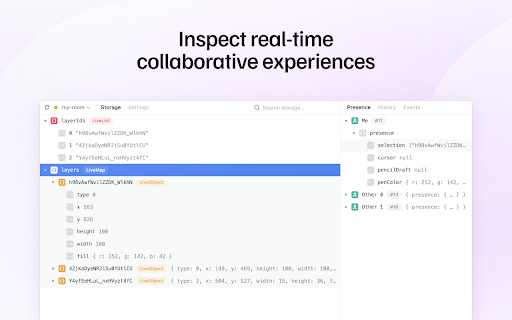
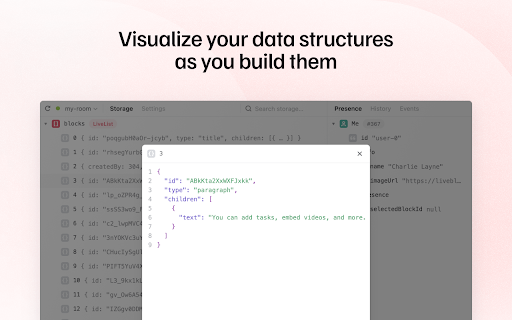

A browser extension that lets you inspect Liveblocks real-time collaborative experiences. Liveblocks DevTools is a browser extension that lets you inspect Liveblocks real-time collaborative experiences. ✦ The Storage tab shows you the current room’s storage data. ✦ The Presence tab shows you the current users’ presence data. ✦ All tabs and what they show update automatically in real-time. ✦ Supports light and dark mode.

Lexical Developer Tools
Adds Lexical debugging tools to the Chrome Developer Tools. Adds Lexical debugging tools to the Firefox Developer Tools. Lexical Developer Tools is a Chrome DevTools extension for the open-source Lexical JavaScript text editor framework. It allows you to inspect the Lexical state in the Chrome Developer Tools. This extension requires permissions to access the page's Lexical state, but it does not transmit any data remotely. It is fully open source, and you can find its source code at https://github.com/facebook/lexical/tree/main/packages/lexical-devtools.

RSC Devtools
This is a tool that lets you record streaming data from React Server Components to then visualize and explore it. You can see how your components and data are loading and in what order and it lets you travel back in time by dragging the timeline slider.

AutoReview for Power Automate
Auto Code Review your Power Automate flows. Upload your legacy export or solution exports (all data stored locally in your browser). Now can give live report from open flow (no export required) The following exports are created: Review - Code Review of flow, with score, errors and warnings Report - All variables, actions and connections Diagram - Visual representation of the flow CSV Exports - Download variables, actions and connections into excel Definition - Flow definition json file Solution - View of content of solution package Solution Diagram - View parent and child flow links Compare 2 Flows - Show changes between 2 flows

OpenText Core SCA Select Extension
Open Source Select will help developers find and use the right open source and reduce friction between organisations and developers Open Source Select helps you find and use policy compliant and great open-source for any development project. The OpenText Core SCA Select Extension is a free plugin created with developers in mind, enabling you to check the health metrics and license information of an open source project at a glance. If you need more granular data, the extension can lead you to Open Source Select for more detailed information. The three types of metrics you can examine are: Community - How healthy the community around a project is. Popularity - Is it used by many? Is the usage declining? Security - How well does the maintainers apply security best practices. The extension now supports Start Left Policies. This lets you immediately see if the open source you are browsing is compliant with your company’s open source policy, without the need to import and scan code with Software Composition Analysis tools and common source code repositories and package registries such as GitHub, pypi, npmjs, nuget and many others are supported.
