
ihkanhofammhmkfmliipepjonimkdkld


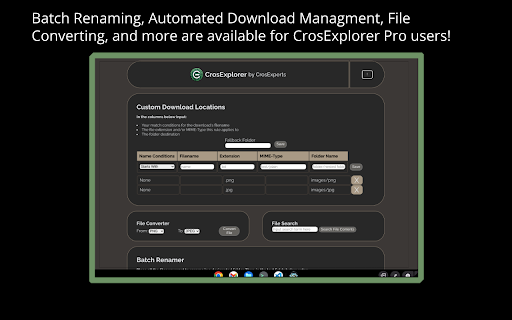
Manage your Chromebook's files with desktop-class power! 🌟 𝗪𝗛𝗔𝗧'𝗦 𝗡𝗘𝗪 - Removed CASA verification from Google Drive (See the FAQ for why - https://www.crosexperts.com/crosexplorer/help#h.10l9wa2315xu) - Added NextCloud/ownCloud/Web DAV Support! - Added fix for unzip/extract OS changes. The ChromeOS Exclusive file management extension! 🗃 𝗘𝗫𝗣𝗔𝗡𝗗 𝗬𝗢𝗨𝗥 𝗙𝗜𝗟𝗘𝗦 𝗔𝗣𝗣 - Go beyond ChromeOS’ base Google Drive integration with more Cloud options. - Box & Dropbox cloud support! - Add NextCloud/ownCloud/Web DAV and Google Drive accounts with CrosExplorer Pro! - CrosExplorer users can add one account for free. Add an unlimited amount with a CrosExplorer Pro purchase! 💨 𝐀𝐂𝐓𝐈𝐎𝐍𝐒 - Use cloud-based functions to enhance the power of your Chromebook. - Share files via link. (Google Drive) - Download Zip folders (Dropbox & Box) - Manage Files in the browser app to get access to your Cloud extensions & applications! 📂 𝗔𝗗𝗗 𝗙𝗨𝗡𝗖𝗧𝗜𝗢𝗡𝗔𝗟𝗜𝗧𝗬 - Archive & Extract files ChromeOS doesn’t natively support. - Add password protection to your archives! (PRO) - Supported formats include .7z, .rar, and more!! · Download Manager (PRO) · Batch Renamer (PRO) · File Content Search (PRO) · Folder Sync (PRO) 🦾 𝗖𝗥𝗢𝗦𝗘𝗫𝗣𝗟𝗢𝗥𝗘𝗥 𝗣𝗥𝗢 Unlock CrosExplorer Pro for $14.99! (Custom Pricing for Enterprise/Education) - NextCloud/ownCloud/Web DAV Access! Self-host your own cloud! - Secondary Google Drive Access! Open & Edit files stored in your other Google Accounts! - Batch Renamer! Tired of renaming files one by one? No more with CrosExplorer Pro’s powerful renaming functions. Let variables handle your file names and editing dates automatically! - File Content Search (Beta) - Forgot where you wrote a much needed note? Search entire directories of documents and their contents using CrosExplorer Pro! - File Converter! Want to change a file format but don’t want to install a whole new application? Try out the media-converter function. - Download Manager - Take full advantage of CrosExplorer’s file powers to make managing and organizing downloads a cinch! - Folder Sync (Alpha) - Make backups and duplication easier by keeping folder pairs in sync with each other! 🔒 𝗦𝗧𝗔𝗬 𝗣𝗥𝗜𝗩𝗔𝗧𝗘 & 𝗦𝗘𝗖𝗨𝗥𝗘 - We use the latest, most secure extension technologies from Google to accomplish what we do. Manifest Version 3 keeps you safe from harmful extensions and we embrace it wholeheartedly. 𝗔𝗗𝗗𝗜𝗧𝗜𝗢𝗡𝗔𝗟 𝗜𝗡𝗙𝗢𝗥𝗠𝗔𝗧𝗜𝗢𝗡 - Some CrosExplorer Pro features require an internet connection. - We developed CrosExplorer for ChromeOS and it will not work on Windows, MacOS, or Linux. For full patch notes and support, visit us on our subreddit: https://www.reddit.com/r/CrosExperts/

Get CRX
Get source .crx extension file of any Chrome extension *Now working on both old and new Chrome Web Stores* Instantly get .crx source file of any free Chrome extension via right click context menu.

ProseMirror Developer Tools
Run prosemirror-dev-toolkit as Chrome extension Inspect and debug any ProseMirror rich-text editor from your browser without having to bundle prosemirror-dev-toolkit https://github.com/TeemuKoivisto/prosemirror-dev-toolkit Created in the spirit of React and Redux DevTools. Report any issues or bugs to the GitHub repository.

Easy Extension Manager
Effortlessly Manage Your Chrome Extensions Easy Extension Manager is your all-in-one tool for optimizing and organizing Chrome extensions. Easily search, sort, snapshot, export, and import your extension setups in JSON format—all with a user-friendly interface. ☆ Complete List: View all your installed extensions from a single popup. ☆ Snapshot: Save and load your extension setups with a single click. ☆ Export & Import: Backup or restore your extension configurations in JSON format ☆ Toggle Extensions: Easily enable or disable extensions to improve performance. ☆ Sort Options: Sort extensions alphabetically or by enabled/disabled status for quick access. ☆ Quick Search: Find specific extensions quickly and easily. ☆ Dark Mode: Switch between dark and light themes for better viewing. ☆ Context Menu: Right-click for powerful options ☆ Disable All Extensions to temporarily boost performance. ☆ Enable All Extensions with one click. Effortlessly back up and restore your extension snapshots in JSON format. Export & Import Highlights: ☆ Backup Snapshots: Export your extension setups as JSON files for safekeeping. ☆ Restore Setups: Import your saved configurations and apply them instantly. ☆ Auto Save Snapshots: Automatically back up your latest extension setup, ensuring it's always up to date. ============================== Why Choose Easy Extension Manager? Easy Extension Manager simplifies managing Chrome extensions. Stay organized, perform backups and restores easily, and streamline your workflow. With powerful search and sorting with features like Snapshots, Export & Import, and Auto Save, managing extensions has never been simpler. Take control of your extensions today with Easy Extension Manager—the smarter way to manage Chrome.

Chrome Screenshot
Use Chrome Screenshot: smart screenshot chrome extension! Capture, edit, save any page. Explore how to screenshot on chrome browser Ultimate Webpage snapshot extension: Edit, save & screenshot in chrome Effortlessly 🚀 Struggling with how to screenshot on chrome? Capture content with chrome screenshot extension. Screengrab anything instantly - snippets, webpages, or dynamic elements. Perfect for professionals needing precision and simple users! 🔑 Core Advantages of full page screenshot chrome extension. Experience unmatched versatility: 1️⃣ Simple click screenshot snipping tool of selected area 2️⃣ Built-in easy to use tools (blur, arrows, etc.) 3️⃣ Access to chrome screenshot by URL for instant access 4️⃣ Lightweight and user friendly design avoids slowdown ⚡ Optimized Performance. This screen capture chrome extension works seamlessly on: ⭕ Media-heavy sites 📰 ⭕ E-commerce platforms ⭕ Google Docs/Atlassian 🎗️Simple 3-Step Workflow. Master screen grab plugin effortlessly: ➤ Click the toolbar icon 🖱️ ➤ Choose mode: area, visible, or chrome browser screenshot ➤ Annotate and export formats 🎯 Advanced screen capture extension. Transform snapshots with screenshot edit toolkit: - Highlight elements with shapes - Blur/hide sensitive data privately - Add text labels and mark with arrows - Crop/resize before saving in chrome screenshot 🧩 Instant Installation of screen capture extension. Start in 30 seconds: 🎨 Add chrome screenshot extension 🎨 Pin to toolbar, you will see the set of different tools you can use 🎨 Edit the webpage using several instruments at the same time 🎨 Picture now! Save as a file local on your PC. Or make a URL share it 📌 Aside from Basic Tools Unlike google snipping tool, our screen grab chrome plugin excels at: 🖍️ Infinite-scroll social media 🖼️ 🖍️ Hover menus and dropdowns 🖍️ HD snapshot web making 💼 Ideal For Diverse Users. This screen tool serves: 1. Designers: Visual UI feedback 2. snapshot extension archives 3. Marketers: Social visuals 4. Educators: Tutorial notes 🌐 Universal Compatibility. Works as: — screenshot snipping tool — screen grab plugin for academics — screenshot addon chrome for devs ◾Computer Science Student. During late-night coding sessions, our group project’s UI kept glitching. With chrome screenshot app I captured dynamic error states with one click, circled flaws in red, and shared annotated visuals over Slack. We fixed the React component before sunrise 🛠️. By the way, go full page chrome extension mode also helped a lot. ◾ IT Support Specialist. When finance reported a disappearing invoice button, I replicated the issue instantly. Instead of vague emails, I sent a visual with circled elements and workflow notes. Developers resolved it in one sprint cycle thanks to chrome screenshot extension ⏱️. ◾ DevOps Engineer. During a major outage, our team needed real-time evidence. Due to screenshot google chrome I grabbed live monitoring dashboards during peak failure, annotated traffic spikes, and created a timeline PDF. The post-mortem cleared us in 20 minutes 🚨. Thanks to chrome screenshot tool. ◾ Project Manager. Remote sprint reviews became chaotic with verbal updates. I started manually making daily progress snapshots—Jira boards, design mockups, and test logs—into a single annotated PDF. Stakeholders finally stopped micromanaging ✅. Thanks to chrome screenshot. ◾ IT Student. Final exam portals crashed constantly. Before each test, I secured a full capture of instructions and login paths. When systems failed, my offline archive became the class lifeline 💻. By virtue of chrome screenshot addon. FREQUENTLY ASKED QUESTIONS for how to screenshot on google chrome browser ❓ How do I install this tool? 💡 Simply visit the Web Store, search for our app, click *Add*, and pin the icon to your toolbar. No restart needed for chrome screenshot. ❓ How to edit the web picture before snapshot? 💡 Use our screen shot editing panel. Just choose needed tool, for example: Blur sensitive areas, or Add arrows/text, or Crop/resize, etc. ❓Can I save the edited capture local on my PC? 💡 Of course. Select the exact mode and save it in one-click in chrome screenshot.
