
ihgfdecdmhcckcnlhgfciplpbpmmjmdl

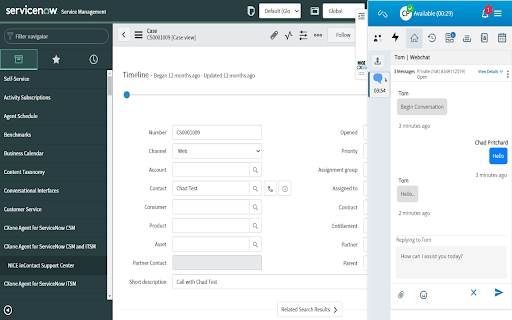
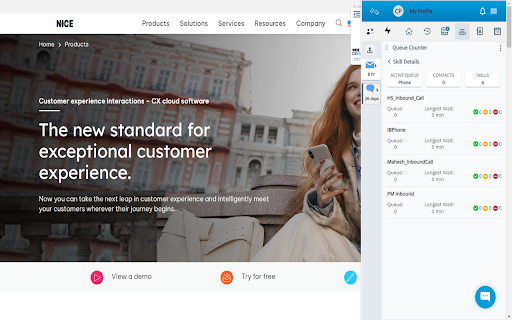

CXone Agent Browser Extension NICE CXone Integrated Agent browser extension allows for seamless integration with any CRM to consolidate customer context with NICE CXone contact center functionality. Users have access to a unified inbox for all interactions, including voice and digital, creating a consistent experience regardless of the channel or product. Additionally, agents have visibility into the complete customer journey via a single customer card that aggregates both contact history and customer data, creating more efficient, empowered agents. Key Features Include: - A single inbox for all interaction handling, independent of the channel - The ability to manage multiple interactions at a single time - View contact details, history, associated channels, and all current activities for the contact on a single contact card - Ability to see previous interactions that have been handled by the agent - Search for agents, skills, teams, and address books to initiate outbound interactions - Review agent status, skills assigned to the agent, number of calls in queue, how long calls have been waiting, and the number of agents assigned to a skill

CXone Agent Noise Cancellation
CXone Agent Noise Cancellation offers an independent softphone connection by moving the audio path out of the browser application into a companion browser extension to allow for increased reliability. The extension delivers AI-powered ambient noise reduction and echo cancellation to both customers and agents for a clear, crisp and focused conversation when enabled across CXone Agent via the feature toggle in tenant management. Voices are instantly isolated and all background noise is removed in real-time from both sides of the call from start to finish. When the CXone Agent Noise Cancellation extension is installed and enabled and the Noise Cancellation feature toggle across CXone Agent in Tenant Management is enabled and the Noise Cancellation slider will display in CXone Agent. The agent can then adjust the sensitivity using the displayed sliders for eliminating the background noise from the agent and patron side. It is set to 90 for the mic slider (agent side) and 70 for the speaker slider (patron side) by default. In the event that CXone Agent is refreshed or unexpectedly closed, the active audio path between the agent and patron will not be disrupted.

NiCE CXone Mpower HAR Logger
Designed for technical support with NiCE CXone products. 1. Install extension. 2. Press F12 to access Developer Tools. 3. Select HAR Logger in the Developer Tools. (If you do not see menu item, try reloading or navigate to a new page to trigger it) 4. Press Start/Stop Capture Button 5. Download HAR Logs to Downloads Folder, (i.e. Capture.har) Easily capture and export browser network activity with this DevTools extension. HAR Logger creates a dedicated panel in Chrome DevTools to log HTTP(S) requests, console messages, and UI-triggered network events—perfect for debugging frontend performance or sharing HAR files with support teams. - Log all standard HTTP/HTTPS traffic in HAR format - View headers, payloads, and responses - Capture basic console logs (warnings, errors, messages) - Track UI interactions alongside network requests - Doesn’t capture WebSocket or WebRTC traffic - Sensitive data like auth tokens or cookies may be hidden - No access to private browser or low-level protocol data (for privacy reasons) Best For: - Debugging slow or failed network requests - Sharing reproducible HAR logs with developers or support Disclaimer: https://www.nice.com/company/legal/general-disclaimer-for-community-add-ons

BBR Helper
This provides some advanced stats (game score, simple player rating and game box plus-minus) on multiple pages for NBA, WNBA, G-League, international leagues and college basketball. Including: - average stats by season on the player page - average stats by playoff series on the player page - average stats by player on the team_season page - average stats by player on the team_player page - average stats by player on the season_player page - single game/half/quarter stats by player on the game_boxscore page - single game and average stats on the gamelog and split pages - top 5 and top 20 average stats players on the season page - top 20 average stats players on the team_season page - top 20 average stats seasons rankings on the player page - top 50 career stats rankings on the player page - multiple stats rankings on the leader page - player awards column on team season page gBPM = (-0.55 * fga + 1.04 * fg3 + 1.39 * fg - 0.25 * fta + 0.79 *ft + 0.17 * orb + 0.27 * drb + 0.24 * (trb - orb - drb) + 1.34 * stl + 0.43 * ast + 0.64 * blk - 0.34 * pf - 0.95 * tov) / g """ , where orb is treated as 0.3 * trb and drb is treated as 0.7 * trb approximately when stats are not complete in early years.

CXone Guide Plugin
Browse websites with CXone Guide automatically loaded. This feature can be toggled on and off. The CXone Guide plugin enables you to showcase Guide on any website without requiring script tags being added to that site. Just install it to your Chrome browser, build your rules in your Guide tenant, and BINGO! Guide runs on the customer site.
