
ighcgnijpnfppnggmjcpgbphjmlomcpo
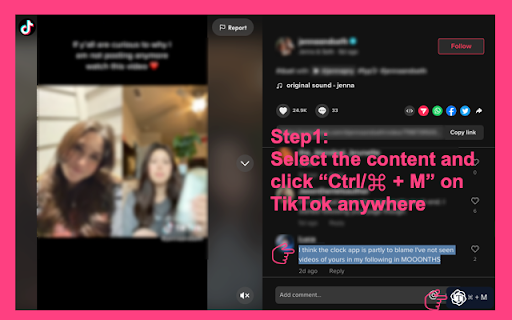

This is a Chat Assistant powerful tool to give you the AI magic on TT for marketing promotion. Unlock the power of content with ChatGPT - the ultimate browser extension for accessing ChatGPT! Click Ctrl/⌘+M to use OpenAI Chat GPT on TT website anywhere. This extension has a revolutionary new UI for using ChatGPT on TT sites. Here's how it works: ➡️ Simply select any online content by your mouse in TT ➡️ Click on Cmd+M (Mac) or Ctrl+M (Windows) to open extension ➡️ Choose what you want to do with it (create a reply, comment, make it shorter, or add some fun) ➡️ Click the switch icon, extension will automatically jump to https://chat.openai.com/chat ➡️ Click "Copy to " button on https://chat.openai.com/chat, extension help you copy response back to TT page. ➡️ And voila! You'll get an 80% done reply at your fingertips. This extension brings the power of OpenAI's GPT-3 to your browsing experience, GPT-3 is focused on reliability and keeping up with recent changes. Features: Easily access extension by clicking in the toolbar. The popup will appear and you can start an AI conversation. Quickly access chat.openai.com/chat from the navigation bar pressing space. Get answers from web pages on popular. We strive to keep up with the fast-paced development of GPT-3 to bring you the best possible experience. If you encounter an error, try opening OpenAI again. The service may be under high demand. If you continue to experience issues, please report a bug in the review section of our extension's page.

TikTok Video Tags Summary with ChatGPT
Recommend tags and tag summary from TikTok video with Chat GPT Open AI. TikTok Video Tags are considered as an important factor in ranking of videos for a particular query. You can better understand TikTok videos and get recommended information through ChatGPT by using this extension. Features: ● View the tags of any TikTok Video ● Get the recommendations of TikTok Video with Chat GPT ● Save time: Quickly understand the content of the video through recommended tags summary. ● Easy to use: Copy the tags summary with one click The only thing you need to do is to install this extension, then go to the TikTok and below the video player, you can find the tags&summary of the video are shown in the screenshot. Note: don't forget to reload the TikTok page after installing the extension.

ChatGPT Assistant For Quora™
This is an Open-AI ChatGPT powerful tool to give you the AI magic on Quora for marketing promotion. Elevate your content game with ChatGPT - the ultimate browser extension for unleashing the power of ChatGPT on Quora! Here is a guide on how to use it: 1. Highlight any online content with your mouse. 2. Open the extension window by clicking on Cmd+M (Mac) or Ctrl+M (Windows). 3. Select the action you wish to perform, such as creating a reply, comment, shortening the content, or adding some fun. 4. Click on the switch icon and the extension will automatically take you to https://chat.openai.com/chat. 5. On https://chat.openai.com/chat, click the "Copy to" button and the extension will help you copy the ChatGPT response back to the Quora page. 6. That's it! You now have an 80% completed response at your fingertips. Features: Easily access extension by clicking in the toolbar. The popup will appear and you can start an AI conversation. Quickly access chat.openai.com/chat from the navigation bar pressing space. Get answers from web pages on popular. We strive to keep up with the fast-paced development of GPT-3 to bring you the best possible experience. If you encounter an error, try opening OpenAI again. The service may be under high demand. If you continue to experience issues, please report a bug in the review section of our extension's page. If you have any difficulties reach out to WhatsApp ID: +86 180 2303 4541 or email to nathanskovalchik9095@gmail.com

Influencer Finder & Analyzer|TikTok Downloader
Download TikTok videos/audio, bulk save creator posts, view metrics, analyze creators, and use AI subtitles, summaries, rewrites. Download TikTok videos, extract audio, analyze creators, and work with AI subtitles directly from TikTok pages. Influencer Finder adds practical creator tools to TikTok, including one-click video downloads, bulk downloads from creator profiles, MP3 audio extraction, video metrics overlays, creator analysis, subtitle extraction, translation, summaries, and AI rewrite prompts. Influencer Finder adds download, analysis, and AI subtitle tools directly to TikTok, so you can save videos, extract audio, review creator performance, translate subtitles, summarize content, and generate rewrite prompts without leaving the page. No extra tabs. No copy-paste. Just faster TikTok research and content workflow.

TTNote: Video Downloader and Saver
Download videos without watermark from TT. Save and manage videos in a single home. TTNote - Download and Save your videos without watermarks. 🚀 Feature: ● Download videos without watermarks; ● Batch download videos wich one click; ● Share videos with anyone; ● View video datas and experience tagging and comment function; ● Store, organize and manage in your single home; ● Easy to use; 🚀 How to Use? ● Quick access to www.tiktok.com/@yourname. ● Choose the video you want to download and click the "Save" button. They will be saved. ● Click the TTNote button on the side of the page to open the expanded action panel. You can see your saved videos and batch download of them without watermarks. ● Go to your personal home to categorize and manage your saved videos. Share video links with your peers. 🚀 Important: This extension does not collect browsing history. The tabs permission is required for the video downloader to send information from the background script to the content_scripts, which triggers the warning for browsing history. 🚀 Is TTNote Legal? Yes, as long as you download videos for personal offline use, you are unlikely to engage in any illegal activities. However, if you intend to share them within the community or for commercial purposes, you will need the author's consent. 📢 Notice: We hereby declare that TTNote is an independent mobile application (APP) and has no direct or indirect affiliation or collaboration with TK and its product series. TTNote is developed and operated independently by our team, aiming to provide users with a completely new and unique mobile experience.
